







Question: The copy and paste from Exercise 1 have been done already. Hero2.java import imagePackage.RasterImage; import java.awt.BasicStroke; import java.awt.Color; import java.awt.Dimension; import java.awt.Graphics2D; import java.awt.Point; import
The copy and paste from Exercise 1 have been done already.
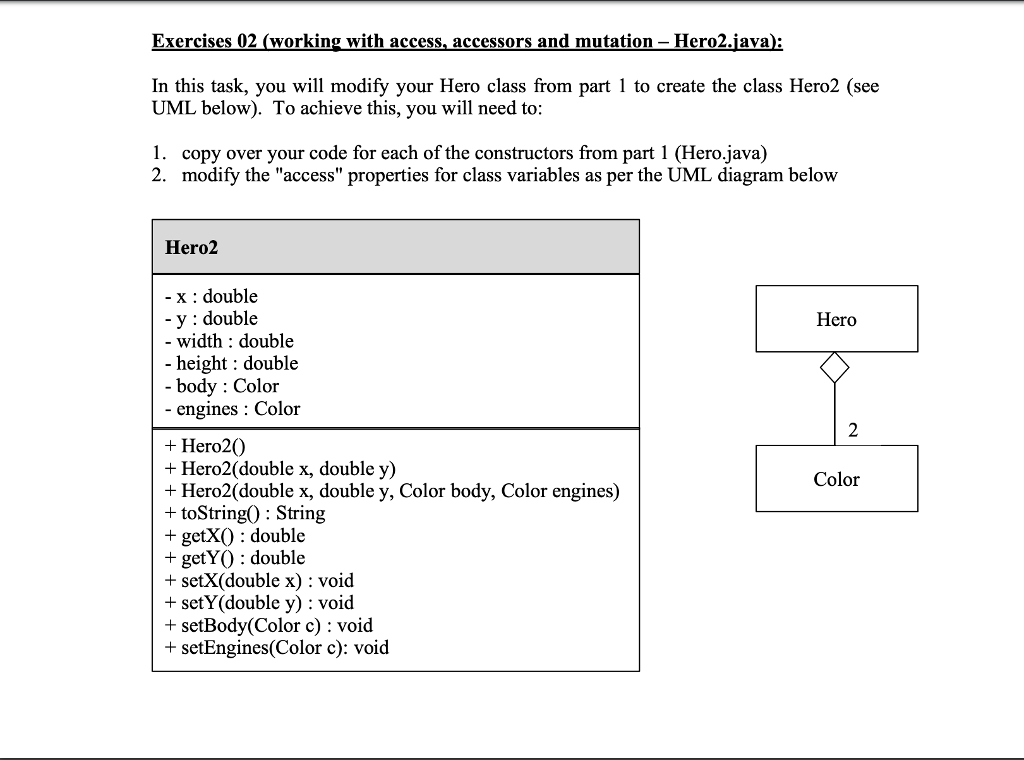
Hero2.java
import imagePackage.RasterImage;
import java.awt.BasicStroke; import java.awt.Color; import java.awt.Dimension; import java.awt.Graphics2D; import java.awt.Point; import java.awt.Shape; import java.awt.Stroke; import java.awt.Toolkit; import java.awt.geom.Ellipse2D; import java.awt.geom.Line2D; import java.awt.geom.Point2D; import java.io.PrintStream;
public class Hero2 { // CLASS VARIABLES public double x = 0, y = 0; public double width = 50, height = 40; public Color body = Color.BLACK; public Color engines = Color.RED;
public Hero2() { } public Hero2(double x, double y) { this.x = x; this.y = y; } public Hero2(double x, double y, Color body, Color engines) { this.x = x; this.y = y; this.body = body; this.engines = engines;
} public double getX() { } public double getY() { } public void setX(double x) { } public void setY(double y) { } public void setBody(Color body) { } public void setEngines(Color engines) { } /** * This method is provided for you (DO NOT EDIT) * it can be used to output the state of a Hero object * * Assumes that class fields exist and are created as * per the UML diagram in the lab3 pdf (part 1) * */ public String toString() { String result = ""; result = "Hero @ (" + this.x + ", " + this.y + "): "; result += " [ width= " + this.width + ", height= " + this.height + " ] "; result += " [ body= " + this.body + " ] "; result += " [ engines= " + this.engines + " ] "; return result; }
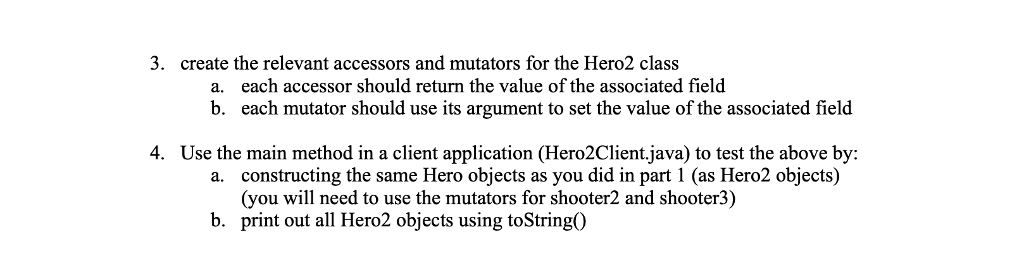
public static void main(String[] args) { /* * * In this task, you will add to your Hero class from part 1 * and color of a Hero object (the player's icon in a SpaceInvaders game) * * To achieve this, you will need to: * * 1. copy over your code for each of the constructors from Exercise01 (Hero.java) * * 2. modify the "access" properties for class variables as per the UML diagram * given in Exercise02 of the lab3 pdf * * 3. create the relevant accessors and mutators for the Hero2 class (as per * the UML diagram in part 2 of the lab3 pdf) * - each accessor should return the value of the field * - each mutator should use its argument to set the value of the field * * * 4. Use the main method in Hero2Client as a client application to test the above by: * - constructing the same Hero objects as you did in part 1 (as Hero2 objects) * (you will need mutators for shooter2 & shooter3) * - print out all Hero2 objects using toString() */
///////////////////////////////////////////// // DO NOT ADD ANY CODE TO THIS MAIN METHOD // // *** USE Hero2Client.java *** // ///////////////////////////////////////////// } }
Hero2Client.java
import java.awt.Color; import java.io.PrintStream;
public class Hero2Client {
public static void main(String[] args) { // Client application to test Hero2 class // Insert your code here to instantiate Hero2 objects as per instructions in the lab3 pdf Hero shooter1 = new Hero(); System.out.println(shooter1.toString()); Hero shooter2 = new Hero(); shooter2.y += 100; shooter2.body = Color.CYAN; System.out.println(shooter2.toString()); Hero shooter3 = new Hero(300,400); shooter3.engines = Color.GRAY; System.out.println(shooter3.toString()); Hero shooter4 = new Hero(580,340, Color.MAGENTA, Color.PINK); System.out.println(shooter4.toString());
}
}
Exercises 02 (working with access, accessors and mutation Hero2.java): In this task, you will modify your Hero class from part 1 to create the class Hero2 (see UML below). To achieve this, you will need to: 1. copy over your code for each of the constructors from part 1 (Hero.java) 2. modify the "access" properties for class variables as per the UML diagram below Hero2 - x : double y : double - width : double - height : double - body : Color - engines : Color Hero 2 + Hero20 + Hero2(double x, double y) + Hero2(double x, double y, Color body, Color engines) + toString0 : String + getXO : double + getYO : double + setX(double x) : void + setY(double y) : void + setBody(Color c) : void + setEngines(Color c): void Color 3. create the relevant accessors and mutators for the Hero2 class each accessor should return the value of the associated field each mutator should use its argument to set the value of the associated field a. b. 4. Use the main method in a client application (Hero2Client java) to test the above by: constructing the same Hero objects as you did in part 1 (as Hero2 objects) (you will need to use the mutators for shooter2 and shooter3) a. b. print out all Hero2 objects using toString0
Step by Step Solution
There are 3 Steps involved in it

Get step-by-step solutions from verified subject matter experts
 Study Help