







Question: Hero 2.java has been copied and pasted into Hero3.java(the current file). All the constructors have been renamed Hero3. import imagePackage.RasterImage; import java.awt.BasicStroke; import java.awt.Color; import
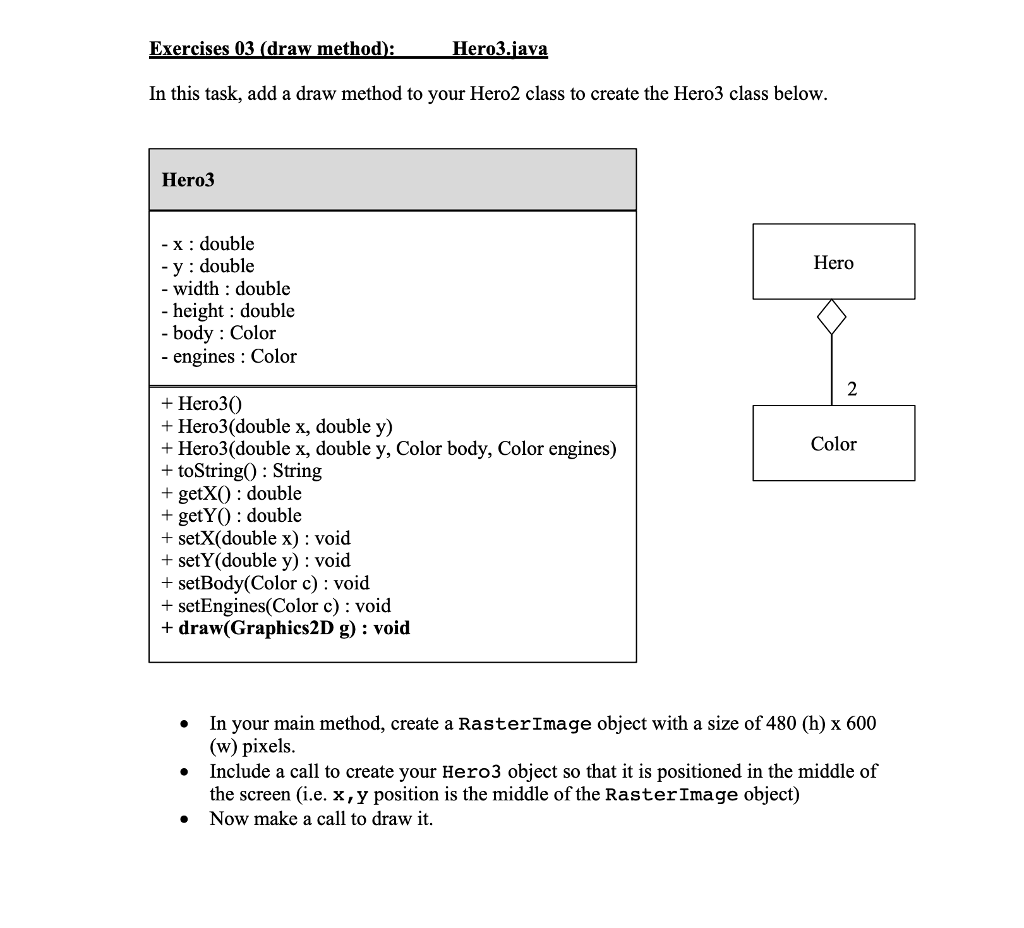
Hero 2.java has been copied and pasted into Hero3.java(the current file). All the constructors have been renamed Hero3.
import imagePackage.RasterImage;
import java.awt.BasicStroke; import java.awt.Color; import java.awt.Dimension; import java.awt.Graphics2D; import java.awt.Point; import java.awt.Shape; import java.awt.Stroke; import java.awt.Toolkit; import java.awt.geom.Ellipse2D; import java.awt.geom.Line2D; import java.awt.geom.Point2D; import java.io.PrintStream;
public class Hero3 { // CLASS VARIABLES // copy paste and modify code from Hero2 class to here // include all constructors and accessor/mutator methods public double x = 0, y = 0; public double width = 50, height = 40; public Color body = Color.BLACK; public Color engines = Color.RED;
public Hero3() { x=0; y=0; } public Hero3(double x, double y) { this.x = x; this.y = y; } public Hero3(double x, double y, Color body, Color engines) { this.x = x; this.y = y; this.body = body; this.engines = engines;
} public double getX() { return x; } public double getY() { return y; } public void setX(double x) { this.x = x; } public void setY(double y) { this.y = y; } public void setBody(Color body) { this.body = body; } public void setEngines(Color engines) { this.engines = engines; } public void draw(Graphics2D gfx) { // now complete this method
} /** * This method is provided for you (DO NOT EDIT) * it can be used to output the state of a Hero object * * Assumes that class fields exist and are created as * per the UML diagram in the lab3 pdf (part 1) * */ public String toString() { String result = ""; result = "Hero @ (" + this.x + ", " + this.y + "): "; result += " [ width= " + this.width + ", height= " + this.height + " ] "; result += " [ body= " + this.body + " ] "; result += " [ engines= " + this.engines + " ] "; return result; }
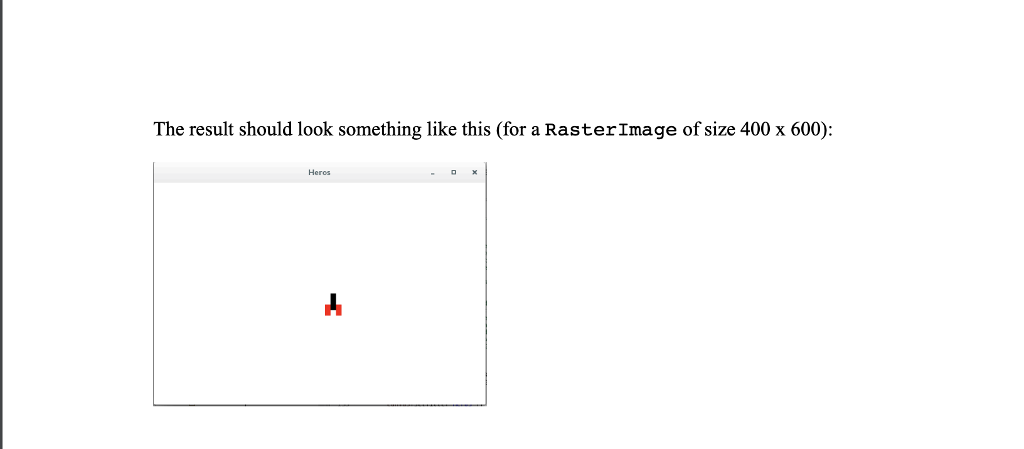
public static void main(String[] args) { /* * * In this task, you will add to your Hero class from part 1 & 2 * and color of a Hero object (the player's icon in a SpaceInvaders-like game) * * To achieve this, you will need to: * * 1. copy over your code from Exercise02 (Hero2.java) - be sure to rename constructors to Hero3 * * 2. create a draw method for Hero3 as per the UML diagram, that creates a graphic: * - within a provided Graphics2D object (given as an argument to this method) * - follows the specified layout provided in the lab3 pdf file * - i.e. one rectangle for the body, 2 rectangles for the engines (see pdf file) * * - HINT: you may use 3 calls to the drawRect method available in the Graphics2D argument * * * 3. Use your main method as a client application to test the above by: * - construct a RasterImage object of height 400, width 600, titled "Heros" * - extract a reference to the Graphics2D object from RasterImage * - construct and display the Hero object positioned at the center of the RasterImage * - draw the Hero object (passing the Graphics2D object) */ } }
Exercises 03 (draw method): Hero3.java In this task, add a draw method to your Hero2 class to create the Hero3 class below Hero3 - x : double - v : double - Wl width : double - height : double -body Color - engines : Color + Hero30 + Hero3(double x, double y) + Hero3(double x, double y, Color body, Color engines) + toString) : String + getX) : double + getYO : double + setX(double x) : void + setY(double y) : void + setBody(Color c) : void Color + setEngines(Color c): void + draw(Graphics2D g) : void In your main method, create a RasterImage object with a size of 480 (h) x 600 (w) pixels Include a call to create your Hero3 object so that it is positioned in the middle of the screen (i.e. x,y position is the middle of the RasterImage object) * * Now make a call to draw it. The result should look something like this (for a RasterImage of size 400 x 600): Heros
Step by Step Solution
There are 3 Steps involved in it

Get step-by-step solutions from verified subject matter experts
 Study Help