







Question: The programming language is Java and all of the Classes I was given are in bold. ALIEN CLASS import imagePackage.RasterImage; import java.awt.BasicStroke; import java.awt.Color; import
The programming language is Java and all of the Classes I was given are in bold.
ALIEN CLASS
import imagePackage.RasterImage;
import java.awt.BasicStroke; import java.awt.Color; import java.awt.Dimension; import java.awt.Graphics2D; import java.awt.Toolkit; import java.awt.geom.*; import java.awt.geom.Point2D; import java.awt.geom.Rectangle2D; import java.io.PrintStream;
// ALIEN is a COMPOSITION of Point2D // ALIEN is an AGGREGATION of Color
public class Alien { // functionality to draw an Alien, given a position and Graphics2D object private Point2D.Double pos; private Color col; private double width; private double height; public Alien(Point2D.Double pos) { this.pos = new Point2D.Double(pos.getX(),pos.getY()); this.col = Color.BLACK; this.width = 50; this.height = 40; } public Alien(Point2D.Double pos, double width, double height, Color col) { this.pos = new Point2D.Double(pos.getX(),pos.getY()); this.width = width; this.height = height; this.col = col; } public Alien(Alien other) { this.pos = new Point2D.Double(other.pos.getX(),other.pos.getY()); this.col = other.col; this.width = other.width; this.height = other.height; } public void setColor(Color col) { this.col = col; } public void setPos(Point2D.Double pos) { this.pos = new Point2D.Double(pos.getX(), pos.getY()); } public void drawAlien(Graphics2D gfx) { int[] xPoints = new int[6]; int[] yPoints = new int[6]; int lx = (int) this.pos.getX(); int ly = (int) this.pos.getY(); int cx = (int) (lx + this.width/2); int cy = (int) (ly + this.height/2); int rx = (int) (lx + this.width); int ry = (int) (ly + this.height); xPoints[0] = lx; yPoints[0] = ly; xPoints[1] = cx; yPoints[1] = cy; xPoints[2] = rx; yPoints[2] = ly; xPoints[3] = rx; yPoints[3] = cy; xPoints[4] = cx; yPoints[4] = ry; xPoints[5] = lx; yPoints[5] = cy; gfx.setColor(this.col); gfx.setStroke(new BasicStroke(2.0f)); gfx.fillPolygon(xPoints, yPoints, xPoints.length); } @Override public String toString() { String result = "Alien: pos= " + this.pos + ", size= " + this.width + ", " + this.height; return result; }
public static void main(String[] args) { /* * In this task, you are to create an Alien class that stores the * * */ PrintStream out = System.out; Dimension screen = Toolkit.getDefaultToolkit().getScreenSize(); RasterImage gameBoard = new RasterImage(640,480); gameBoard.show(); Graphics2D g = gameBoard.getGraphics2D(); Alien a1 = new Alien(new Point2D.Double(100, 100)); Alien a2 = new Alien(new Point2D.Double(200, 100),100,150,Color.RED); Alien a3 = new Alien(a1); a3.setColor(Color.ORANGE); a3.setPos(new Point2D.Double(100, 300)); a1.drawAlien(g); a2.drawAlien(g); a3.drawAlien(g); } }
ANGRYALIEN CLASS
import imagePackage.RasterImage;
import java.awt.BasicStroke; import java.awt.Color; import java.awt.Dimension; import java.awt.Graphics2D; import java.awt.Toolkit; import java.awt.geom.*; import java.awt.geom.Point2D; import java.awt.geom.Rectangle2D; import java.io.PrintStream;
public class AngryAlien extends Alien {
public static void main(String[] args) { // Use this to test creation (instantiation) and display of an individual // AngryAlien // OR - use the main method in BattleField to test
} }
DOCILEALIEN CLASS
import imagePackage.RasterImage;
import java.awt.BasicStroke; import java.awt.Color; import java.awt.Dimension; import java.awt.Graphics2D; import java.awt.Toolkit; import java.awt.geom.*; import java.awt.geom.Point2D; import java.awt.geom.Rectangle2D; import java.io.PrintStream;
public class DocileAlien extends Alien {
public static void main(String[] args) { // Use this to test creation (instantiation) and display of an individual // DocileAlien // OR - use the main method in BattleField to test
} }
NEUTRALALIEN CLASS
import imagePackage.RasterImage;
import java.awt.BasicStroke; import java.awt.Color; import java.awt.Dimension; import java.awt.Graphics2D; import java.awt.Toolkit; import java.awt.geom.*; import java.awt.geom.Point2D; import java.awt.geom.Rectangle2D; import java.io.PrintStream;
public class NeutralAlien extends Alien {
public static void main(String[] args) { // Use this to test creation (instantiation) and display of an individual // NeutralAlien // OR - use the main method in BattleField to test
} }
BATTLEFIELD CLASS
import imagePackage.RasterImage;
import java.awt.Color; import java.awt.Composite; import java.awt.Dimension; import java.awt.Font; import java.awt.Graphics2D; import java.awt.Paint; import java.awt.Shape; import java.awt.Stroke; import java.awt.Toolkit; import java.awt.geom.AffineTransform; import java.awt.geom.Point2D; import java.io.PrintStream;
public class BattleField {
public static void main(String[] args) { /* * Exercise: * Create an Array of Aliens, positioned according to a bounding box * * */
final int ROWS = 3; final int COLS = 10; Dimension screen = Toolkit.getDefaultToolkit().getScreenSize(); RasterImage gameBoard = new RasterImage(640,480); gameBoard.show(); gameBoard.setTitle("BattleField"); Graphics2D g = gameBoard.getGraphics2D();
Alien[][] aliens = new Alien[ROWS][COLS]; // 2D array of Aliens
for (int col=0; col for (int row=0; row
// create and initialize position of Aliens Point2D.Double pos = new Point2D.Double(col*60.0, row*60.0); aliens[row][col] = new Alien(pos); aliens[row][col].drawAlien(g);
}
} Hero shooter = new Hero(200,350); shooter.draw(g);
//
} }
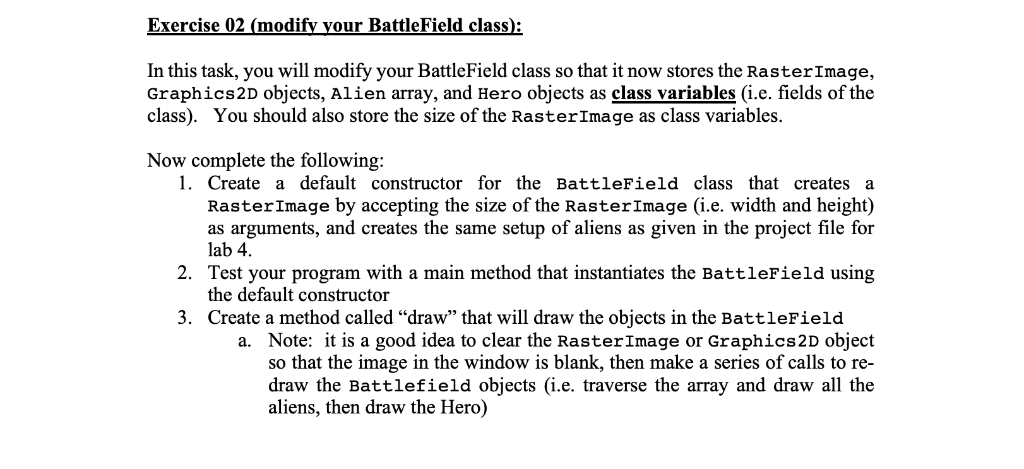
Exercise 02 (modify your BattleField class): In this task, you will modify your BattleField class so that it now stores the RasterImage, Graphics2D objects, Alien array, and Hero objects as class variables (i.e. fields of the class). You should also store the size of the RasterImage as class variables. Now complete the following: 1. Create a default constructor for the BattleField class that creates a RasterImage by accepting the size of the RasterImage (i.e. width and height) as arguments, and creates the same setup of aliens as given in the project file for lab 4. 2. Test your program with a main method that instantiates the BattleField using the default constructor Create a method called "draw" that will draw the objects in the BattleField 3. a. Note: it is a good idea to clear the RasterImage or Graphics2D object so that the image in the window is blank, then make a series of calls to re draw the Battlefield objects (i.e. traverse the array and draw all the aliens, then draw the Hero)
Step by Step Solution
There are 3 Steps involved in it

Get step-by-step solutions from verified subject matter experts
 Study Help