Question: The dbconn.php file contains boilerplate code for connecting to a MariaDB/MySQL DBMS. Modify this file as instructed to set the appropriate database name, username,
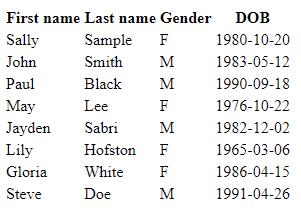
The dbconn.php file contains boilerplate code for connecting to a MariaDB/MySQL DBMS. • Modify this file as instructed to set the appropriate database name, username, and password. • This file can be included in any PHP file that requires a database connection, which you will do shortly. The participants.php file contains skeleton HTML and a placeholder for PHP code. • Add the necessary PHP code to the file to query the database for a list of all participants. o Use this query: SELECT firstName, lastName, DOB, gender FROM Participant; o You may wish to run the query in phpMyAdmin first to see the expected output. o Hint: You will need to use a loop to iterate over each of the returned rows. • The first thing you will need to do is include the dbconn.php file to establish a connection to the database. o Hint: You can use the require or require_once statement to achieve this. • Display the participants in a table as depicted in the image below. o You will need to consider how to produce the required HTML for the table. ▪ Styling is not required for this activity o The record you added for yourself should appear as the top row. o Note the order the data is returned in does not necessarily have to be the order it is displayed in.
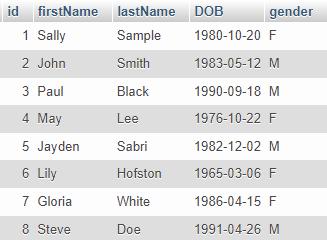
This is the sql that I've uploaded on the database
The dpconn.php looks like this:
Error: Unable to connect to database."; echo "
Debugging errno: " . $ex->getCode() . "
"; echo "
Debugging error: " . $ex->getMessage() . "
"; exit; }
And down here is the participants.php:
           Supplementary Task
All I need to do is to finish both php files.
First name Last name Gender DOB Sally 1980-10-20 John 1983-05-12 Paul May Jayden Lily Gloria Steve Sample F Smith M Black M Lee F Sabri M Hofston F White F Doe M 1990-09-18 1976-10-22 1982-12-02 1965-03-06 1986-04-15 1991-04-26
Step by Step Solution
There are 3 Steps involved in it
1 Expert Approved Answer
Step: 1 Unlock
Question Has Been Solved by an Expert!
Get step-by-step solutions from verified subject matter experts
Step: 2 Unlock
Step: 3 Unlock
Students Have Also Explored These Related Databases Questions!









 Study Help