Question: The instructions are on the 3rd image. Thanks. In this assignment you will write another 'toy program, that will expose you to your first Network-related
The instructions are on the 3rd image. Thanks.
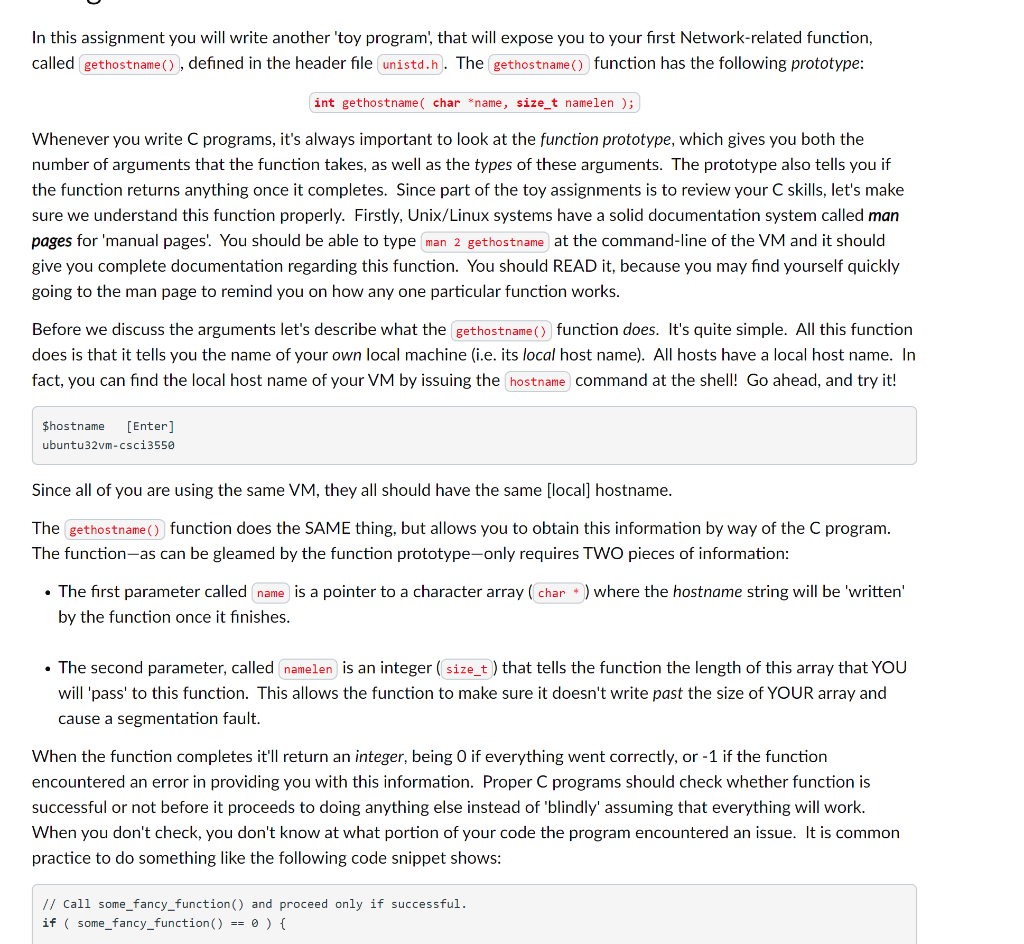
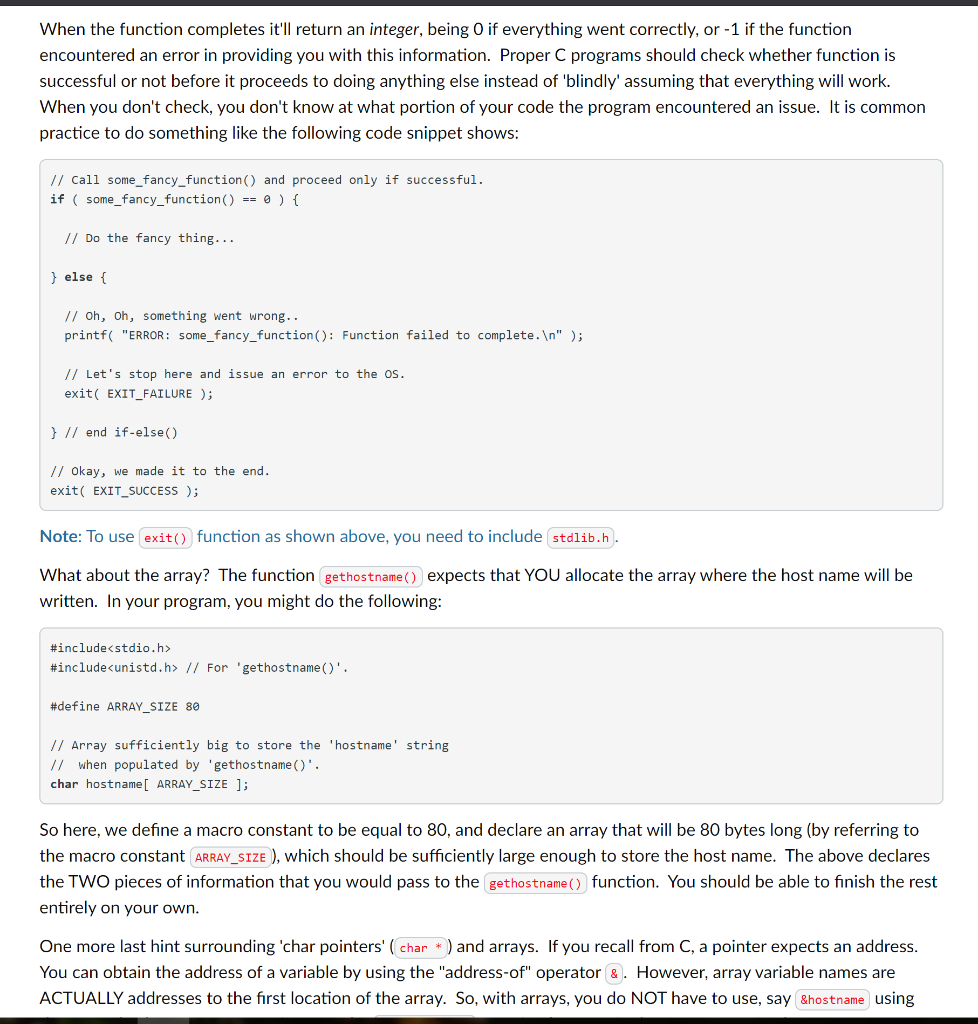
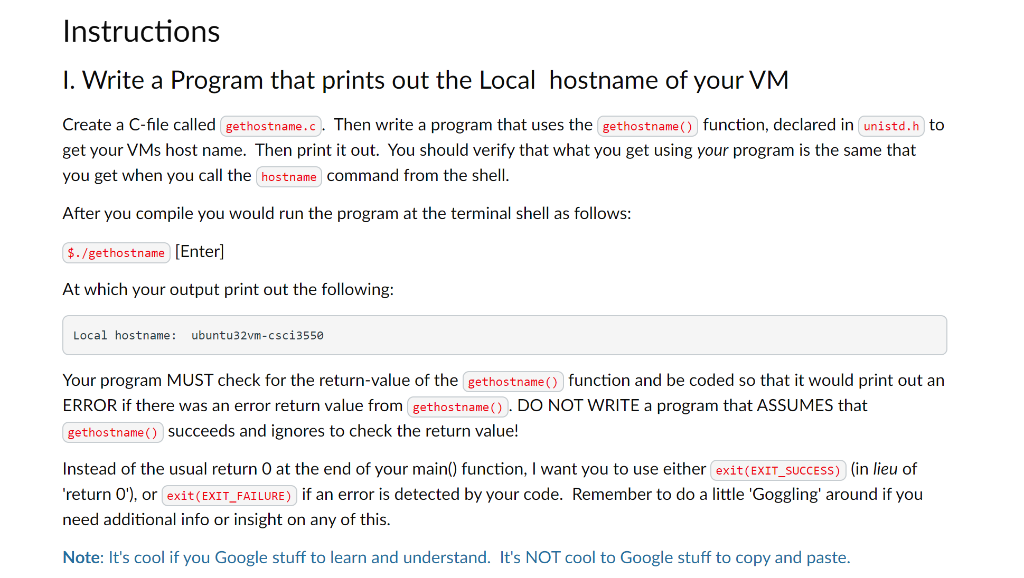
In this assignment you will write another 'toy program, that will expose you to your first Network-related function, called gethostname(), defined in the header file unistd.n. The gethostname() function has the following prototype: int gethostname( char *name, size_t namelen ); Whenever you write C programs, it's always important to look at the function prototype, which gives you both the number of arguments that the function takes, as well as the types of these arguments. The prototype also tells you if the function returns anything once it completes. Since part of the toy assignments is to review your C skills, let's make sure we understand this function properly. Firstly, Unix/Linux systems have a solid documentation system called man pages for 'manual pages! You should be able to type man 2 gethostname at the command-line of the VM and it should give you complete documentation regarding this function. You should READ it, because you may find yourself quickly going to the man page to remind you on how any one particular function works. Before we discuss the arguments let's describe what the gethostname() function does. It's quite simple. All this function does is that it tells you the name of your own local machine (i.e. its local host name). All hosts have a local host name. In fact, you can find the local host name of your VM by issuing the hostname command at the shell! Go ahead, and try it! $hostname (Enter) ubuntu32vm-csci3550 Since all of you are using the same VM, they all should have the same [local] hostname. The gethostname() function does the SAME thing, but allows you to obtain this information by way of the C program. The function-as can be gleamed by the function prototype-only requires TWO pieces of information: The first parameter called name is a pointer to a character array(char * ) where the hostname string will be 'written' by the function once it finishes. The second parameter, called namelen is an integer size_t ) that tells the function the length of this array that YOU will pass' to this function. This allows the function to make sure it doesn't write past the size of YOUR array and cause a segmentation fault. When the function completes it'll return an integer, being O if everything went correctly, or -1 if the function encountered an error in providing you with this information. Proper C programs should check whether function is successful or not before it proceeds to doing anything else instead of 'blindly' assuming that everything will work. When you don't check, you don't know at what portion of your code the program encountered an issue. It is common practice to do something like the following code snippet shows: // Call some_fancy_function() and proceed only if successful. if ( some_fancy_function() == 0 ) { When the function completes it'll return an integer, being O if everything went correctly, or -1 if the function encountered an error in providing you with this information. Proper C programs should check whether function is successful or not before it proceeds to doing anything else instead of 'blindly' assuming that everything will work. When you don't check, you don't know at what portion of your code the program encountered an issue. It is common practice to do something like the following code snippet shows: // Call some_fancy_function() and proceed only if successful. if ( some_fancy_function() == 0 ) { // Do the fancy thing... } else { // oh, oh, something went wrong.. printf("ERROR: some_fancy_function(): Function failed to complete. " ); // Let's stop here and issue an error to the os. exit( EXIT_FAILURE ); } // end if-else) // Okay, we made it to the end. exit( EXIT_SUCCESS ); Note: To use exit() function as shown above, you need to include stdlib.h. What about the array? The function gethostname() expects that YOU allocate the array where the host name will be written. In your program, you might do the following: #include #include // For 'gethostname()'. #define ARRAY_SIZE 80 // Array sufficiently big to store the 'hostname' string // when populated by 'gethostname()'. char hostname[ ARRAY_SIZE ]; So here, we define a macro constant to be equal to 80, and declare an array that will be 80 bytes long (by referring to the macro constant ARRAY_SIZE ), which should be sufficiently large enough to store the host name. The above declares the TWO pieces of information that you would pass to the gethostname() function. You should be able to finish the rest entirely on your own. One more last hint surrounding 'char pointers' (char * ) and arrays. If you recall from C, a pointer expects an address. You can obtain the address of a variable by using the "address-of" operator &. However, array variable names are ACTUALLY addresses to the first location of the array. So, with arrays, you do NOT have to use, say &hostname using Instructions 1. Write a Program that prints out the Local hostname of your VM Create a C-file called gethostname.c. Then write a program that uses the gethostname() function, declared in unistd.h to get your VMs host name. Then print it out. You should verify that what you get using your program is the same that you get when you call the hostname command from the shell. After you compile you would run the program at the terminal shell as follows: $./gethostname (Enter) At which your output print out the following: Local hostname: ubuntu32 vm-csci3550 Your program MUST check for the return value of the gethostname() function and be coded so that it would print out an ERROR if there was an error return value from gethostname(). DO NOT WRITE a program that ASSUMES that gethostname() succeeds and ignores to check the return value! Instead of the usual return 0 at the end of your main() function, I want you to use either exit(EXIT_SUCCESS) (in lieu of 'return 0'), or exit(EXIT_FAILURE) if an error is detected by your code. Remember to do a little 'Goggling' around if you need additional info or insight on any of this. Note: It's cool if you Google stuff to learn and understand. It's NOT cool to Google stuff to copy and paste. In this assignment you will write another 'toy program, that will expose you to your first Network-related function, called gethostname(), defined in the header file unistd.n. The gethostname() function has the following prototype: int gethostname( char *name, size_t namelen ); Whenever you write C programs, it's always important to look at the function prototype, which gives you both the number of arguments that the function takes, as well as the types of these arguments. The prototype also tells you if the function returns anything once it completes. Since part of the toy assignments is to review your C skills, let's make sure we understand this function properly. Firstly, Unix/Linux systems have a solid documentation system called man pages for 'manual pages! You should be able to type man 2 gethostname at the command-line of the VM and it should give you complete documentation regarding this function. You should READ it, because you may find yourself quickly going to the man page to remind you on how any one particular function works. Before we discuss the arguments let's describe what the gethostname() function does. It's quite simple. All this function does is that it tells you the name of your own local machine (i.e. its local host name). All hosts have a local host name. In fact, you can find the local host name of your VM by issuing the hostname command at the shell! Go ahead, and try it! $hostname (Enter) ubuntu32vm-csci3550 Since all of you are using the same VM, they all should have the same [local] hostname. The gethostname() function does the SAME thing, but allows you to obtain this information by way of the C program. The function-as can be gleamed by the function prototype-only requires TWO pieces of information: The first parameter called name is a pointer to a character array(char * ) where the hostname string will be 'written' by the function once it finishes. The second parameter, called namelen is an integer size_t ) that tells the function the length of this array that YOU will pass' to this function. This allows the function to make sure it doesn't write past the size of YOUR array and cause a segmentation fault. When the function completes it'll return an integer, being O if everything went correctly, or -1 if the function encountered an error in providing you with this information. Proper C programs should check whether function is successful or not before it proceeds to doing anything else instead of 'blindly' assuming that everything will work. When you don't check, you don't know at what portion of your code the program encountered an issue. It is common practice to do something like the following code snippet shows: // Call some_fancy_function() and proceed only if successful. if ( some_fancy_function() == 0 ) { When the function completes it'll return an integer, being O if everything went correctly, or -1 if the function encountered an error in providing you with this information. Proper C programs should check whether function is successful or not before it proceeds to doing anything else instead of 'blindly' assuming that everything will work. When you don't check, you don't know at what portion of your code the program encountered an issue. It is common practice to do something like the following code snippet shows: // Call some_fancy_function() and proceed only if successful. if ( some_fancy_function() == 0 ) { // Do the fancy thing... } else { // oh, oh, something went wrong.. printf("ERROR: some_fancy_function(): Function failed to complete. " ); // Let's stop here and issue an error to the os. exit( EXIT_FAILURE ); } // end if-else) // Okay, we made it to the end. exit( EXIT_SUCCESS ); Note: To use exit() function as shown above, you need to include stdlib.h. What about the array? The function gethostname() expects that YOU allocate the array where the host name will be written. In your program, you might do the following: #include #include // For 'gethostname()'. #define ARRAY_SIZE 80 // Array sufficiently big to store the 'hostname' string // when populated by 'gethostname()'. char hostname[ ARRAY_SIZE ]; So here, we define a macro constant to be equal to 80, and declare an array that will be 80 bytes long (by referring to the macro constant ARRAY_SIZE ), which should be sufficiently large enough to store the host name. The above declares the TWO pieces of information that you would pass to the gethostname() function. You should be able to finish the rest entirely on your own. One more last hint surrounding 'char pointers' (char * ) and arrays. If you recall from C, a pointer expects an address. You can obtain the address of a variable by using the "address-of" operator &. However, array variable names are ACTUALLY addresses to the first location of the array. So, with arrays, you do NOT have to use, say &hostname using Instructions 1. Write a Program that prints out the Local hostname of your VM Create a C-file called gethostname.c. Then write a program that uses the gethostname() function, declared in unistd.h to get your VMs host name. Then print it out. You should verify that what you get using your program is the same that you get when you call the hostname command from the shell. After you compile you would run the program at the terminal shell as follows: $./gethostname (Enter) At which your output print out the following: Local hostname: ubuntu32 vm-csci3550 Your program MUST check for the return value of the gethostname() function and be coded so that it would print out an ERROR if there was an error return value from gethostname(). DO NOT WRITE a program that ASSUMES that gethostname() succeeds and ignores to check the return value! Instead of the usual return 0 at the end of your main() function, I want you to use either exit(EXIT_SUCCESS) (in lieu of 'return 0'), or exit(EXIT_FAILURE) if an error is detected by your code. Remember to do a little 'Goggling' around if you need additional info or insight on any of this. Note: It's cool if you Google stuff to learn and understand. It's NOT cool to Google stuff to copy and paste









 Study Help