







Question: The Operating System Task Management! 1.Run Word application on your computer. Inside the Performance tab, click on open resource monitor. Find Winword.exe. a. How many
The Operating System Task Management!
1.Run Word application on your computer. Inside the Performance tab, click on open resource monitor. Find Winword.exe.
a. How many threads does the winword.exe process have? Get a screenshot here. Screenshot 3. [2 marks]
b. Click on the Associated Handles and Associated Modules that is there in Resource Monitor. In your opinion, what can be the purpose of each thread that are running? Explain your point. [2 marks]
3. Still in the resource monitor, Right click on Winword.exe and click on analyze wait chain.
a. Screenshot your finding. Screenshot 4 [1 mark]
b. Based on what you see, what is a wait chain? [ 1 mark]
c. Why do you think Winword.exe is waiting for that event? [2 marks]
4. Still on the resource monitor, click on the memory tab.
a. Screenshot your finding. Screenshot 5. [1 mark]
b. What is the difference between all the color indicators of memory use? Explain the meaning of each. [2 marks]
c. There is a cached memory and available memory. What is the use of cached memory? [2 marks]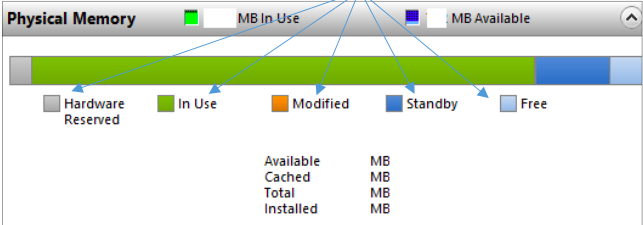
5.Go back to the main Task Manager page. On the performance tab under memory category, investigate the following:
a. What does IN USE and AVAILABLE means? [ 2 marks]
b. What is the difference between Paged Pool and Non-paged pool? Why is it needed? [2 marks]
Physical Memory MB In Use MB Available In Use Hardware Reserved Modified Standby Free Available Cached Total Installed MB MB MB MB
Step by Step Solution
There are 3 Steps involved in it

Get step-by-step solutions from verified subject matter experts
 Study Help