







Question: THE PROGRAM: Write a program that does the following: Asks the user for a state abbreviation. Asks the user for a date in the form
THE PROGRAM:
Write a program that does the following:
-
Asks the user for a state abbreviation.
-
Asks the user for a date in the form MM/DD/YY.
-
Searches all-states-history.csv (AVAILABLE ON WEBSITE) to find the row corresponding to the specified state on
the specified day. o The data file has all state abbreviations as two capital letters
You must be able to change user input to fit this format so that you can do the matchng
-
For example :hi to HI
-
For example: Hi toHI o In the data file, single digit months and days appear without a leading zero.
Extra credit if you can correct the user-supplied dates so they match the data file format
-
For example: 02/12/21 to 2/12/21
-
For example: 12/03/21 to 12/3/21
-
For example: 02/03/21 to 2/3/21
o Must be able to handle a case when the state & date cannot be found
-
-
Picks out the number of deaths and the number of cases from the appropriate columns of
the matched row.
-
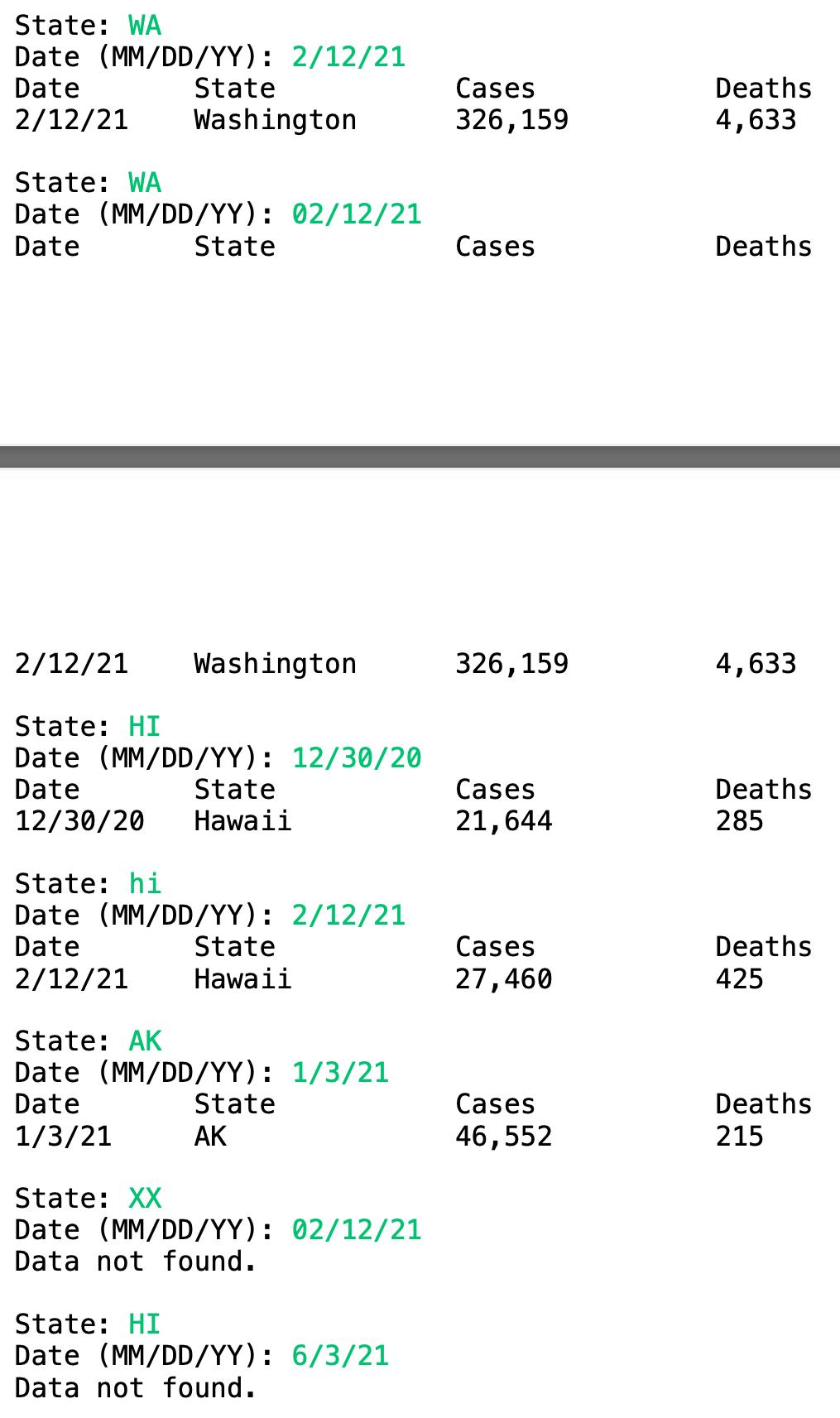
Prints the data in a nicely formatted manner.
-
o Adds commas in numbers when necessary o Lines up columns neatly o Prints Data not found. if the user-input data could not be matched to a row in
the data file.
o Changes state abbreviations to the full name At least for CA, OR, HI, and WA. Extra credit for all 50! If the state abbreviation is not changed, the abbreviation should appear
[DETAILS]
The program should be called SearchCOVIDData. It should have at least the following methods:
findRow Write a method called findRow that takes as input the two strings that the user entered: the date and the state, and returns the whole row that matches from the data base. The row should be returned as a string. If no row matches the state and date, then findRow should return an empty string. In findRow, use a loop controlled by hasNext() to search through the data file. (Note that this will always search the whole data file, even if it finds the appropriate data. Think about how you might get it to stop searching once it finds the data.)
getStateName
Write a method called getStateName that takes a states abbreviation as input and returns the
whole state name as output. You only have to handle CA, OR, HI, and WA. But you can get
extra credit for handling all 50 states. (Hint: Think about switch()).
getColumn
Write a method called getColumn which returns the data that is at a particular column in a
comma-separated string. The first argument to getColumn should be the desired column
number, and the second argument should be a whole row from the data file. For example,
if String row = one,two,three,four,five
then getColumn(2,row), should return two
Hint: you can use a Scanner to examine the elements in a string. The next() method will jump to
each next element. In order to tell the Scanner to use commas as the delimiter between elements,
define it like this (if
line
is a comma-separated string):
Scanner in = new Scanner(line).useDelimiter(",");
Call next() twice to get to the second element, three times to get to the third, etc. Note that next()
always returns a string, so any numerical data that is obtained using next() must be converted if
it is going to be used in as a number.
Big hint: You can put calls to next() in a loop if you want to call it more than once.
main
fixDate (optional extra credit)
As mentioned above, the date data in the file has no leading zeros on the months of the days. For
example, it has 2/2/21 instead of 02/02/21. This means that the user input has to match perfectly,
or else you must modify it to match what is in the data file. fixDate would take the date that a
user input and fix it (if necessary) so that it matches the format of the data file. For example,
02/02/21 would be changed to 2/2/21. This is pretty hard, so extra credit if you can do it!
Obviously, you will have a main method! First your main method needs to get user input. Next
it should call findRow to try and get the appropriate row from the table. Note that you have to
fix any user input (i.e. state abbreviations or dates) before you try matching the data to the
database either before calling findRow or someplace in findRow. (Hint: the String method
toUpperCase() will change any string to all upper case.) If a row is not matched, the program is
done and must print that it failed to find the data. If the row is matched, then you next have to
pretty-print it. You must call getStateName before or inside the print statement in order to get
the state name to print right. You will need to convert the numbers from strings in order to print
them with commas.
SUGGESTION:
Try writing this program a little at a time. Use print statements liberally to see what your code is
doing (you can just take them out later). I would start by making sure you can loop though the
whole data file and read every line. Just write your code to read every line print each line out as
it is read. Once this works, write the getColumn method and try just printing out the one column
from each line as it is read. Once these both work, you can start dealing with findRow. Just print
out the raw data row that findRow returns to make sure you are getting the right row. Once you
know that is working, put it together with getColumn before you start working on the formatted
printing. Make sure findRow works for all cases (bad input, no leading zeros, etc.) before even
trying the formatted printing part. After you know you are at least getting the right data to print,
then work on the formatted printing statements. This will take some time, but incremental
development and testing will make it easier.
State: WA Date (MM/DD/YY): 2/12/21 Date State 2/12/21 Washington Cases 326,159 Deaths 4,633 State: WA Date (MM/DD/YY): 02/12/21 Date State Cases Deaths 2/12/21 Washington 326,159 4,633 State: HI Date (MM/DD/YY): 12/30/20 Date State 12/30/20 Hawaii Cases 21,644 Deaths 285 State: hi Date (MM/DD/YY): 2/12/21 Date State 2/12/21 Hawaii Cases 27,460 Deaths 425 State: AK Date (MM/DD/YY): 1/3/21 Date State 1/3/21 AK Cases 46,552 Deaths 215 State: XX Date (MM/DD/YY): 02/12/21 Data not found. State: HI Date (MM/DD/YY): 6/3/21 Data not found. State: WA Date (MM/DD/YY): 2/12/21 Date State 2/12/21 Washington Cases 326,159 Deaths 4,633 State: WA Date (MM/DD/YY): 02/12/21 Date State Cases Deaths 2/12/21 Washington 326,159 4,633 State: HI Date (MM/DD/YY): 12/30/20 Date State 12/30/20 Hawaii Cases 21,644 Deaths 285 State: hi Date (MM/DD/YY): 2/12/21 Date State 2/12/21 Hawaii Cases 27,460 Deaths 425 State: AK Date (MM/DD/YY): 1/3/21 Date State 1/3/21 AK Cases 46,552 Deaths 215 State: XX Date (MM/DD/YY): 02/12/21 Data not found. State: HI Date (MM/DD/YY): 6/3/21 Data not found
Step by Step Solution
There are 3 Steps involved in it

Get step-by-step solutions from verified subject matter experts
 Study Help