







Question: The programming language is Java and all of the Classes I was given are in bold. ALIEN CLASS import imagePackage.RasterImage; import java.awt.BasicStroke; import java.awt.Color; import
The programming language is Java and all of the Classes I was given are in bold.
ALIEN CLASS
import imagePackage.RasterImage;
import java.awt.BasicStroke;
import java.awt.Color;
import java.awt.Dimension;
import java.awt.Graphics2D;
import java.awt.Toolkit;
import java.awt.geom.*;
import java.awt.geom.Point2D;
import java.awt.geom.Rectangle2D;
import java.io.PrintStream;
// ALIEN is a COMPOSITION of Point2D
// ALIEN is an AGGREGATION of Color
public class Alien {
// functionality to draw an Alien, given a position and Graphics2D object
private Point2D.Double pos;
private Color col;
private double width;
private double height;
public Alien(Point2D.Double pos) {
this.pos = new Point2D.Double(pos.getX(),pos.getY());
this.col = Color.BLACK;
this.width = 50;
this.height = 40;
}
public Alien(Point2D.Double pos, double width, double height, Color col) {
this.pos = new Point2D.Double(pos.getX(),pos.getY());
this.width = width;
this.height = height;
this.col = col;
}
public Alien(Alien other) {
this.pos = new Point2D.Double(other.pos.getX(),other.pos.getY());
this.col = other.col;
this.width = other.width;
this.height = other.height;
}
public void setColor(Color col) {
this.col = col;
}
public void setPos(Point2D.Double pos) {
this.pos = new Point2D.Double(pos.getX(), pos.getY());
}
public void drawAlien(Graphics2D gfx) {
int[] xPoints = new int[6];
int[] yPoints = new int[6];
int lx = (int) this.pos.getX();
int ly = (int) this.pos.getY();
int cx = (int) (lx + this.width/2);
int cy = (int) (ly + this.height/2);
int rx = (int) (lx + this.width);
int ry = (int) (ly + this.height);
xPoints[0] = lx; yPoints[0] = ly;
xPoints[1] = cx; yPoints[1] = cy;
xPoints[2] = rx; yPoints[2] = ly;
xPoints[3] = rx; yPoints[3] = cy;
xPoints[4] = cx; yPoints[4] = ry;
xPoints[5] = lx; yPoints[5] = cy;
gfx.setColor(this.col);
gfx.setStroke(new BasicStroke(2.0f));
gfx.fillPolygon(xPoints, yPoints, xPoints.length);
}
@Override
public String toString() {
String result = "Alien: pos= " + this.pos + ", size= " + this.width + ", " + this.height;
return result;
}
public static void main(String[] args) {
/*
* In this task, you are to create an Alien class that stores the
*
*
*/
PrintStream out = System.out;
Dimension screen = Toolkit.getDefaultToolkit().getScreenSize();
RasterImage gameBoard = new RasterImage(640,480);
gameBoard.show();
Graphics2D g = gameBoard.getGraphics2D();
Alien a1 = new Alien(new Point2D.Double(100, 100));
Alien a2 = new Alien(new Point2D.Double(200, 100),100,150,Color.RED);
Alien a3 = new Alien(a1);
a3.setColor(Color.ORANGE);
a3.setPos(new Point2D.Double(100, 300));
a1.drawAlien(g);
a2.drawAlien(g);
a3.drawAlien(g);
}
}
ANGRYALIEN CLASS
import imagePackage.RasterImage;
import java.awt.BasicStroke;
import java.awt.Color;
import java.awt.Dimension;
import java.awt.Graphics2D;
import java.awt.Toolkit;
import java.awt.geom.*;
import java.awt.geom.Point2D;
import java.awt.geom.Rectangle2D;
import java.io.PrintStream;
public class AngryAlien extends Alien {
public static void main(String[] args) {
// Use this to test creation (instantiation) and display of an individual
// AngryAlien
// OR - use the main method in BattleField to test
}
}
DOCILEALIEN CLASS
import imagePackage.RasterImage;
import java.awt.BasicStroke;
import java.awt.Color;
import java.awt.Dimension;
import java.awt.Graphics2D;
import java.awt.Toolkit;
import java.awt.geom.*;
import java.awt.geom.Point2D;
import java.awt.geom.Rectangle2D;
import java.io.PrintStream;
public class DocileAlien extends Alien {
public static void main(String[] args) {
// Use this to test creation (instantiation) and display of an individual
// DocileAlien
// OR - use the main method in BattleField to test
}
}
NEUTRALALIEN CLASS
import imagePackage.RasterImage;
import java.awt.BasicStroke;
import java.awt.Color;
import java.awt.Dimension;
import java.awt.Graphics2D;
import java.awt.Toolkit;
import java.awt.geom.*;
import java.awt.geom.Point2D;
import java.awt.geom.Rectangle2D;
import java.io.PrintStream;
public class NeutralAlien extends Alien {
public static void main(String[] args) {
// Use this to test creation (instantiation) and display of an individual
// NeutralAlien
// OR - use the main method in BattleField to test
}
}
BATTLEFIELD CLASS
import imagePackage.RasterImage;
import java.awt.Color;
import java.awt.Composite;
import java.awt.Dimension;
import java.awt.Font;
import java.awt.Graphics2D;
import java.awt.Paint;
import java.awt.Shape;
import java.awt.Stroke;
import java.awt.Toolkit;
import java.awt.geom.AffineTransform;
import java.awt.geom.Point2D;
import java.io.PrintStream;
public class BattleField {
public BattleField() {
}
public static void main(String[] args) {
BattleField battleField = new BattleField();
/*
* Exercise:
* Create an Array of Aliens, positioned according to a bounding box
*
*
*/
final int ROWS = 3;
final int COLS = 10;
Dimension screen = Toolkit.getDefaultToolkit().getScreenSize();
RasterImage gameBoard = new RasterImage(640,480);
gameBoard.show();
gameBoard.setTitle("BattleField");
Graphics2D g = gameBoard.getGraphics2D();
Alien[][] aliens = new Alien[ROWS][COLS]; // 2D array of Aliens
for (int col=0; col
for (int row=0; row
// create and initialize position of Aliens
Point2D.Double pos = new Point2D.Double(col*60.0, row*60.0);
aliens[row][col] = new Alien(pos);
aliens[row][col].drawAlien(g);
}
public void draw(BattleField battleField) {
int rows = battleField.ROWS;
int cols = battleField.COLS;
for (int row=0;row < rows;row++){
for (int col=0;col < cols;col++){
Point2D.Double pos = new Point2D.Double(col*60.0, row*60.0);
aliens[row][col] = new Alien(pos);
aliens[row][col].drawAlien(g);
}
}
}
}
Hero shooter = new Hero(200,350);
shooter.draw(g);
//
}
}
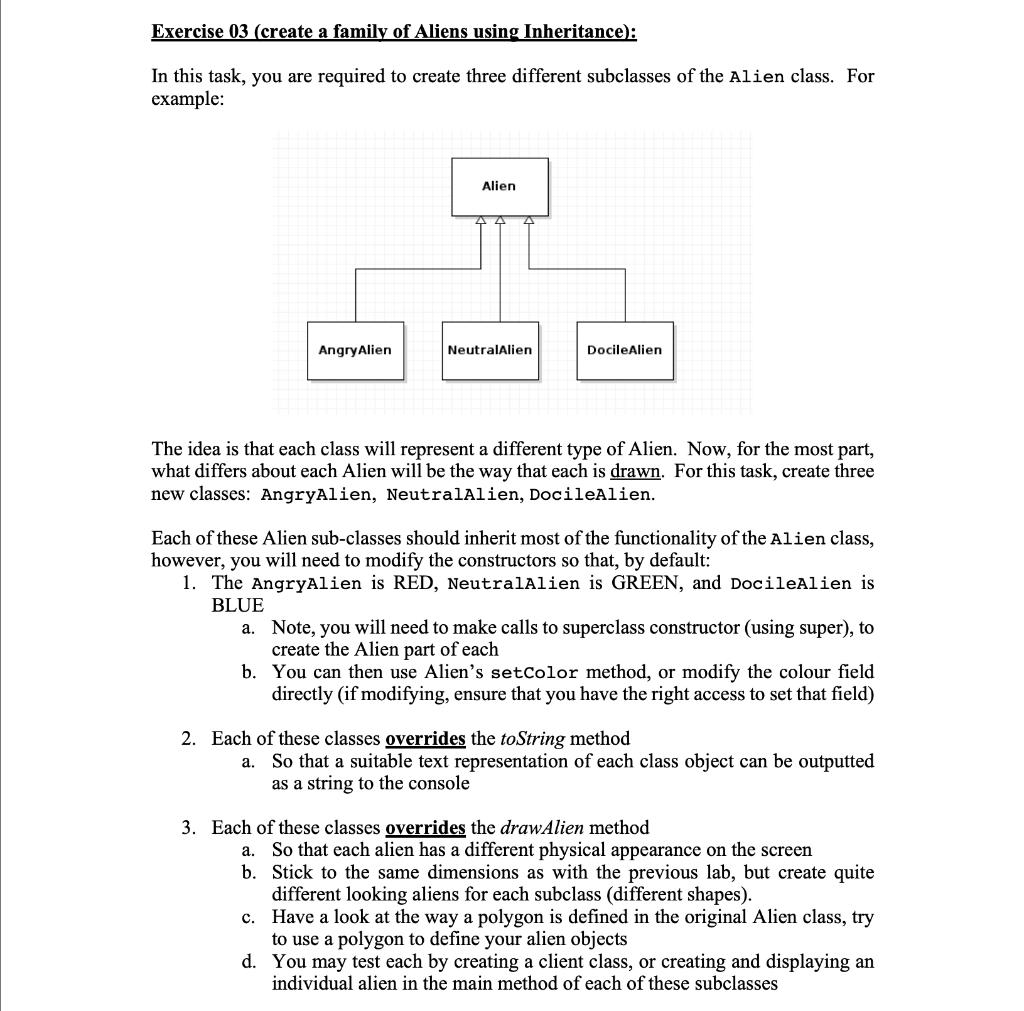
Exercise 03 (create a family of Aliens using Inheritance): In this task, you are required to create three different subclasses of the Alien class. For example: AngryAlien Alien NeutralAlien DocileAlien The idea is that each class will represent a different type of Alien. Now, for the most part, what differs about each Alien will be the way that each is drawn. For this task, create three new classes: AngryAlien, NeutralAlien, DocileAlien. Each of these Alien sub-classes should inherit most of the functionality of the Alien class, however, you will need to modify the constructors so that, by default: 1. The AngryAlien is RED, NeutralAlien is GREEN, and DocileAlien is BLUE a. Note, you will need to make calls to superclass constructor (using super), to create the Alien part of each b. You can then use Alien's setColor method, or modify the colour field directly (if modifying, ensure that you have the right access to set that field) 2. Each of these classes overrides the toString method a. So that a suitable text representation of each class object can be outputted as a string to the console 3. Each of these classes overrides the drawAlien method a. So that each alien has a different physical appearance on the screen b. Stick to the same dimensions as with the previous lab, but create quite different looking aliens for each subclass (different shapes). c. Have a look at the way a polygon is defined in the original Alien class, try to use a polygon to define your alien objects d. You may test each by creating a client class, or creating and displaying an individual alien in the main method of each of these subclasses
Step by Step Solution
There are 3 Steps involved in it
import image Package RasterImage import javaawt BasicStroke import java awt Color import javaawt Dimension import javaawt Graphics2D import javaawt Toolkit import javaawt geom import javaawt geomPoint... View full answer

Get step-by-step solutions from verified subject matter experts
 Study Help