







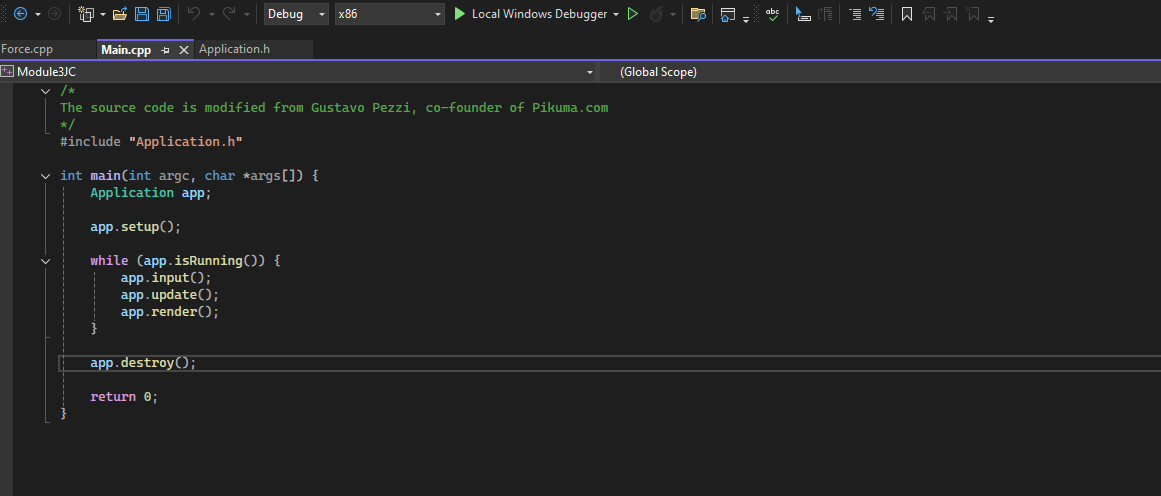
Question: * The project is done in Microsoft Visual Studio 2 0 2 2 ( x 8 6 and SDL 2 used ) . The photo
The project is done in Microsoft Visual Studio x and SDL used The photo is Main.cpp to show the desired structure. The requirements for the project are that a maximized window with a title must be created for both video simulations.
Problem:
You run into Galileo outside, and he's going to climb the Leaning Tower of Pisa with two balls.
One ball is heavy, and the other is light, and he says he wants to prove that both balls would reach the
ground at the same time. You tell him, in fact, he doesn't need to work hard in this way, and you will
show him some simulations. You then take him to a cafe for a drink, and then you open your laptop and
run your program.
Two balls of different colors appear on your screen, and their initial positions are at the same height. For
example, one ball's initial position is at and the other is at Their weights differ by a
hundred times. For example, the heavy ball is kg while the light ball is only kg They're of the
same size, because you're going to assume they experience the same drag force later.
You make two simulations for Galileo. The first simulation ignores the resistance of the air, and it
demonstrates that the two balls of different masses reach the ground at the same time. The second
simulation considers the resistance of the air. For the sake of simplicity, you assume they experience the
same drag, since they are of the same size, shape and smoothness, the only difference is the mass. In the
second simulation, you apply a small drag force to both balls. The Simulation shows that the heavier ball
reaches the ground first. Its better to set the bouncing ratio to zero so when a ball hits the ground it
stops. The drag force for the two balls is set the same, and you decide how strong it is
Applicationh
#ifndef APPLICATIONH
#define APPLICATIONH
#include Graphicsh
#include PhysicsParticleh
#include
class Application
private:
bool running false;
std::vector particles;
Vec pushForce Vec;
Vec mouseCursor Vec;
bool leftMouseButtonDown false;
public:
Application default;
~Application default;
bool isRunning;
void setup;
void input;
void update;
void render;
void destroy;
;
#endif
Code present in completed applications:
#include "Application.h
#include PhysicsConstantsh
#include PhysicsForceh
#include
bool Application::isRunning
return running;
void Application::setup
running Graphics::openWindowA single particle moving within a rectangle";openWindow;
set up the position of the coordinate system origin in the window
Graphics::setOriginGraphics::windowWidth Graphics::windowHeight ;
Particle aDot new Particle;
particles.pushbackaDot;
void Application::input
SDLEvent event;
while SDLPollEvent&event
switch eventtype
case SDLQUIT:
running false;
break;
void Application::update
static int timePreviousFrame;
int timeToWait MILLISECSPERFRAME SDLGetTicks timePreviousFrame;
if timeToWait
SDLDelaytimeToWait;
float deltaTime SDLGetTicks timePreviousFramef;
if deltaTime
deltaTime ;
timePreviousFrame SDLGetTicks;
for auto particle : particles
particleaddForcepushForce;
Vec friction Force::generateFrictionForceparticle;
ifparticlevelocity.magnitude
particleaddForcefriction;
for auto particle : particles
particleintegratedeltaTime; Integrate the acceleration and velocity to estimate the new position
for auto particle : particles
if Graphics::xPosInWindowparticleposition.x particleradius
particleposition.x Graphics::xPosInCoordinate particleradius;
particlevelocity.x ratio;
particlevelocity.y ratio;
else if Graphics::xPosInWindowparticleposition.x particleradius Graphics::getWindowWidth
particleposition.x Graphics::xPosInCoordinateGraphics::getWindowWidth particleradius;
particlevelocity.x ratio;
particlevelocity.y ratio;
if Graphics::yPosInWindowparticleposition.y particleradius Graphics::getWindowHeight
particleposition.y Graphics::yPosInCoordinateGraphics::getWindowHeight particleradius;
particlevelocity.x ratio;
particlevelocity.y ratio;
else if Graphics::yPosInWindowparticleposition.y particleradius
particleposition.y Graphics::yPosInCoordinate particleradius;
particlevelocity.x ratio;
particlevelocity.y ratio;
void Application::render
x
x
Graphics::renderFrame;
void Application::destroy
for auto particle: particles
delete particle;
Graphics::CloseWindow;
Step by Step Solution
There are 3 Steps involved in it
1 Expert Approved Answer
Step: 1 Unlock

Question Has Been Solved by an Expert!
Get step-by-step solutions from verified subject matter experts
Step: 2 Unlock
Step: 3 Unlock
 Study Help