







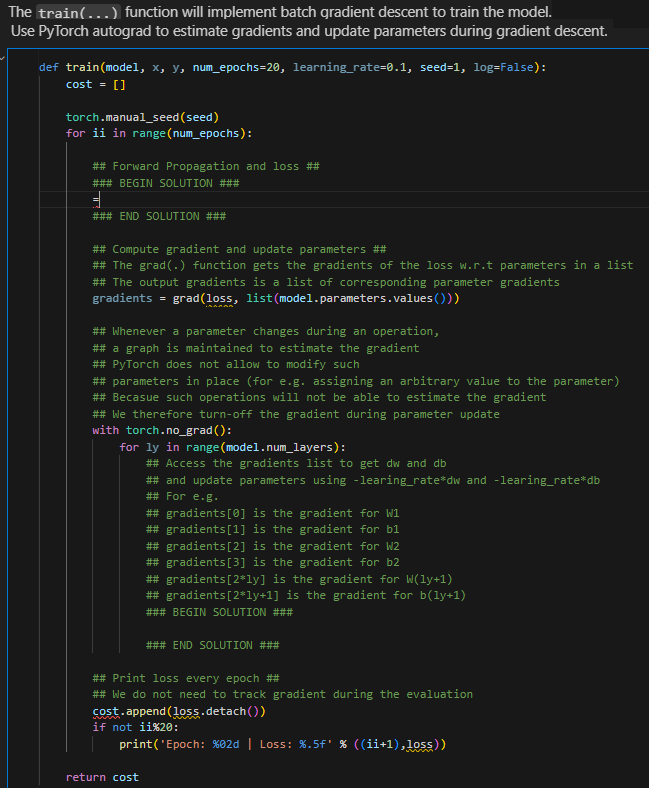
Question: The train ( . . . ) function will implement batch qradient descent to train the model. Use PyTorch autograd to estimate gradients and update
The train function will implement batch qradient descent to train the model.
Use PyTorch autograd to estimate gradients and update parameters during gradient descent.
def trainmodel numepochs learningrate seed logFalse:
torch.manualseedseed
for ii in rangenumepochs:
## Forward Propagation and loss ##
### BEGIN SOLUTION ###
### END SOLUTION ###
## Compute gradient and update parameters ##
## The grad function gets the gradients of the loss wrt parameters in a list
## The output gradients is a list of corresponding parameter gradients
gradients grads listmodelparameters.values
## Whenever a parameter changes during an operation,
## a graph is maintained to estimate the gradient
## PyTorch does not allow to modify such
## parameters in place for eg assigning an arbitrary value to the parameter
## Becasue such operations will not be able to estimate the gradient
## We therefore turnoff the gradient during parameter update
with torch.nograd:
for ly in rangemodelnumlayers:
## Access the gradients list to get and
## and update parameters using learingratedb
## For eg
## gradients is the gradient for W
## gradients is the gradient for b
## gradients is the gradient for W
## gradients is the gradient for b
## gradientsy is the gradient for
## gradients is the gradient for
### BEGIN SOLUTION ###
### END SOLUTION ###
## Print loss every epoch ##
## We do not need to track gradient during the evaluation
costappend lossdetach
if not ii:
printEpoch: d Loss: fii
Step by Step Solution
There are 3 Steps involved in it
1 Expert Approved Answer
Step: 1 Unlock

Question Has Been Solved by an Expert!
Get step-by-step solutions from verified subject matter experts
Step: 2 Unlock
Step: 3 Unlock
 Study Help