







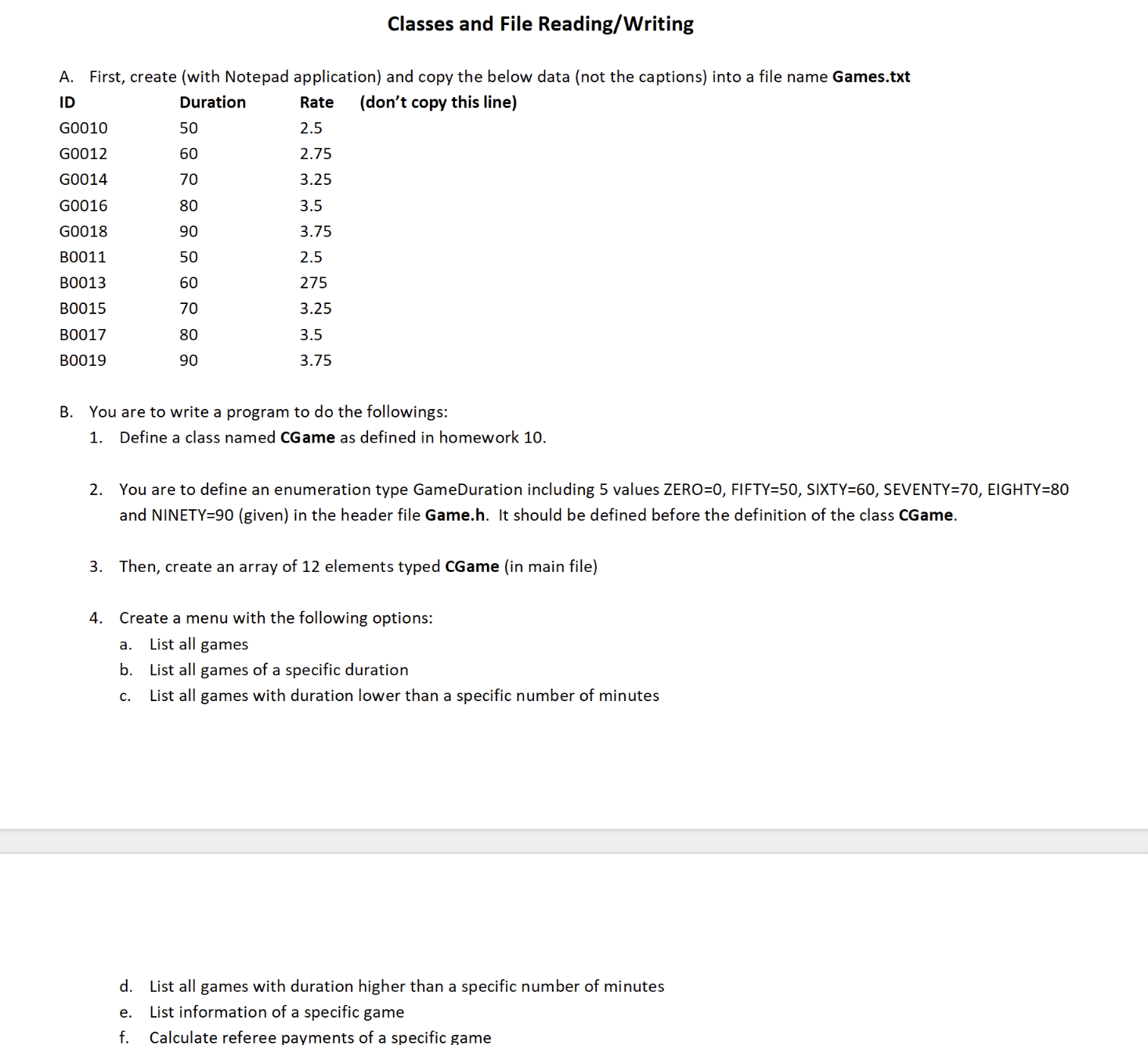
Question: The whole code and output A . First, create ( with Notepad application ) and copy the below data ( not the captions ) into
The whole code and output
A First, create with Notepad application and copy the below data not the captions into a file name Games.txt
B You are to write a program to do the followings:
Define a class named CGame
You are to define an enumeration type GameDuration including values mathrmZEROmathrmFIFTYmathrmSIXTY SEVENTY EIGHTY and NINETYgiven in the header file Game.h It should be defined before the definition of the class CGame.
Then, create an array of elements typed CGame in main file
Create a menu with the following options:
a List all games
b List all games of a specific duration
c List all games with duration lower than a specific number of minutes
d List all games with duration higher than a specific number of minutes
e List information of a specific game
f Calculate referee payments of a specific game
g Add a game
h Remove a game
i Update a game
j Quit
Add a new function readGameInfo to read the list of games from the input file Games.txt into the array of games. Thisfunction should be called first in main
Add a new function writeGameInfo to write the current information of the games from the application to the file Games.txt
This function should be called in the Quit option before terminating your application. The file Games.txt is then updated with
the latest information of the games.
For option "List all games with grade ask for that specific duration and then use operators or for comparison.
For option "List information of a specific game", ask for game id and then search for it in the list.
If found, list the information of the that specific game.
Otherwise, raise an error message and return to the menu.
For option "Calculate referee payments of a specific game", ask for game id and then search for it in the list.
If found, calculate Center and AR payments and show the results same as Project
Otherwise, raise an error message and return to the menu.
For option "Add a game", search for an available slot ie id isG
If there is one, ask for new game information id duration, rate and then insert the information into that slot.
If there is no slot available, raise an error message and return to the menu.
For option "Remove a game", ask for game id and then search for it in the list.
If found, reset the information with the default values used in the default constructor.
Otherwise, raise an error message and return to the menu.
For option "Update a game", ask for game id and then search for it in the list.
If found, ask for its new duration, rate and validate these new values same as Project Then, update the information for
that game.
Otherwise, raise an error message and return to the menu.
Step by Step Solution
There are 3 Steps involved in it
1 Expert Approved Answer
Step: 1 Unlock

Question Has Been Solved by an Expert!
Get step-by-step solutions from verified subject matter experts
Step: 2 Unlock
Step: 3 Unlock
 Study Help