







Question: These are my rectangle and point class i need help with the canvas class. Class Canvas represents a collection of Rectangles. It has 8 methods.
These are my rectangle and point class i need help with the canvas class.
Class Canvas represents a collection of Rectangles. It has 8 methods. In addition, to the constructor (i.e. __init__ method) and two methods that override python's object methods (and make your class user friendly as suggested by the test cases), your class should contain 5 more methods: add_one_rectangle, count_same_color, total_perimeter, min_enclosing_rectangle, and common_point. Here is a description of those methods whose job may not be obvious from the test cases. * The method total_perimeter: returns the sum of the perimeters of all the rectangles in the calling canvas. To compute total perimeter do not compute a perimeter of an individual rectangle in the body of total_perimeter method. Instead use get_perimeter method from the Rectangle class. * Method min_enclosing_rectangle: calculates the minimum enclosing rectangle that contains all the rectangles in the calling canvas. It returns an object of type Rectangle of any colour you prefer. To find minimum enclosing rectangle you will need to find the minimum x coordinate of all rectangles, the maximum x coordinate for all rectangles, the minimum y coordinate and the maximum y coordinate of all rectangles. * Method common_point: returns True if there exists a point that intersects all rectangles in the calling canvas. To test this (for axis parallel rectangles like ours), it is enough to test if every pair of rectangles intersects (according to a Helly's theorem for axis-alligned rectangles: http://en.wikipedia.org/wiki/Helly's_theorem ).
class Point:
'class that represents a point in the plane'
def __init__(self, xcoord=0, ycoord=0):
''' (Point,number, number) -> None
initialize point coordinates to (xcoord, ycoord)'''
self.x = xcoord
self.y = ycoord
def setx(self, xcoord):
''' (Point,number)->None
Sets x coordinate of point to xcoord'''
self.x = xcoord
def sety(self, ycoord):
''' (Point,number)->None
Sets y coordinate of point to ycoord'''
self.y = ycoord
def get(self):
'''(Point)->tuple
Returns a tuple with x and y coordinates of the point'''
return (self.x, self.y)
def move(self, dx, dy):
'''(Point,number,number)->None
changes the x and y coordinates by dx and dy'''
self.x += dx
self.y += dy
def __eq__(self, other):
'''(Point,Point)->bool
Returns True if self and other have the same coordinates'''
return self.x == other.x and self.y == other.y
def __repr__(self):
'''(Point)->str
Returns canonical string representation Point(x, y)'''
return 'Point('+str(self.x)+','+str(self.y)+')'
def __str__(self):
'''(Point)->str
Returns nice string representation Point(x, y).
In the case we chose the same representation as in __repr__'''
return 'Point('+str(self.x)+','+str(self.y)+')'
class Rectangle:
a = Point()
b = Point()
color = str("")
def __init__(self, a, b, color):
self.a = a
self.b = b
self.color = color
def get_bottom_left(self):
return self.a
def __eq__(self, other):
'''(Point,Point)->bool
Returns True if self and other have the same coordinates'''
return str(self.a) == str(other.a) and str(self.b) == str(other.b)
def __repr__(self):
'''(Point)->str
Returns canonical string representation Point(x, y)'''
return 'Rectangle('+str(self.a)+','+str(self.b)+','+str(self.color)+')'
def __str__(self):
'''(Point)->str
Returns nice string representation Point(x, y).
In the case we chose the same representation as in __repr__'''
return 'Rectangle('+str(self.a)+','+str(self.b)+','+str(self.color)+')'
def get_top_right(self):
return self.b
def get_color(self):
return self.color
def reset_color(self, color):
self.color = color
def get_perimeter(self):
length = (self.b.x - self.a.x)
breadth = (self.b.y - self.a.y)
return 2 * (length + breadth)
def get_area(self):
length = (self.b.x - self.a.x)
breadth = (self.b.y - self.a.y)
return (length * breadth)
def move(self, dx, dy):
self.a.move(dx,dy)
self.b.move(dx,dy)
def intersects(self, rect):
for i1 in range(int(self.a.x), int(self.b.x+1)):
for j1 in range(int(self.a.y), int(self.b.y+1)):
p = (i1, j1)
for i2 in range(int(rect.a.x), int(rect.b.x+1)):
for j2 in range(int(rect.a.y), int(rect.b.y+1)):
if(p == (i2,j2)):
return True
return False
def contains(self, x, y):
for i in range(self.a.x, self.b.x+1):
for j in range(self.a.y, self.b.y+1):
if((i,j) == (x,y)):
return True
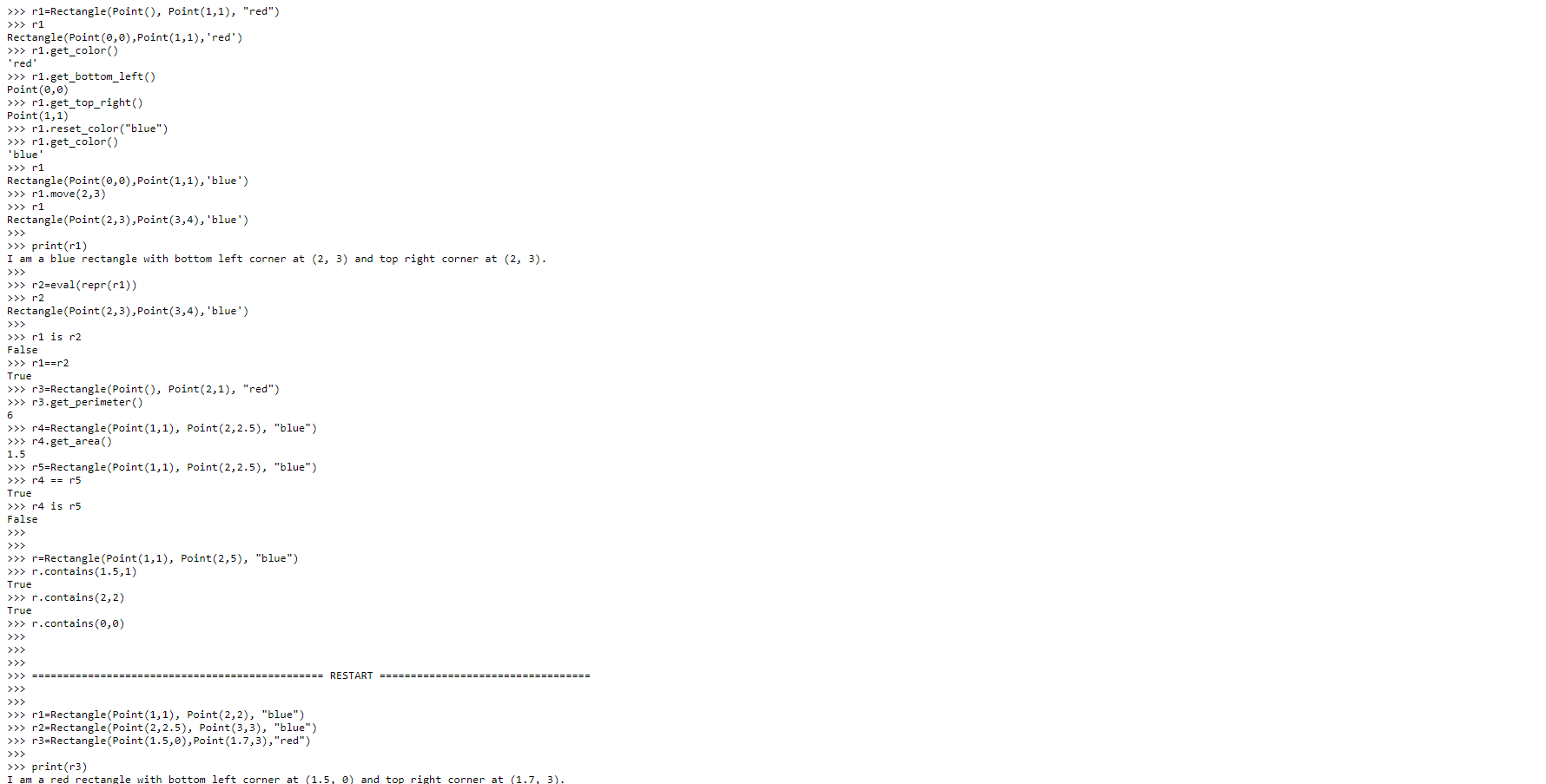
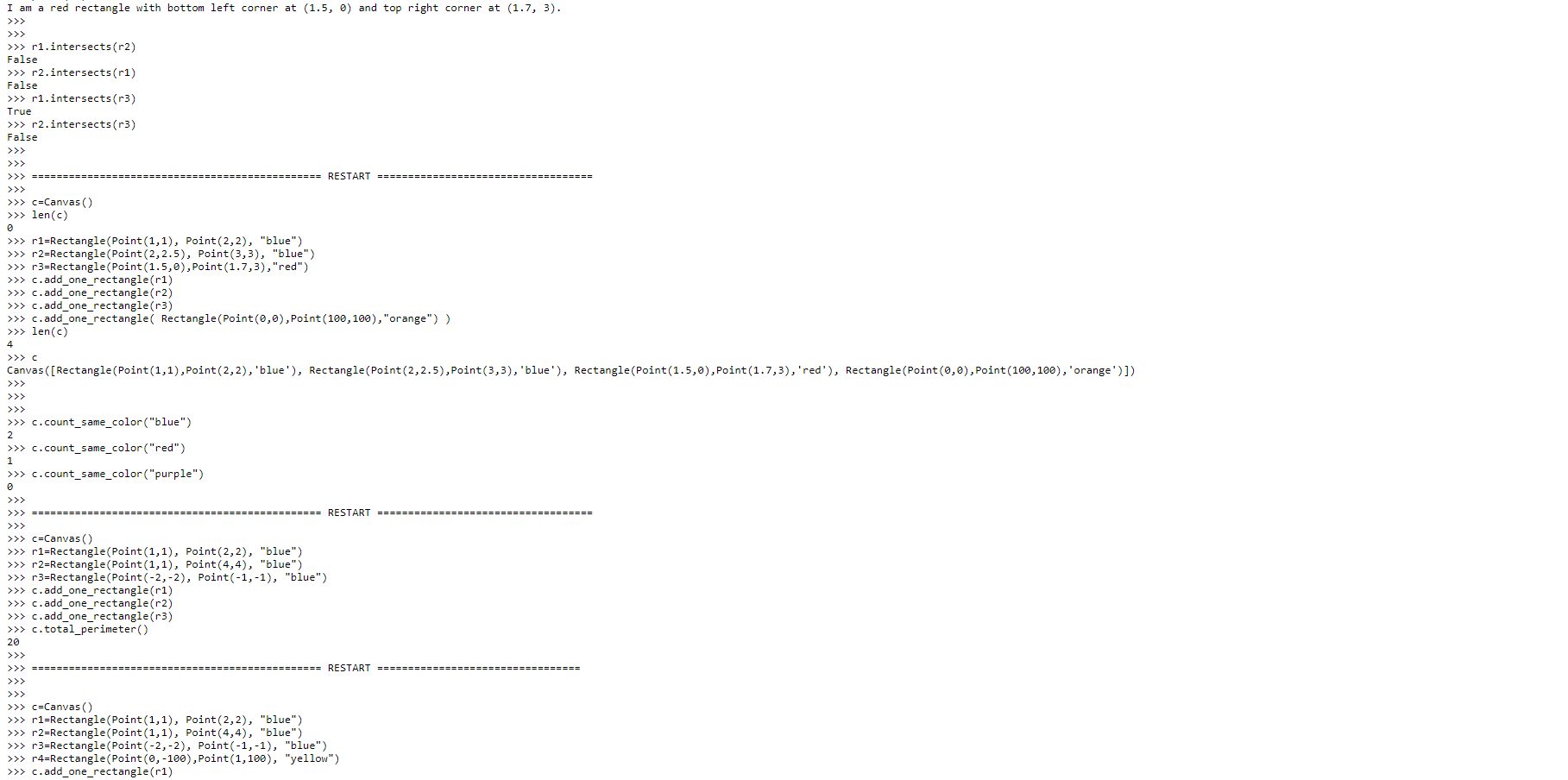
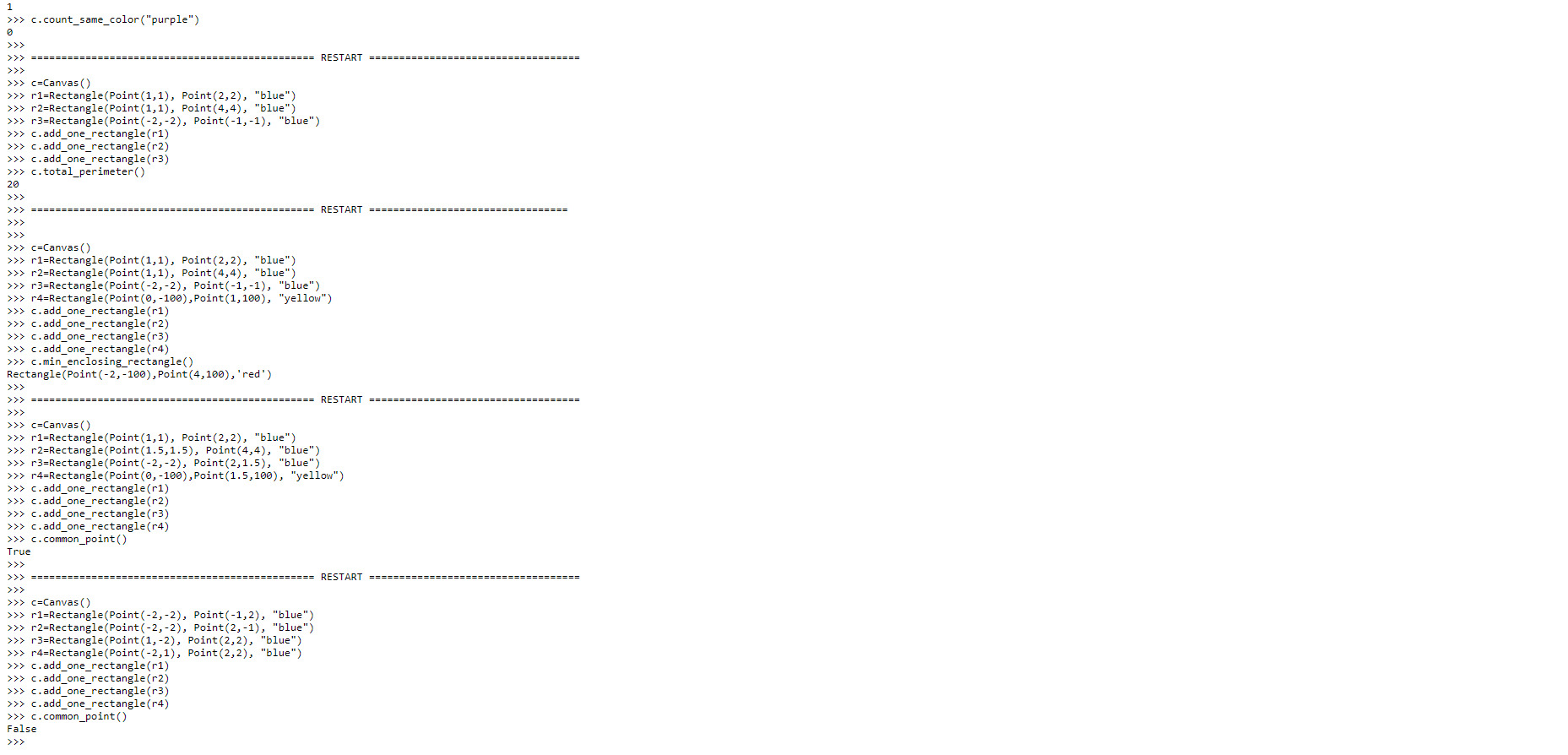
> > > r1 r1=Rectangle(Point( ), Point( 1,1), "red" ) Rectangle(Point (0,0), Point(1,1), 'red' ) >>> rl.get_color( ) 'red' > > > r1.get_bottom_left( ) Point(0,0) >>> rl.get_top_right( ) Point(1, 1) > > > r1. reset_color( "blue" ) > > > 'blue rl.get_color( ) > >> r1 Rectangle(Point (0, 0), Point(1, 1), 'blue' ) > > > r1. move( 2, 3) > > > r1 Rectangle(Point (2, 3), Point(3,4), 'blue ' ) > > > > > > print(r1) I am a blue rectangle with bottom left corner at (2, 3) and top right corner at (2, 3) . > > > > > > r > > > r2 r2=eval(repr(r1) ) > > > Rectangle(Point (2, 3) , Point(3,4), 'blue' ) > > > r1 is r2 False > > > r1==r2 True > > > r3=Rectangle(Point( ), Point(2, 1), "red") > > > r3 . get_perimeter ( ) r4=Rectangle(Point(1, 1), Point(2, 2.5), "blue" ) > >> r4.get_area ( ) 1.5 > > > r5=Rectangle(Point (1, 1), Point(2, 2.5), "blue") > > > r4 == r5 True > > > r4 is r5 False > > > > > > > > > 1 r=Rectangle(Point(1,1), Point(2,5), "blue" ) > > > r. contains(1.5,1) True > > > r. contains(2, 2) True > > > r. contains(0, 0) > > > > > > > > > > > > ===== RESTART === > > > > > > >> > r1=Rectangle(Point (1, 1), Point(2, 2), "blue" ) r2=Rectangle(Point (2, 2.5), Point(3, 3), > > > r3=Rectangle(Point(1. 5, 0), Point(1.7, 3) , "red" ) , "blue" ) > > > > > > print(r3)I am a red rectangle with bottom Left corner at ( 1 . 5 , 6) and top right corner at ( 1 . 7 . 3 ) . > > > (1 . intersects ( 12 ) FALSE\\ > > > r2 . intersects ( -1 ) False\\ > > > rl . intersects ( 13) True > > > r2 . intersects ( 13) False = = = = = = = RESTART = = = = = = = = = = = > > > [ = Canvas! ) > > > Len ( C ) > > > r1 = Rectangle ( Point ( 1 , 1 ) , Point ( 2 , 2 ) . " > > > ( 2 = Rectangle ( Point ( 2, 2. 5) , Point ( 3 , 3 ) .` 1. " blue " ) . " blue " ) > > > > > C . add_ one_ rectangle ( 13 )| > > > [ . add_ one_ rectangle ( Rectangle ( Point ( 8 , 0 ) , Point ( lab , 198 ) , " orange " ] ] > > > len ( C ) Canvas ( [ Rectangle ( Point ( 1 , 1 ) , Point ( 2 , 2 ) , ' blue ' ] , Rectangle ( Point ( 2 , 2 . 5 ) , Point ( 3 , 3 ) , ' blue ' ) , Rectangle ( Point ( 1 . 5 , 6 ) , Point ( 1 . 7 , 3 ) , ' red ' ) , Rectangle ( Point ( 6 , 8 ) , Point ( 100 , 180 ) , ' orange ' ) ] ) > > > [ . count_ same_ color ( " blue " ) > > > [ . count_ same_ color ( " red " ! > > > [ . count_ same_ color ( " purple " ) = = = = = RESTART = = [ = Canvas (! ) > > > (1 = Rectangle ( Point ( 1 , 1 ) , Point ( 2 , 2 ) , " blue " ] > > > ( 2 = Rectangle ( Point ( 1 , 1 ) , Point ( 4 , 4 ) , " blue " ) > > > > > [ . add_ one_ rectangle ( -1 ) > > > [ . add_ one_ rectangle ( 1 2 ) > > > [ . add_ one_ rectangle ( 1 3 ) > > > [ . total_ perimeter ( !) 20 = = = = = = = RESTART = = = = = = > > > [ = Canvas ( ) > > > r1 = Rectangle ( Point ( 1 , 1 ) , Point ( 2 , 2 ) , " BLUE " > > > ( 2 = Rectangle ( Point ( 1 , 1 ) , Point ( 4 , 4 ) ,` }, " blue " ) > > > > > 1 4 = Rectangle ( Point ( 0, - 109 ) , Point ( 1 , 180 ) , " yellow " ) c . add one rectangle ( (1 )> > > [ . count_ same_ color ( " purple " ) B > > > = = = =ZZZ Z RESTART = = = = ` > > > [ = Canvas ( )| > > > (1 = Rectangle ( Point ( 1 , 1 ) , Point ( 2 , 2 ) , " blue " ) > > > ( 2 = Rectangle ( Point ( 1 , 1 ) , Point ( 4 , 4 ) , " blue " ) > > > > > [ . add_ one_ rectangle ( (1 ) > > > [ . add_ one_ rectangle ( 12 ) > > > [ . add one_ rectangle ( 13 ) > > > [ . total_ perimeter ( !) 20 = = = = = RESTART = = = = = ` = = = = = = = = = = > > > [ = Canvas ( )| > > > ( 1 = Rectangle ( Point ( 1 , 1 ) , Point ( 2 , 2 ) , " blue ") > > > ( 2 = Rectangle ( Point ( 1 , 1 ) , Point ( 4 , 4 ) , " blue "] > > > > > 1 4 = Rectangle ( Point ( @ , - 180 ) , Point ( 1 , 108 ) , " Yellow " ) > > > [ . add one_ rectangle ( (1 ) > > > [ . add_ one_ rectangle ( 12 ) > > > [ . add_ one_ rectangle ( 13 ) > > > [ . add_ one_ rectangle ( 14 ) > > > [ . min _ Enclosing_ rectangle ( ) Rectangle ( Point ( - 2 , - 180 ) , Point ( 4 , 180 ) , ' red ' ) = = RESTART = = = = > > > [ = Canvas ( ) > > > (1 = Rectangle ( Point ( 1 , 1 ) , Point ( 2 , 2) , " blue ' ) > > > r 2 = Rectangle ( Point ( 1 . 5 , 1 . 5 ) , Point ( 4 , 4 ) , " BLUE" ) > > > > > 1 4 = Rectangle ( Point ( 0, - 180 ) , Point ( 1 . 5 , 109 ) , " yellow " ) > > > [ . add one_ rectangle ( (1 ) > > > [ . add_ one_ rectangle ( 12 ) > > > [ . add_ one_ rectangle ( 13 ) > > > [ . add_ one_ rectangle ( 1 4 ) > > > [ . common_ point ( )| True = = = = = = = = = RESTART = = = = = = = = =` ` = = = = = = = = = = = = = = = = = = = = = > > > [ = Canvas ( )| > > > (1 = Rectangle ( Point ( - 2, - 2) , Point ( - 1 , 2 ) , " blue ") > > > ( 2 = Rectangle ( Point ( - 2, - 2) , Point ( 2 1 - 1 ) ,` . " LIVE ") > > > > > ( 4 = Rectangle ( Point ( - 2, 1 ) , Point ( 2 , 2 ) , " blue " ) > > > [ . add_ one_ rectangle ( (1 ) > > > [ . add_ one_ rectangle ( -2 ) > > > [ . add_ one_ rectangle ( 1 3) > > > [ . add_ one_ rectangle ( 14 ) > > > [ . common_ point ! ) False
Step by Step Solution
There are 3 Steps involved in it

Get step-by-step solutions from verified subject matter experts
 Study Help