Question: THIS ASSIGNMENT NEEDS TO BE DONE ON MICROSOFT PROJECT AND THE FIILE NEEDS TO BE ATTACHED Details for Individual Assignment 1. See course outline to
THIS ASSIGNMENT NEEDS TO BE DONE ON MICROSOFT PROJECT AND THE FIILE NEEDS TO BE ATTACHED
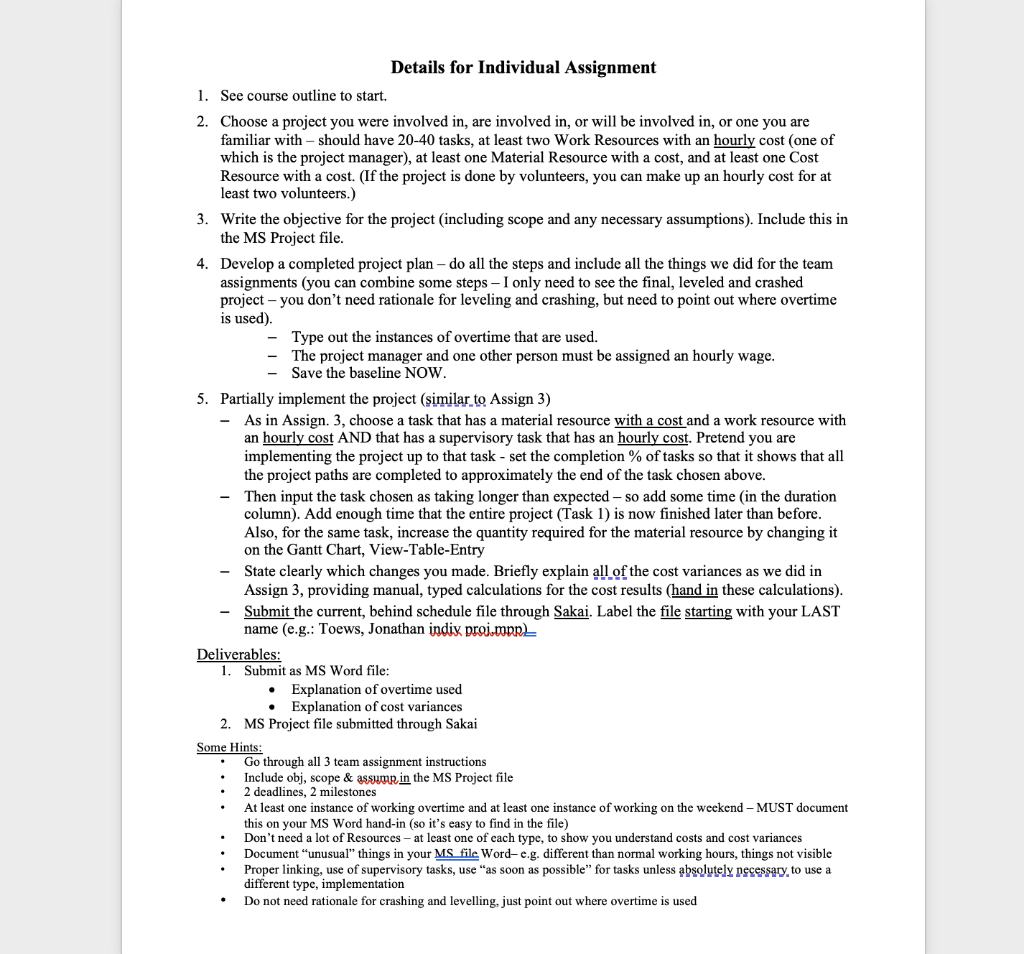
Details for Individual Assignment 1. See course outline to start. 2. Choose a project you were involved in, are involved in, or will be involved in, or one you are familiar with should have 20-40 tasks, at least two Work Resources with an hourly cost (one of which is the project manager), at least one Material Resource with a cost, and at least one Cost Resource with a cost. (If the project is done by volunteers, you can make up an hourly cost for at least two volunteers.) 3. Write the objective for the project (including scope and any necessary assumptions). Include this in the MS Project file. 4. Develop a completed project plan - do all the steps and include all the things we did for the team assignments (you can combine some steps - I only need to see the final, leveled and crashed project - you don't need rationale for leveling and crashing, but need to point out where overtime is used). Type out the instances of overtime that are used. The project manager and one other person must be assigned an hourly wage. Save the baseline NOW. 5. Partially implement the project (similar to Assign 3) - As in Assign. 3, choose a task that has a material resource with a cost and a work resource with an hourly cost AND that has a supervisory task that has an hourly cost. Pretend you are implementing the project up to that task - set the completion % of tasks so that it shows that all the project paths are completed to approximately the end of the task chosen above. Then input the task chosen as taking longer than expected - so add some time in the duration column). Add enough time that the entire project (Task 1) is now finished later than before. Also, for the same task, increase the quantity required for the material resource by changing it on the Gantt Chart, View-Table-Entry State clearly which changes you made. Briefly explain all of the cost variances as we did in Assign 3, providing manual, typed calculations for the cost results (hand in these calculations). Submit the current, behind schedule file through Sakai. Label the file starting with your LAST name (e.g.: Toews, Jonathan indix proi.mpre Deliverables: 1. Submit as MS Word file: Explanation of overtime used Explanation of cost variances 2. MS Project file submitted through Sakai Some Hints: Go through all 3 team assignment instructions Include obj, scope & assump in the MS Project file 2 deadlines, 2 milestones At least one instance of working overtime and at least one instance of working on the weekend - MUST document this on your MS Word hand-in (so it's easy to find in the file) Don't need a lot of Resources - at least one of each type, to show you understand costs and cost variances Document "unusual" things in your MS file Word-e.g. different than normal working hours, things not visible Proper linking, use of supervisory tasks, use "as soon as possible" for tasks unless absolutely necessary to use a different type, implementation Do not need rationale for crashing and levelling, just point out where overtime is used Details for Individual Assignment 1. See course outline to start. 2. Choose a project you were involved in, are involved in, or will be involved in, or one you are familiar with should have 20-40 tasks, at least two Work Resources with an hourly cost (one of which is the project manager), at least one Material Resource with a cost, and at least one Cost Resource with a cost. (If the project is done by volunteers, you can make up an hourly cost for at least two volunteers.) 3. Write the objective for the project (including scope and any necessary assumptions). Include this in the MS Project file. 4. Develop a completed project plan - do all the steps and include all the things we did for the team assignments (you can combine some steps - I only need to see the final, leveled and crashed project - you don't need rationale for leveling and crashing, but need to point out where overtime is used). Type out the instances of overtime that are used. The project manager and one other person must be assigned an hourly wage. Save the baseline NOW. 5. Partially implement the project (similar to Assign 3) - As in Assign. 3, choose a task that has a material resource with a cost and a work resource with an hourly cost AND that has a supervisory task that has an hourly cost. Pretend you are implementing the project up to that task - set the completion % of tasks so that it shows that all the project paths are completed to approximately the end of the task chosen above. Then input the task chosen as taking longer than expected - so add some time in the duration column). Add enough time that the entire project (Task 1) is now finished later than before. Also, for the same task, increase the quantity required for the material resource by changing it on the Gantt Chart, View-Table-Entry State clearly which changes you made. Briefly explain all of the cost variances as we did in Assign 3, providing manual, typed calculations for the cost results (hand in these calculations). Submit the current, behind schedule file through Sakai. Label the file starting with your LAST name (e.g.: Toews, Jonathan indix proi.mpre Deliverables: 1. Submit as MS Word file: Explanation of overtime used Explanation of cost variances 2. MS Project file submitted through Sakai Some Hints: Go through all 3 team assignment instructions Include obj, scope & assump in the MS Project file 2 deadlines, 2 milestones At least one instance of working overtime and at least one instance of working on the weekend - MUST document this on your MS Word hand-in (so it's easy to find in the file) Don't need a lot of Resources - at least one of each type, to show you understand costs and cost variances Document "unusual" things in your MS file Word-e.g. different than normal working hours, things not visible Proper linking, use of supervisory tasks, use "as soon as possible" for tasks unless absolutely necessary to use a different type, implementation Do not need rationale for crashing and levelling, just point out where overtime is used









 Study Help