







Question: This assignment requires Database Development using MS Azure, Microsoft SQL Server Management Studio (MSSMS) and Microsoft Visual Studio (VS). It involves the following features
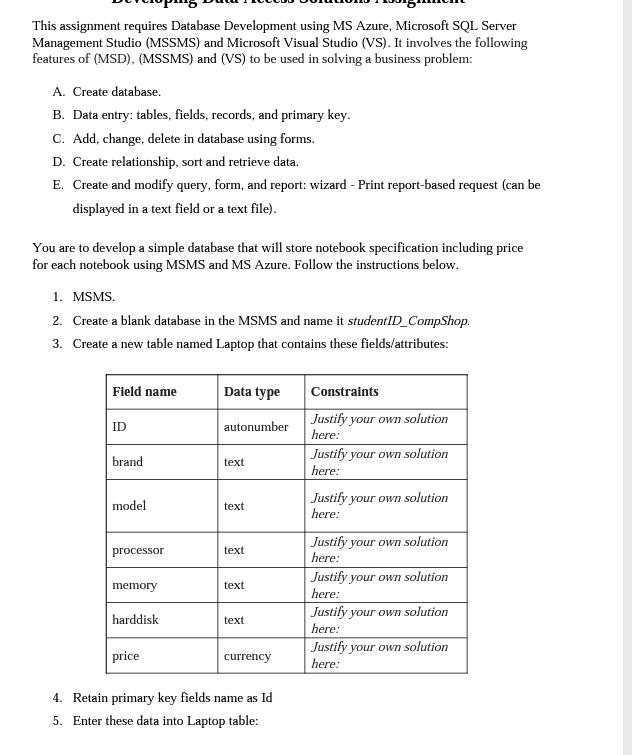
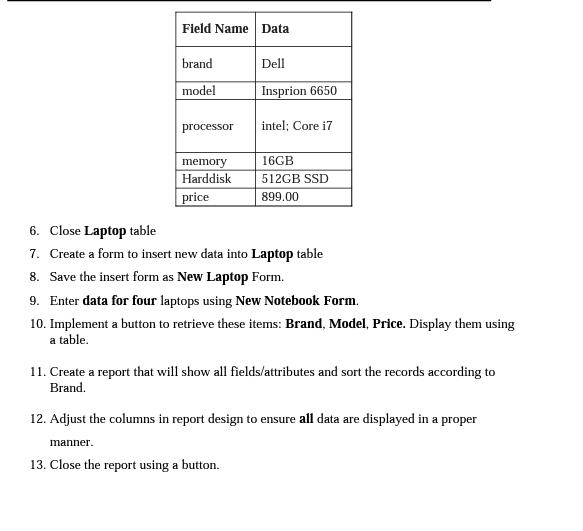
This assignment requires Database Development using MS Azure, Microsoft SQL Server Management Studio (MSSMS) and Microsoft Visual Studio (VS). It involves the following features of (MSD), (MSSMS) and (VS) to be used in solving a business problem: A. Create database. B. Data entry: tables, fields, records, and primary key. C. Add, change, delete in database using forms. D. Create relationship, sort and retrieve data. E. Create and modify query, form, and report: wizard - Print report-based request (can be displayed in a text field or a text file). You are to develop a simple database that will store notebook specification including price for each notebook using MSMS and MS Azure. Follow the instructions below. 1. MSMS. 2. Create a blank database in the MSMS and name it studentID_CompShop. 3. Create a new table named Laptop that contains these fields/attributes: Field name Data type ID autonumber Constraints Justify your own solution here: brand text Justify your own solution here: model text Justify your own solution here: Justify your own solution processor text here: Justify your own solution memory text here: harddisk text Justify your own solution here: price Justify your own solution currency here: 4. Retain primary key fields name as Id 5. Enter these data into Laptop table: Field Name Data brand Dell model Insprion 6650 processor intel; Core i7 memory 16GB Harddisk 512GB SSD price 899.00 6. Close Laptop table 7. Create a form to insert new data into Laptop table 8. Save the insert form as New Laptop Form. 9. Enter data for four laptops using New Notebook Form. 10. Implement a button to retrieve these items: Brand, Model, Price. Display them using a table. 11. Create a report that will show all fields/attributes and sort the records according to Brand. 12. Adjust the columns in report design to ensure all data are displayed in a proper manner. 13. Close the report using a button.
Step by Step Solution
There are 3 Steps involved in it

Get step-by-step solutions from verified subject matter experts
 Study Help