







Question: This case puts you in the driver seat ( as a production planner ) . Open the attached xIs workbook.. Your job is to prepare
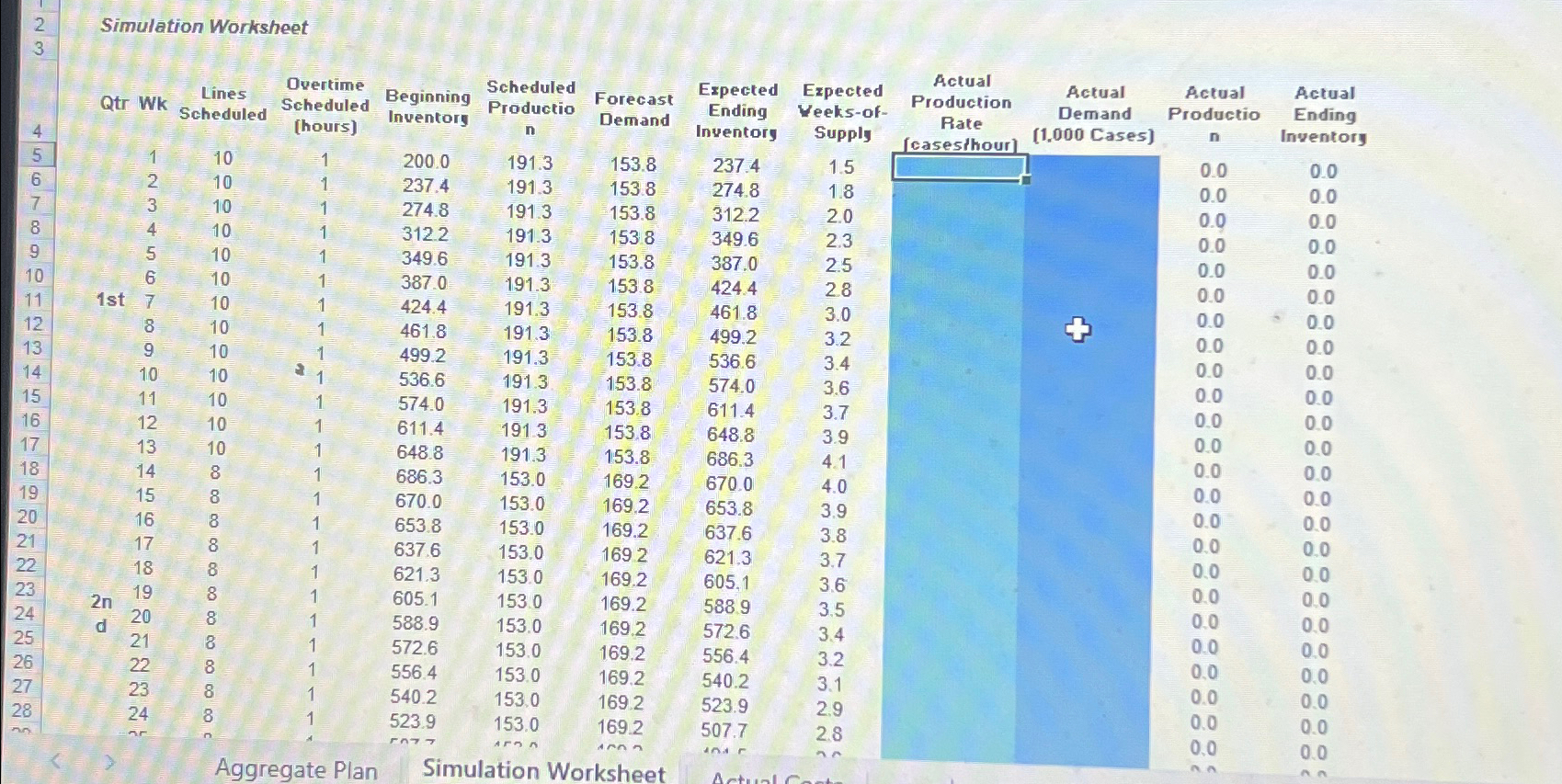
This case puts you in the driver seat as a production planner Open the attached xIs workbook.. Your job is to prepare a production schedule considering the constraints and rules of this case in Chp and to determine the operating budget for such a plan. Conceptually, you might try a Chase or Level type plan, but you need to abide by the constraints which are very specific. There are worksheets available to execute this plan the st Aggregate Plan worksheet is where you determine your production planschedule by indicating the number of lines and any overtime hrs per day yellow highlights and then determine the associated budget costs blue highlights of your plan. You can use the defaulted number of production lines and overtime hours as a first try; Once you've determined your budgeted plan, then there is the Simulation worksheet where you need to indicate the Actual Production Rate and the Actual Demand columns cells in reality the actual data would be getting filled in each week as time progresses but you need to fill all weeks with numbers into the blue cells simply enter into the Actual Production Rate column each cell and then copy the Forecast column into the Actual Demand column which will end up simulating how much your plan will actually cost onto the rd worksheet; This rd worksheet is the Actual Cost worksheet, which will fill in automatically, based on data from the Simulation Worksheet. The main idea here is to do your plan sheet estimate your budget sheet enter in the production rate and demand sheet which will automatically generate numbers showing the actual costs sheet You should compare your budget sheet to what it actually costs to execute sheet Lastly, you should make an attempt to reconcile any differences between your budget and the actual costs that are simulated. Make adjustments to your planbudget and rerun again, till you get the budget and actual costs to align.
Simulation Worksheet
tableQtr WktableLinesScheduledtableOvertimeScheduledtableBeginningInventorytableScheduledProductiontableForecastDemandtableExpectedEndingInventorytableExpectedVeeksofSupplytableActualProductionRatecasesthourtableActualDemandtableActualProductio
Step by Step Solution
There are 3 Steps involved in it
1 Expert Approved Answer
Step: 1 Unlock

Question Has Been Solved by an Expert!
Get step-by-step solutions from verified subject matter experts
Step: 2 Unlock
Step: 3 Unlock
 Study Help