







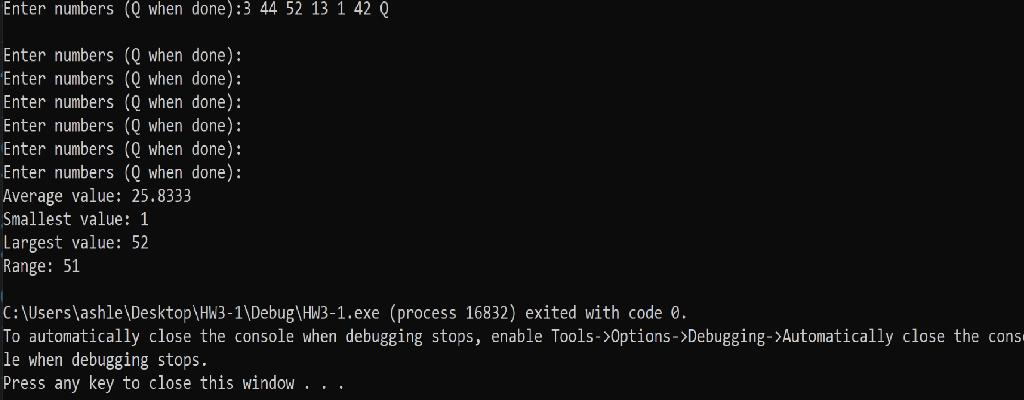
Question: This code needs to be written in C++, I got it mostly right although I have a weird output where it repeats the phrase Enter
This code needs to be written in C++, I got it mostly right although I have a weird output where it repeats the phrase "Enter numbers (Q when done): ". I attached my code and
MY CODE
#include
int main() {
float number; float average; float minimum = 0, maximum = 0; float sum = 0; int counter = 0; do { cout > number; cout
if (number == false) break;
counter = counter + 1;
if (counter == 1) { minimum = number; maximum = number; }
else { if (number maximum) maximum = number; }
sum = sum + number; }
while (number != 0); average = sum / counter;
cout
}
THE WEIRD OUTPUT :(
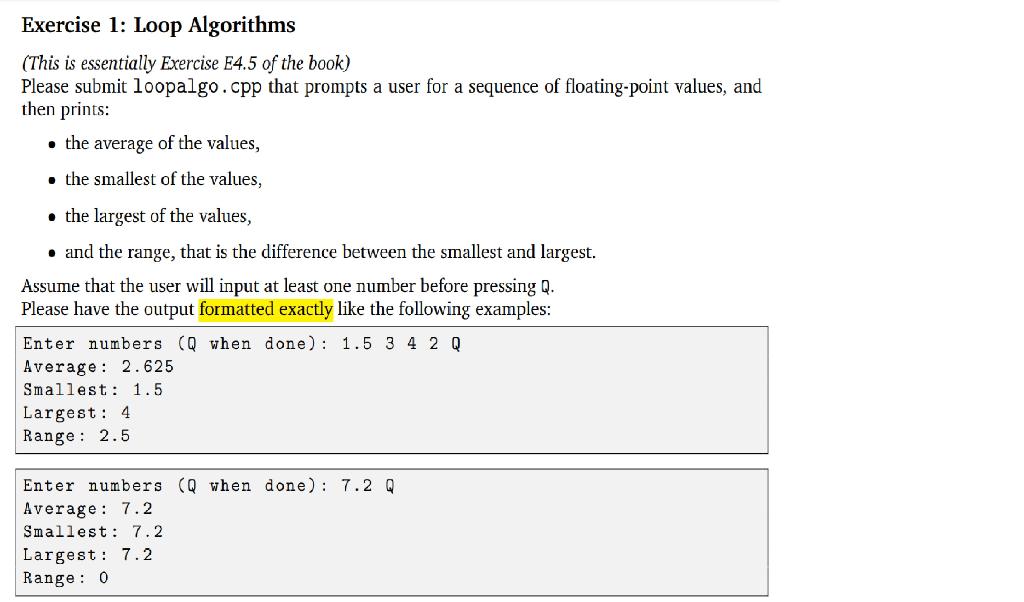
Exercise 1: Loop Algorithms (This is essentially Exercise E4.5 of the book) Please submit loopalgo.cpp that prompts a user for a sequence of floating-point values, and then prints: the average of the values, the smallest of the values, . the largest of the values, and the range, that is the difference between the smallest and largest. Assume that the user will input at least one number before pressing Q. Please have the output formatted exactly like the following examples: Enter numbers (Qwhen done): 1.5 3 4 2 Q Average: 2.625 Smallest: 1.5 Largest: 4 Range: 2.5 Enter numbers (Q when done) : 7.2 Q Average: 7.2 Smallest: 7.2 Largest: 7.2 Range: 0 Enter numbers (Qwhen done):3 44 52 13 1 42 Q Enter numbers (Q when done): Enter numbers ( when done): Enter numbers ( when done): Enter numbers ( when done): Enter numbers ( when done): Enter numbers (Q when done): Average value: 25.8333 Smallest value: 1 Largest value: 52 Range: 51 C:\Users\ashle \Desktop\HW3-1\Debug\HW3-1.exe (process 16832) exited with code 0. To automatically close the console when debugging stops, enable Tools->Options ->Debugging->Automatically close the cons le when debugging stops. Press any key to close this window
Step by Step Solution
There are 3 Steps involved in it

Get step-by-step solutions from verified subject matter experts
 Study Help