







Question: This is a python assignment, I don't know how to write the code, please write some comments for me. I will rate you a good.
![a good. Thank you. project-2 [70 pts] You will be writing a](https://dsd5zvtm8ll6.cloudfront.net/si.experts.images/questions/2024/09/66f31b5832def_27966f31b57c527f.jpg)
This is a python assignment, I don't know how to write the code, please write some comments for me. I will rate you a good. Thank you.
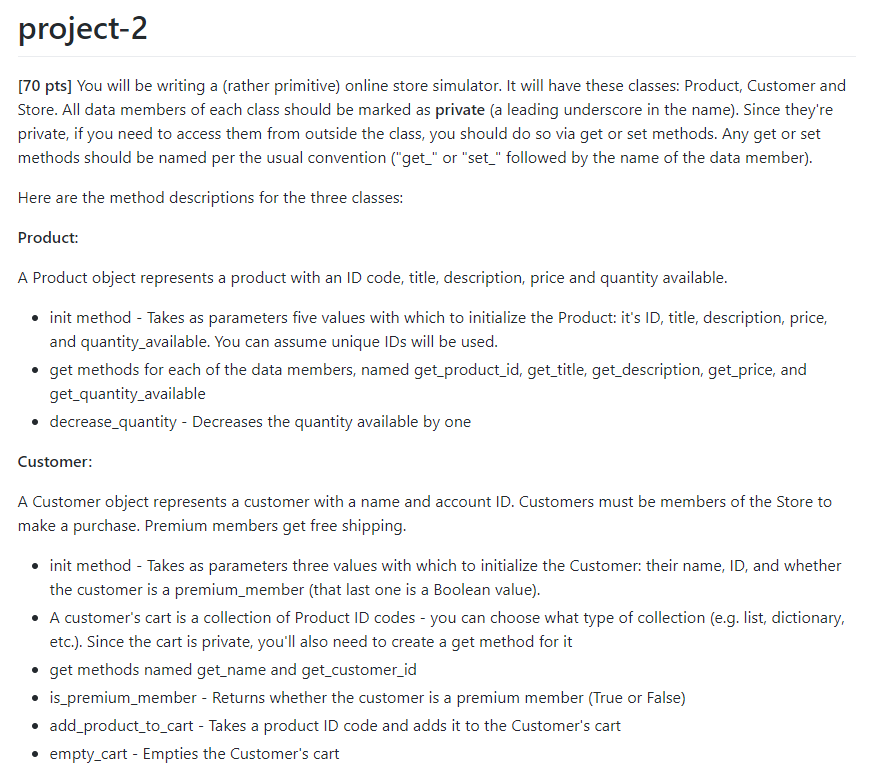
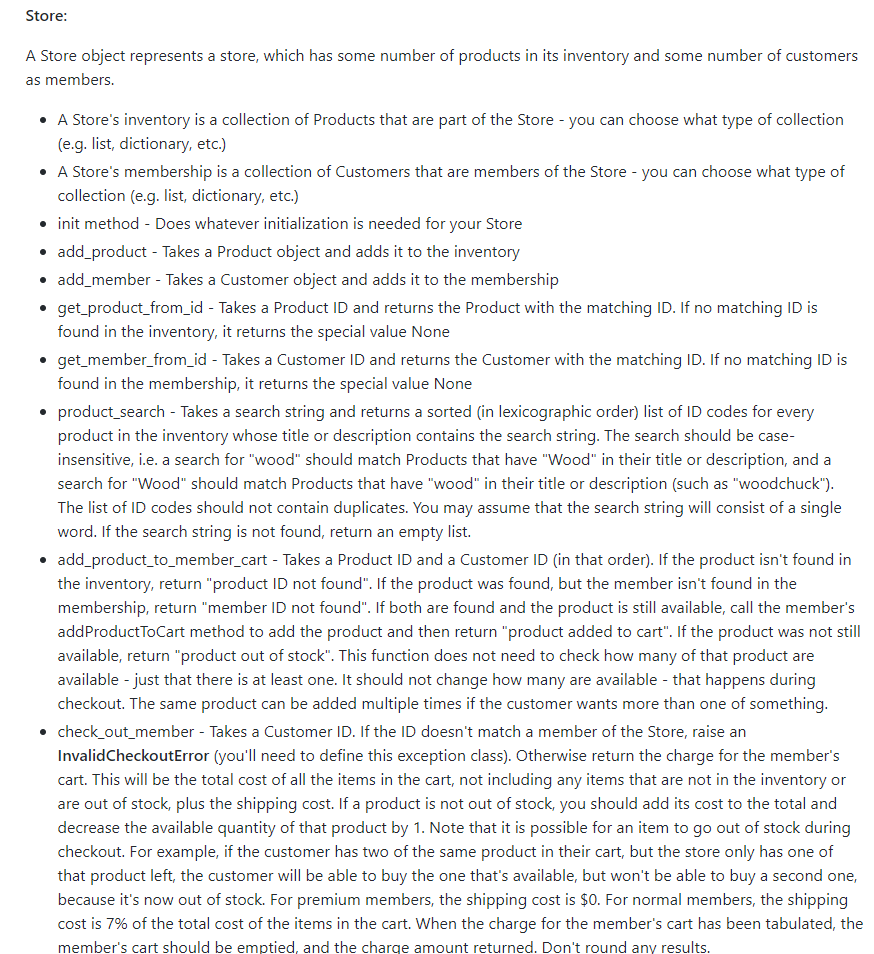
project-2 [70 pts] You will be writing a (rather primitive) online store simulator. It will have these classes: Product, Customer and Store. All data members of each class should be marked as private (a leading underscore in the name). Since they're private, if you need to access them from outside the class, you should do so via get or set methods. Any get or set methods should be named per the usual convention ("get_" or "set_" followed by the name of the data member). Here are the method descriptions for the three classes: Product: A Product object represents a product with an ID code, title, description, price and quantity available. init method - Takes as parameters five values with which to initialize the Product: it's ID, title, description, price, and quantity_available. You can assume unique IDs will be used. get methods for each of the data members, named get_product_id, get_title, get_description, get_price, and get_quantity_available decrease_quantity - Decreases the quantity available by one Customer: A Customer object represents a customer with a name and account ID. Customers must be members of the Store to make a purchase. Premium members get free shipping. init method - Takes as parameters three values with which to initialize the Customers their name, ID, and whether the customer is a premium_member (that last one is a Boolean value). A customer's cart is a collection of Product ID codes - you can choose what type of collection (e.g. list, dictionary, etc.). Since the cart is private, you'll also need to create a get method for it get methods named get_name and get_customer_id is_premium_member - Returns whether the customer is a premium member (True or False) add_product_to_cart - Takes a product ID code and adds it to the Customer's cart empty_cart - Empties the Customer's cart Store: A Store object represents a store, which has some number of products in its inventory and some number of customers as members. A Store's inventory is a collection of Products that are part of the Store - you can choose what type of collection (e.g. list, dictionary, etc.) A Store's membership is a collection of Customers that are members of the Store - you can choose what type of collection (e.g. list, dictionary, etc.) init method - Does whatever initialization is needed for your Store add_product - Takes a Product object and adds it to the inventory add_member - Takes a Customer object and adds it to the membership get_product_from_id - Takes a Product ID and returns the Product with the matching ID. If no matching ID is found in the inventory, it returns the special value None get_member_from_id - Takes a Customer ID and returns the Customer with the matching ID. If no matching ID is found in the membership, it returns the special value None product_search - Takes a search string and returns a sorted (in lexicographic order) list of ID codes for every product in the inventory whose title or description contains the search string. The search should be case- insensitive, i.e. a search for "wood" should match Products that have "Wood" in their title or description, and a search for "Wood" should match Products that have "wood" in their title or description (such as "woodchuck"). The list of ID codes should not contain duplicates. You may assume that the search string will consist of a single word. If the search string is not found, return an empty list. add_product_to_member_cart - Takes a Product ID and a Customer ID (in that order). If the product isn't found in the inventory, return "product ID not found". If the product was found, but the member isn't found in the membership, return "member ID not found". If both are found and the product is still available, call the member's addProductToCart method to add the product and then return "product added to cart". If the product was not still available, return "product out of stock". This function does not need to check how many of that product are available - just that there is at least one. It should not change how many are available - that happens during checkout. The same product can be added multiple times if the customer wants more than one of something. check_out_member - Takes a Customer ID. If the ID doesn't match a member of the Store, raise an InvalidCheckoutError (you'll need to define this exception class). Otherwise return the charge for the member's cart. This will be the total cost of all the items in the cart, not including any items that are not in the inventory or are out of stock, plus the shipping cost. If a product is not out of stock, you should add its cost to the total and decrease the available quantity of that product by 1. Note that it is possible for an item to go out of stock during checkout. For example, if the customer has two of the same product in their cart, but the store only has one of that product left the customer will be able to buy the one that's available, but won't be able to buy a second one, because it's now out of stock. For premium members, the shipping cost is $0. For normal members, the shipping cost is 7% of the total cost of the items in the cart. When the charge for the member's cart has been tabulated, the member's cart should be emptied, and the charge amount returned. Don't round any results. [10 pts] You must include a main function that runs if the file is run as a script, but not if the file is imported. The main function should try to check out a member. If an InvalidCheckoutError is raised, it should be caught with a try/except that prints an explanatory message for the user (otherwise the checkout should proceed normally). [20 pts] In addition to your file containing the code for the above classes, you must also submit a file named Store Tester.py that contains unit tests for your Store.py file. It must have at least five unit tests and use at least three different assert functions. This part (like the rest) must be your own work - do not copy someone else's work. Gradescope will not test your main function or unit tests - the TAs will take care of that. Here's a very simple example of how your classes could be used: p1 Product("389", "Rodent of unusual size", "when a rodent of the usual size just won't do", 33.45, 8) C1 = Customer("Yinsheng", "QWF", False) myStore = Store) myStore.add_product(p1) myStore.add_member(c1) myStore.add_product_to_member_cart("889", "QWF") result myStore.check_out_member("QWF") Your files must be named: Store.py and Store Tester.py
Step by Step Solution
There are 3 Steps involved in it

Get step-by-step solutions from verified subject matter experts
 Study Help