







Question: This is coded in MATLAB. Please provide code for part A. Exercise 3 A magic square is a nxn matrix composed of distinct positive integers
This is coded in MATLAB. Please provide code for part A.
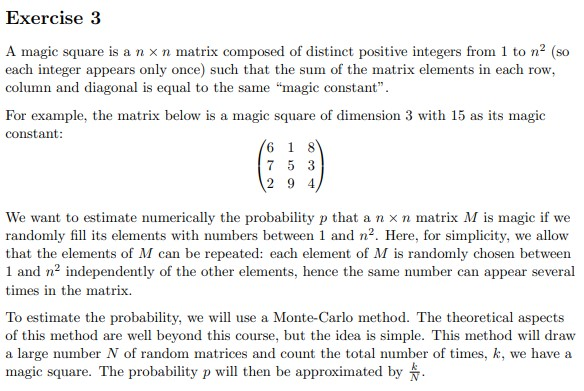
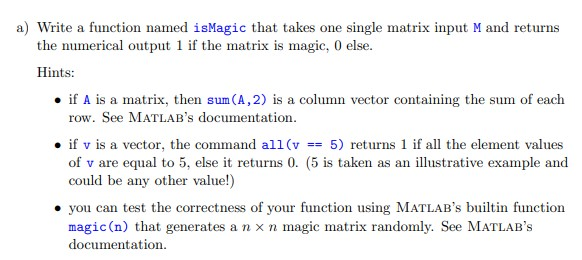
Exercise 3 A magic square is a nxn matrix composed of distinct positive integers from 1 to n (SO each integer appears only once) such that the sum of the matrix elements in each row, column and diagonal is equal to the same "magic constant". For example, the matrix below is a magic square of dimension 3 with 15 as its magic constant: 16 1 8 7 5 3 (2 9 4) We want to estimate numerically the probability p that a nxn matrix M is magic if we randomly fill its elements with numbers between 1 and n. Here, for simplicity, we allow that the elements of M can be repeated: each element of M is randomly chosen between 1 and n independently of the other elements, hence the same number can appear several times in the matrix. To estimate the probability, we will use a Monte-Carlo method. The theoretical aspects of this method are well beyond this course, but the idea is simple. This method will draw a large number N of random matrices and count the total number of times, k, we have a magic square. The probability p will then be approximated by a) Write a function named isMagic that takes one single matrix input M and returns the numerical output 1 if the matrix is magic, 0 else. Hints: . if A is a matrix, then sum(A, 2) is a column vector containing the sum of each row. See MATLAB's documentation. . if v is a vector, the command all(v == 5) returns 1 if all the element values of v are equal to 5, else it returns 0. (5 is taken as an illustrative example and could be any other value!) you can test the correctness of your function using MATLAB's builtin function magic(n) that generates a nxn magic matrix randomly. See MATLAB'S documentation
Step by Step Solution
There are 3 Steps involved in it

Get step-by-step solutions from verified subject matter experts
 Study Help