





Question: This is dealing with Cisco Packet Tracer. I need help getting the basics down for this. I am getting confused with the server part. Here

This is dealing with Cisco Packet Tracer. I need help getting the basics down for this. I am getting confused with the server part. Here are the instructions: This is dealing with Cisco Packet Tracer. I need
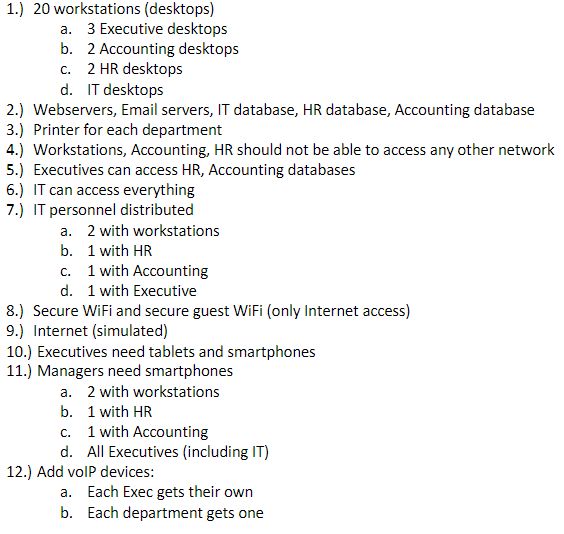
1.) 20 workstations (desktops) a. 3 Executive desktops b. 2 Accounting desktops c. 2 HR desktops d. IT desktops 2.) Webservers, Email servers, IT database, HR database, Accounting database 3.) Printer for each department 4.) Workstations, Accounting, HR should not be able to access any other network 5.) Executives can access HR, Accounting databases 6.) IT can access everything 7.) IT personnel distributed a. 2 with workstations b. 1 with HR c. 1 with Accounting d. 1 with Executive 8.) Secure WiFi and secure guest WiFi (only Internet access) 9.) Internet (simulated) 10.) Executives need tablets and smartphones 11.) Managers need smartphones a. 2 with workstations b. 1 with HR c. 1 with Accounting d. All Executives (including IT) 12.) Add voIP devices: a. Each Exec gets their own b. Each department gets one 1.) 20 workstations (desktops) a. 3 Executive desktops b. 2 Accounting desktops c. 2 HR desktops d. IT desktops 2.) Webservers, Email servers, IT database, HR database, Accounting database 3.) Printer for each department 4.) Workstations, Accounting, HR should not be able to access any other network 5.) Executives can access HR, Accounting databases 6.) IT can access everything 7.) IT personnel distributed a. 2 with workstations b. 1 with HR c. 1 with Accounting d. 1 with Executive 8.) Secure WiFi and secure guest WiFi (only Internet access) 9.) Internet (simulated) 10.) Executives need tablets and smartphones 11.) Managers need smartphones a. 2 with workstations b. 1 with HR c. 1 with Accounting d. All Executives (including IT) 12.) Add voIP devices: a. Each Exec gets their own b. Each department gets one

Step by Step Solution

There are 3 Steps involved in it

1 Expert Approved Answer
Step: 1 Unlock blur-text-image

Question Has Been Solved by an Expert!

Get step-by-step solutions from verified subject matter experts

Step: 2 Unlock
Step: 3 Unlock

Students Have Also Explored These Related General Management Questions!