







Question: This is for an intro level C class so please try to put comments to help me understand and don't do any methods or techniques
This is for an intro level C class so please try to put comments to help me understand and don't do any methods or techniques that are too advanced for a beginner please. Please let me know if you need any more information to complete the assignment.
The program should be written in C and should convert user input from decimal number system to binary, all the directions should be in the photos attached.
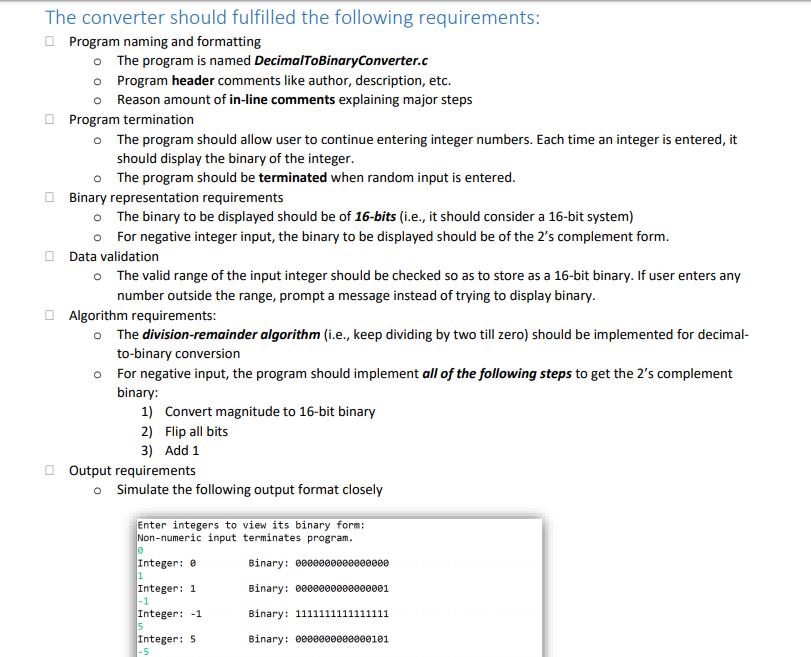
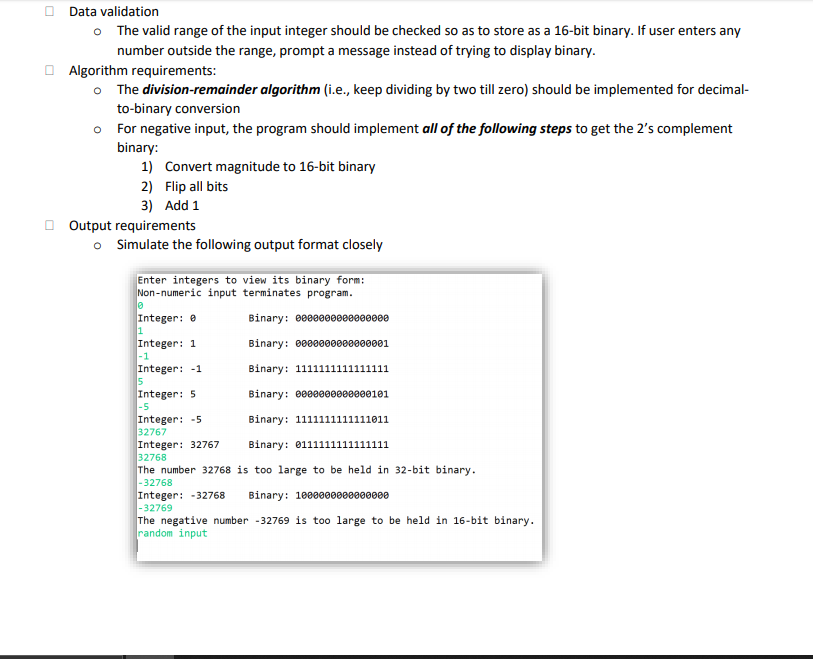
The converter should fulfilled the following requirements: Program naming and formatting The program is named DecimalToBinary Converter.c o Program header comments like author, description, etc. 0 Reason amount of in-line comments explaining major steps Program termination o The program should allow user to continue entering integer numbers. Each time an integer is entered, it should display the binary of the integer. The program should be terminated when random input is entered. Binary representation requirements o The binary to be displayed should be of 16-bits (i.e., it should consider a 16-bit system) o For negative integer input, the binary to be displayed should be of the 2's complement form. Data validation o The valid range of the input integer should be checked so as to store as a 16-bit binary. If user enters any number outside the range, prompt a message instead of trying to display binary. Algorithm requirements: o The division-remainder algorithm (i.e., keep dividing by two till zero) should be implemented for decimal- to-binary conversion o For negative input, the program should implement all of the following steps to get the 2's complement binary: 1) Convert magnitude to 16-bit binary 2) Flip all bits 3) Add 1 Output requirements o Simulate the following output format closely Enter integers to view its binary form: Non-numeric input terminates program. Integer: @ Binary: B000000000000000 Integer: 1 Binary: 6000000000000001 Integer: -1 Binary: 1111111111111111 Integer: 5 Binary: 2880000000000101 Data validation o The valid range of the input integer should be checked so as to store as a 16-bit binary. If user enters any number outside the range, prompt a message instead of trying to display binary. Algorithm requirements: o The division-remainder algorithm (i.e., keep dividing by two till zero) should be implemented for decimal- to-binary conversion o For negative input, the program should implement all of the following steps to get the 2's complement binary: 1) Convert magnitude to 16-bit binary 2) Flip all bits 3) Add 1 Output requirements o Simulate the following output format closely Enter integers to view its binary form: Non-numeric input terminates program. Integer: @ Binary: 8880000000000000 Integer: 1 Binary: B000000000000001 Integer: -1 Binary: 1111111111111111 Integer: 5 Binary: 00000000000101 Integer: -5 Binary: 1111111111111011 32767 Integer: 32767 Binary: 0111111111111111 32768 The number 32768 is too large to be held in 32-bit binary. -32768 Integer: -32768 Binary: 1000000000000000 -32769 The negative number -32769 is too large to be held in 16-bit binary. random input The converter should fulfilled the following requirements: Program naming and formatting The program is named DecimalToBinary Converter.c o Program header comments like author, description, etc. 0 Reason amount of in-line comments explaining major steps Program termination o The program should allow user to continue entering integer numbers. Each time an integer is entered, it should display the binary of the integer. The program should be terminated when random input is entered. Binary representation requirements o The binary to be displayed should be of 16-bits (i.e., it should consider a 16-bit system) o For negative integer input, the binary to be displayed should be of the 2's complement form. Data validation o The valid range of the input integer should be checked so as to store as a 16-bit binary. If user enters any number outside the range, prompt a message instead of trying to display binary. Algorithm requirements: o The division-remainder algorithm (i.e., keep dividing by two till zero) should be implemented for decimal- to-binary conversion o For negative input, the program should implement all of the following steps to get the 2's complement binary: 1) Convert magnitude to 16-bit binary 2) Flip all bits 3) Add 1 Output requirements o Simulate the following output format closely Enter integers to view its binary form: Non-numeric input terminates program. Integer: @ Binary: B000000000000000 Integer: 1 Binary: 6000000000000001 Integer: -1 Binary: 1111111111111111 Integer: 5 Binary: 2880000000000101 Data validation o The valid range of the input integer should be checked so as to store as a 16-bit binary. If user enters any number outside the range, prompt a message instead of trying to display binary. Algorithm requirements: o The division-remainder algorithm (i.e., keep dividing by two till zero) should be implemented for decimal- to-binary conversion o For negative input, the program should implement all of the following steps to get the 2's complement binary: 1) Convert magnitude to 16-bit binary 2) Flip all bits 3) Add 1 Output requirements o Simulate the following output format closely Enter integers to view its binary form: Non-numeric input terminates program. Integer: @ Binary: 8880000000000000 Integer: 1 Binary: B000000000000001 Integer: -1 Binary: 1111111111111111 Integer: 5 Binary: 00000000000101 Integer: -5 Binary: 1111111111111011 32767 Integer: 32767 Binary: 0111111111111111 32768 The number 32768 is too large to be held in 32-bit binary. -32768 Integer: -32768 Binary: 1000000000000000 -32769 The negative number -32769 is too large to be held in 16-bit binary. random input
Step by Step Solution
There are 3 Steps involved in it

Get step-by-step solutions from verified subject matter experts
 Study Help