







Question: THIS IS THE ANSWER BUT I JUST NEED TO KNOW WHAT DO I HAVE TO FIX OR ADD TO RETURN THE CONTROL TO THE OPERATING
THIS IS THE ANSWER BUT I JUST NEED TO KNOW WHAT DO I HAVE TO FIX OR ADD TO RETURN THE CONTROL TO THE OPERATING SYSTEMimport java.awt.Color;import java.awt.Graphics;import java.awt.Point;import java.awt.event.MouseAdapter;import java.awt.event.MouseEvent;import javax.swing.JFrame;import javax.swing.JPanel;import java.awt.GridLayout;import java.awt.event.WindowAdapter;import java.awt.event.WindowEvent;public class Proj06Runner extends JFrame {public Proj06Runner() {String text = "I certify that this program is my own work "+ "and is not the work of others. I agree not " + "to share my solution with others. " + "NAME ";System.out.println(text);drawframe draw = new drawframe();setLayout(new GridLayout());setLocationRelativeTo(null);add(draw);setSize(300, 100);setTitle("NAME");setVisible(true);}// static class to draw the frame and get the position of mouse clickstatic class drawframe extends JPanel {int x;int y;public void paint(Graphics g) {g.clearRect(0, 0, getWidth(), getHeight());g.setColor(Color.red);g.drawString("x= " + x + ", y= " + y + "", x, y);}public drawframe() {addMouseListener(new MouseAdapter() {@Overridepublic void mouseClicked(MouseEvent e) {x = e.getX();y = e.getY();repaint();}});}}class BackToControl extends WindowAdapter{@Overridepublic void windowClosing(WindowEvent e){System.exit(0);}}}// end classINSTRUCTIONS: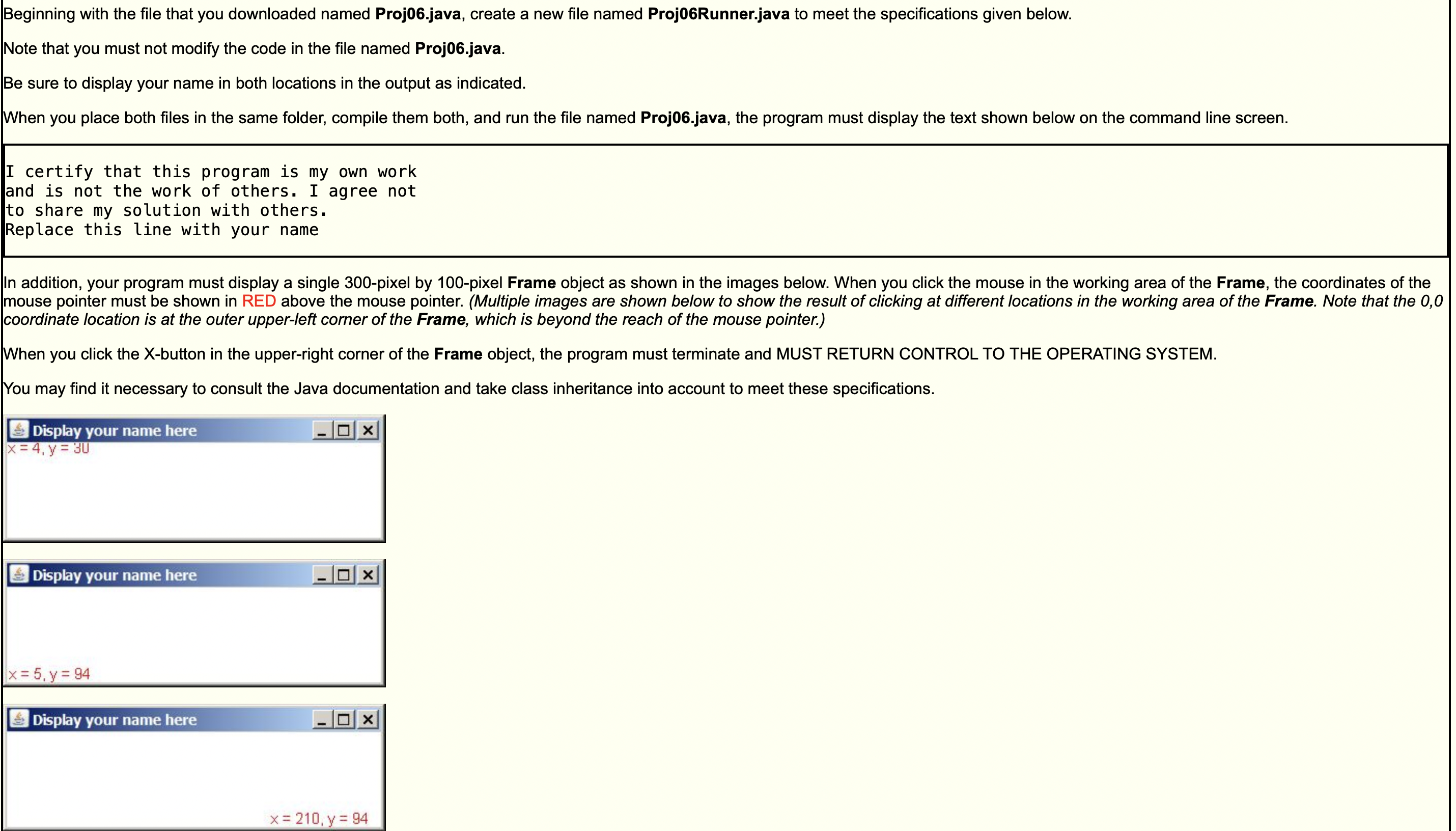
Beginning with the file that you downloaded named Proj06.java, create a new file named Proj06Runner.java to meet the specifications given below. Note that you must not modify the code in the file named Proj06.java. Be sure to display your name in both locations in the output as indicated. When you place both files in the same folder, compile them both, and run the file named Proj06.java, the program must display the text shown below on the command line screen. I certify that this program is my own work and is not the work of others. I agree not to share my solution with others. Replace this line with your name In addition, your program must display a single 300-pixel by 100-pixel Frame object as shown in the images below. When you click the mouse in the working area of the Frame, the coordinates of the mouse pointer must be shown in RED above the mouse pointer. (Multiple images are shown below to show the result of clicking at different locations in the working area of the Frame. Note that the 0,0 coordinate location is at the outer upper-left corner of the Frame, which is beyond the reach of the mouse pointer.) When you click the X-button in the upper-right corner of the Frame object, the program must terminate and MUST RETURN CONTROL TO THE OPERATING SYSTEM. You may find it necessary to consult the Java documentation and take class inheritance into account to meet these specifications. Display your name here x=4,y=30 Display your name here x=5,y=94 Display your name here x=210, y = 94
Step by Step Solution
There are 3 Steps involved in it

Get step-by-step solutions from verified subject matter experts
 Study Help