







Question: this is the class item from lab 3 package lab_3; import java.io.BufferedReader; import java.io.File; import java.io.FileNotFoundException; import java.io.FileReader; import java.io.IOException; import java.io.PrintWriter; import java.util.ArrayList; /**
this is the class item from lab 3
package lab_3;
import java.io.BufferedReader; import java.io.File; import java.io.FileNotFoundException; import java.io.FileReader; import java.io.IOException; import java.io.PrintWriter; import java.util.ArrayList;
/** * * @author Use */ public class TestSupermarket {
/** * @param args the command line arguments */ public static void main(String[] args) throws FileNotFoundException, IOException {
ArrayList items = new ArrayList();
File file = new File("ItemInventory.txt"); FileReader fr = new FileReader(file); BufferedReader br = new BufferedReader(fr); String line;
while ((line = br.readLine()) != null) { Item i = new Item(); String[] data = line.split("\\s+"); i.item_number(data[0]); i.number_of_item_sold(Integer.parseInt(data[1])); i.selling_price(Double.parseDouble(data[3])); i.purchase_price(Double.parseDouble(data[2])); items.add(i); }
PrintWriter writer = new PrintWriter(new File("Items.out"));
for (Item i : items) { int numberOfItemSold = i.getNumberOfItemSold(); double sellingPrice = i.getSellingPrice(); double purchasePrice = i.getPurchasePrice(); double proOrLoss = (sellingPrice - purchasePrice) * numberOfItemSold; String result;
if (proOrLoss
} writer.close();
}}
_________________
here is the main class:
__________________
package lab_3;
import java.io.BufferedReader; import java.io.File; import java.io.FileNotFoundException; import java.io.FileReader; import java.io.IOException; import java.io.PrintWriter; import java.util.ArrayList;
/** * * @author Use */ public class TestSupermarket {
/** * @param args the command line arguments */ public static void main(String[] args) throws FileNotFoundException, IOException {
ArrayList
File file = new File("ItemInventory.txt"); FileReader fr = new FileReader(file); BufferedReader br = new BufferedReader(fr); String line;
while ((line = br.readLine()) != null) { Item i = new Item(); String[] data = line.split("\\s+"); i.item_number(data[0]); i.number_of_item_sold(Integer.parseInt(data[1])); i.selling_price(Double.parseDouble(data[3])); i.purchase_price(Double.parseDouble(data[2])); items.add(i); }
PrintWriter writer = new PrintWriter(new File("Items.out"));
for (Item i : items) { int numberOfItemSold = i.getNumberOfItemSold(); double sellingPrice = i.getSellingPrice(); double purchasePrice = i.getPurchasePrice(); double proOrLoss = (sellingPrice - purchasePrice) * numberOfItemSold; String result;
if (proOrLoss
} writer.close();
}
}
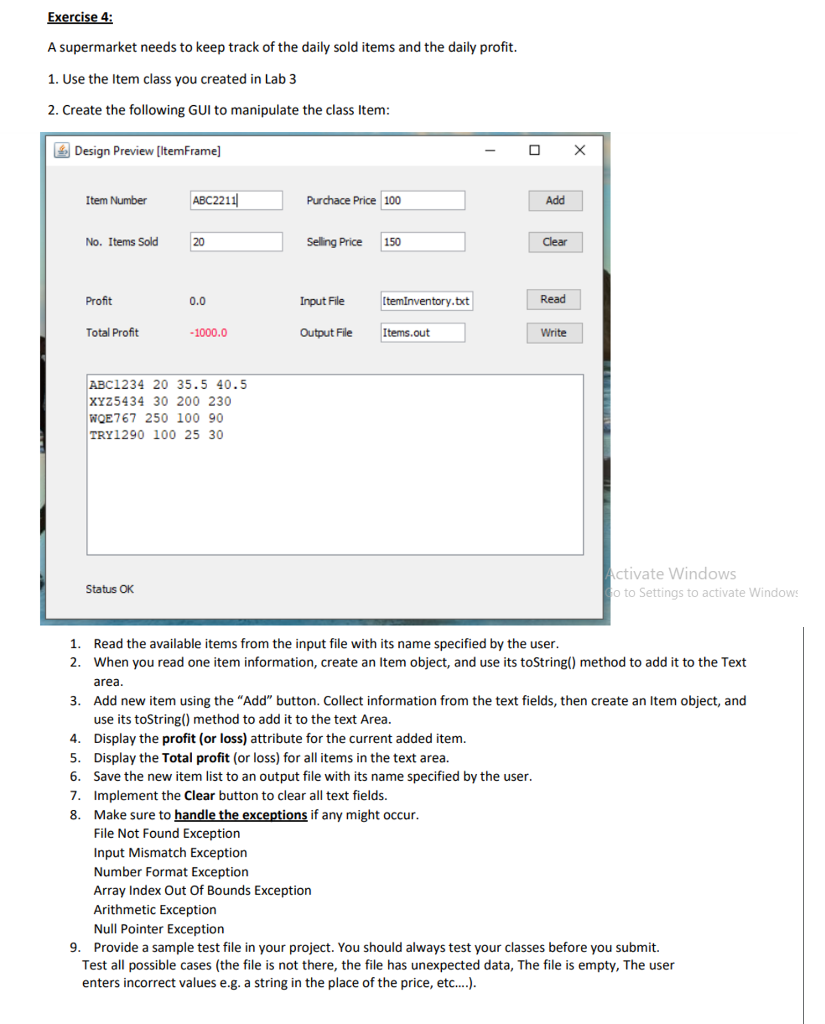
Exercise 4: A supermarket needs to keep track of the daily sold items and the daily profit. 1. Use the item class you created in Lab 3 2. Create the following GUI to manipulate the class Item: 4 Design Preview [ItemFrame] O Item Number ABC2211 Purchace Price 100 Add No. Items Sold 20 Selling Price 150 Clear Profit 0.0 Input File ItemInventory.st Read Total Profit -1000.0 Output File Items.out Write ABC1234 20 35.5 40.5 XYZ 5434 30 200 230 WOE 767 250 100 90 TRY1290 100 25 30 Status OK Activate Windows Po to Settings to activate Window 1. Read the available items from the input file with its name specified by the user. 2. When you read one item information, create an Item object, and use its toString() method to add it to the Text area. 3. Add new item using the "Add" button. Collect information from the text fields, then create an Item object, and use its toString() method to add it to the text Area. 4. Display the profit (or loss) attribute for the current added item. 5. Display the Total profit (or loss) for all items in the text area. 6. Save the new item list to an output file with its name specified by the user. 7. Implement the Clear button to clear all text fields. 8. Make sure to handle the exceptions if any might occur. File Not Found Exception Input Mismatch Exception Number Format Exception Array Index Out Of Bounds Exception Arithmetic Exception Null Pointer Exception 9. Provide a sample test file in your project. You should always test your classes before you submit. Test all possible cases (the file is not there, the file has unexpected data, The file is empty, The user enters incorrect values e.g. a string in the place of the price, etc...)
Step by Step Solution
There are 3 Steps involved in it

Get step-by-step solutions from verified subject matter experts
 Study Help