







Question: This lab puts together everything you learned till now: communication between classes, the creation and display of graphical components, and tracking of user interaction. Although
This lab puts together everything you learned till now: communication between classes, the creation and display of graphical components, and tracking of user interaction. Although it is work intensive, you should be able to handle all the requirements.
What will you learn
communication between classes
use of graphical components
Deliverables
Updated files for app.java, myJFrame.java, myJPanel.java, myJPanel1.java, myJPanel2.java, student.java
Contents
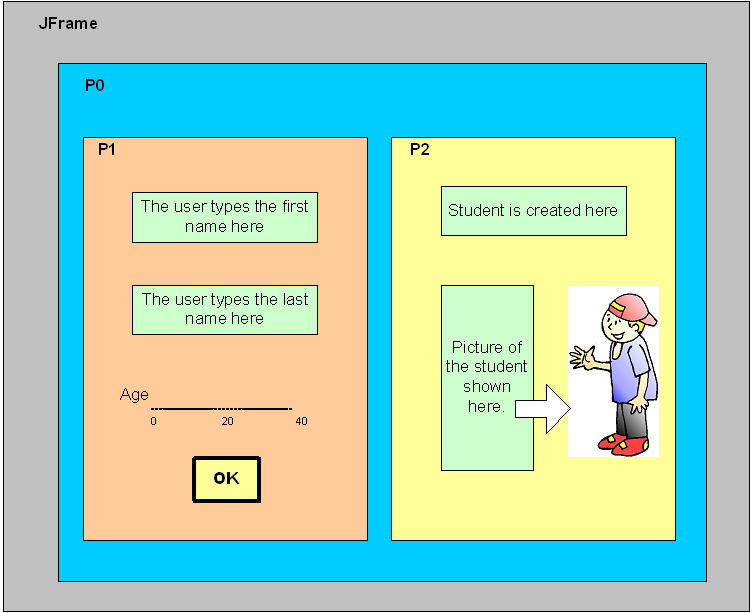
In panel 1
The ActionListener has to be implemented in myJPanel1
It has to ask for first name and last name using JTextFields.
It asks for the students age using a JSlider.
It has to have a OK button.
When the user clicks the OK button a new student is created in p2
Students first name from the first JTextField
Students Last name from the second JtextField
Students age from the JSlider value
The statement student st1 = new student etc has to be executed in myJPanel2.java
In panel 2
A button with the students name
A button with the students picture
Have the option to show at least 3 different students (show just one at a time)
For instance, if the name typed is fred, show a fred.jpg; if its john, show a john.jpg.
The layout is yours to pick.
See drawing next page.
//app.java
public class app { public static void main(String args[]) { myJFrame mjf = new myJFrame();
} }
================================
//myJFrame.java
import java.awt.*; import javax.swing.*;
public class myJFrame extends JFrame { public myJFrame () { super ("My First Frame");
myJPanel mjp = new myJPanel(); getContentPane().add(mjp,"Center");
setDefaultCloseOperation(EXIT_ON_CLOSE); setSize (640, 480); setVisible(true); }
}
======================================
//myJPanel.java
import java.awt.*; import javax.swing.*;
public class myJPanel extends JPanel { public myJPanel() { super(); setBackground(Color.gray); setLayout(new BorderLayout());
myJPanel1 p1 = new myJPanel1(); myJPanel2 p2 = new myJPanel2(p1);
add(p2,"Center"); add(p1,"North"); } }
========================================
//myJPanel1.java
import java.awt.*; import javax.swing.*; import java.awt.event.*;
public class myJPanel1 extends JPanel { JButton b1; public myJPanel1() { super(); setBackground(Color.yellow); b1 = new JButton("student info will be here later ..."); add(b1); } }
==========================================
//myJPanel2.java
import java.awt.*; import javax.swing.*; import java.awt.event.*;
public class myJPanel2 extends JPanel implements ActionListener { JButton b1, b2,x; student st1; myJPanel1 mjp2 = new myJPanel1(); public myJPanel2(myJPanel1 a)
{ super(); st1 = new student("Fred","Fonseca",44); setBackground(Color.pink);
mjp2 = a;
JButton jl1 = new JButton(st1.getInfo()); x = jl1; x.addActionListener(this); add(jl1); b2 = new JButton ("Display here whatsUp from the student in the UPPER panel");
}
public void actionPerformed (ActionEvent event){ Object obj = event.getSource(); String result = st1.whatsUp(); if (obj == x){ mjp2.b1.setText(result); } } }
===========================
//student.java
import java.awt.*; import javax.swing.*;
public class student { String firstName; String lastName; int age;
public student(String a, String b, int x) { super(); firstName = a; lastName = b; age = x; } String getInfo() { return "NAME = "+firstName+ " "+lastName+" "+"Age = "+age; } String whatsUp() { double r = Math.random(); int myNumber = (int) (r * 3f); //comment: a random number between 0 and 2 String answer = "I don't know"; if(myNumber == 0) answer = "searching the web"; if(myNumber == 1) answer = "doing Java"; if(myNumber == 2) answer = "Listening to endless lecture"; return answer; }
}
JFrame PO P1 P2 The user types the first name here Student is created here The user types the last name here Picture of the student shown here Age 20 40 OK
Step by Step Solution
There are 3 Steps involved in it

Get step-by-step solutions from verified subject matter experts
 Study Help