







Question: This programming assignment involves writing a Java application that inputs a date from the user, and calculates how many days have elapsed from January
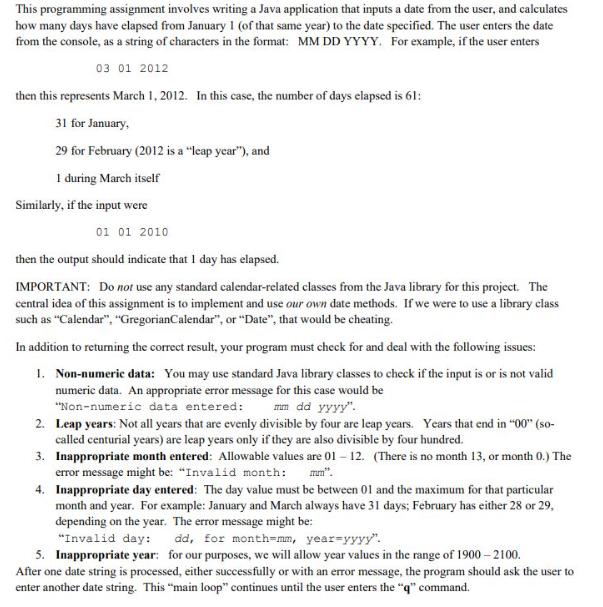
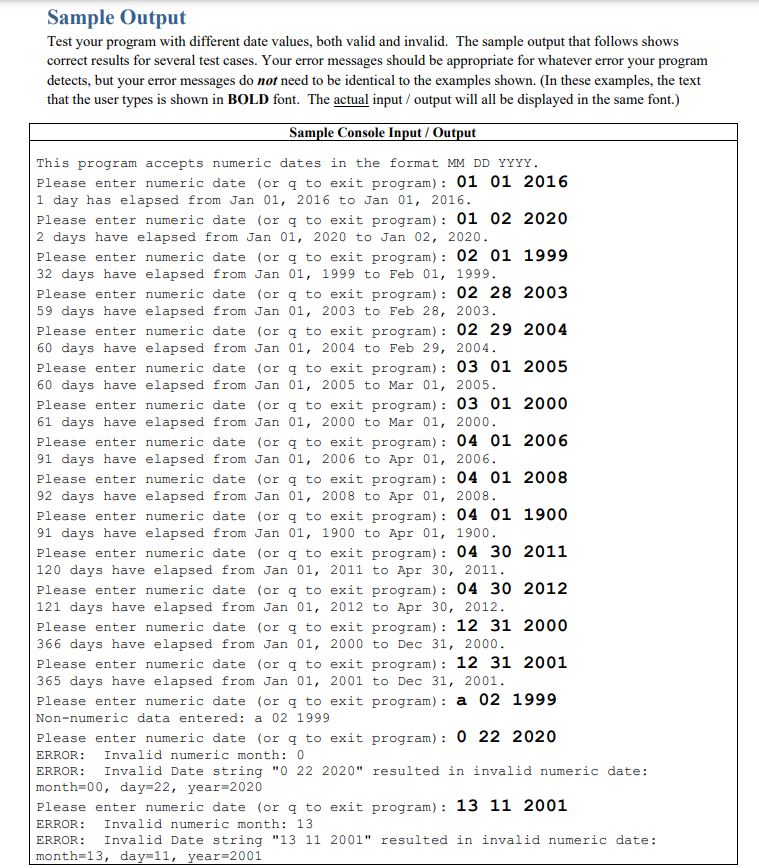
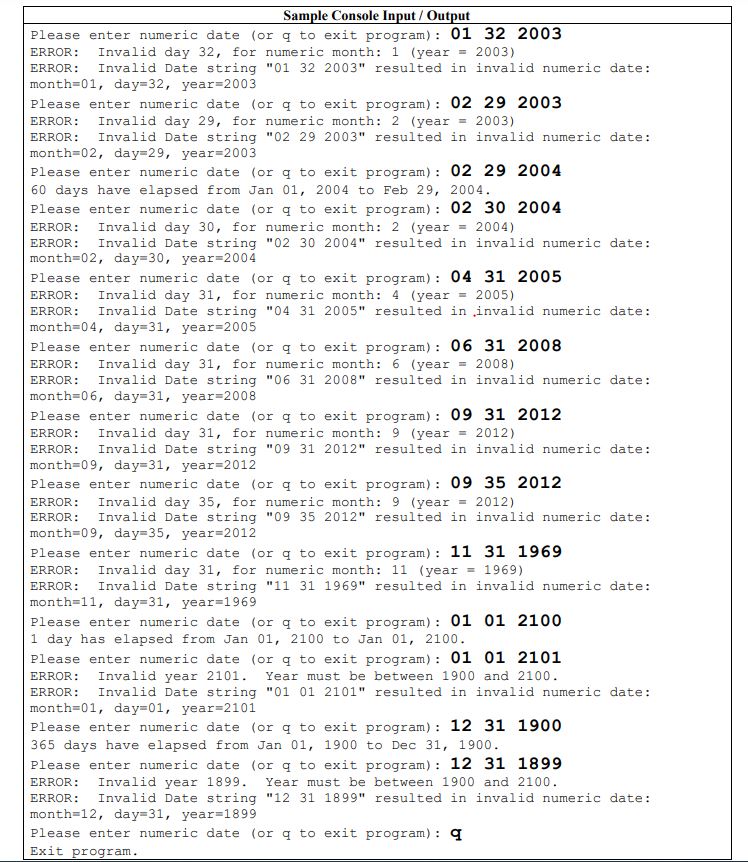
This programming assignment involves writing a Java application that inputs a date from the user, and calculates how many days have elapsed from January 1 (of that same year) to the date specified. The user enters the date from the console, as a string of characters in the format: MM DD YYYY. For example, if the user enters 03 01 2012 then this represents March 1, 2012. In this case, the number of days elapsed is 61: 31 for January, 29 for February (2012 is a "leap year"), and 1 during March itself Similarly, if the input were 01 01 2010 then the output should indicate that I day has elapsed. IMPORTANT: Do not use any standard calendar-related classes from the Java library for this project. The central idea of this assignment is to implement and use our own date methods. If we were to use a library class such as "Calendar", "GregorianCalendar", or "Date", that would be cheating. In addition to returning the correct result, your program must check for and deal with the following issues: 1. Non-numeric data: You may use standard Java library classes to check if the input is or is not valid numeric data. An appropriate error message for this case would be "Non-numeric data entered: mm dd yyyy". 2. Leap years: Not all years that are evenly divisible by four are leap years. Years that end in "00" (so- called centurial years) are leap years only if they are also divisible by four hundred. 3. Inappropriate month entered: Allowable values are 01-12. (There is no month 13, or month 0.) The error message might be: "Invalid month: 4. Inappropriate day entered: The day value must be between 01 and the maximum for that particular month and year. For example: January and March always have 31 days; February has either 28 or 29, depending on the year. The error message might be: "Invalid day: dd, for month-mm, year-yyyy". 5. Inappropriate year: for our purposes, we will allow year values in the range of 1900-2100. After one date string is processed, either successfully or with an error message, the program should ask the user to enter another date string. This "main loop" continues until the user enters the "q" command. Sample Output Test your program with different date values, both valid and invalid. The sample output that follows shows correct results for several test cases. Your error messages should be appropriate for whatever error your program detects, but your error messages do not need to be identical to the examples shown. (In these examples, the text that the user types is shown in BOLD font. The actual input/output will all be displayed in the same font.) Sample Console Input/Output This program accepts numeric dates in the format MM DD YYYY. Please enter numeric date (or q to exit program): 01 01 2016 1 day has elapsed from Jan 01, 2016 to Jan 01, 2016. Please enter numeric date (or q to exit program): 01 02 2020 2 days have elapsed from Jan 01, 2020 to Jan 02, 2020. Please enter numeric date (or q to exit program): 02 01 1999 32 days have elapsed from Jan 01, 1999 to Feb 01, 1999. Please enter numeric date (or q to exit program): 02 28 2003 59 days have elapsed from Jan 01, 2003 to Feb 28, 2003. Please enter numeric date (or q to exit program): 02 29 2004 60 days have elapsed from Jan 01, 2004 to Feb 29, 2004. Please enter numeric date (or q to exit program) : 03 01 2005 60 days have elapsed from Jan 01, 2005 to Mar 01, 2005. Please enter numeric date (or q to exit program): 03 01 2000 61 days have elapsed from Jan 01, 2000 to Mar 01, 2000. Please enter numeric date (or q to exit program): 04 01 2006 91 days have elapsed from Jan 01, 2006 to Apr 01, 2006. Please enter numeric date (or q to exit program): 04 01 2008 92 days have elapsed from Jan 01, 2008 to Apr 01, 2008. Please enter numeric date (or q to exit program): 04 01 1900 91 days have elapsed from Jan 01, 1900 to Apr 01, 1900. Please enter numeric date (or q to exit program): 04 30 2011 120 days have elapsed from Jan 01, 2011 to Apr 30, 2011. Please enter numeric date (or q to exit program): 04 30 2012 121 days have elapsed from Jan 01, 2012 to Apr 30, 2012. Please enter numeric date (or q to exit program): 12 31 2000 366 days have elapsed from Jan 01, 2000 to Dec 31, 2000. Please enter numeric date (or q to exit program): 12 31 2001 365 days have elapsed from Jan 01, 2001 to Dec 31, 2001. Please enter numeric date (or q to exit program): a 02 1999 Non-numeric data entered: a 02 1999 Please enter numeric date (or q to exit program): 0 22 2020 ERROR: Invalid numeric month: 0 ERROR: Invalid Date string "0 22 2020" resulted in invalid numeric date: month=00, day=22, year=2020 Please enter numeric date (or q to exit program): 13 11 2001 ERROR: Invalid numeric month: 13 ERROR: Invalid Date string "13 11 2001" resulted in invalid numeric date: month=13, day=11, year=2001 Sample Console Input/Output Please enter numeric date (or q to exit program): 01 32 2003 ERROR: Invalid day 32, for numeric month: 1 (year = 2003) ERROR: Invalid Date string "01 32 2003" resulted in invalid numeric date: month=01, day=32, year=2003 Please enter numeric date (or q to exit program): 02 29 2003 ERROR: Invalid day 29, for numeric month: 2 (year 2003) ERROR: Invalid Date string "02 29 2003" resulted in invalid numeric date: month=02, day-29, year=2003 Please enter numeric date (or q to exit program): 02 29 2004 60 days have elapsed from Jan 01, 2004 to Feb 29, 2004. Please enter numeric date (or q to exit program): 02 30 2004 ERROR: Invalid day 30, for numeric month: 2 (year = 2004) ERROR: Invalid Date string "02 30 2004" resulted in invalid numeric date: month=02, day-30, year=2004 Please enter numeric date (or q to exit program): 04 31 2005 ERROR: Invalid day 31, for numeric month: 4 (year = 2005) ERROR: Invalid Date string "04 31 2005" resulted in invalid numeric date: month=04, day-31, year=2005 Please enter numeric date (or q to exit program): 06 31 2008 ERROR: Invalid day 31, for numeric month: 6 (year = 2008) ERROR: Invalid Date string "06 31 2008" resulted in invalid numeric date: month=06, day=31, year=2008 Please enter numeric date (or q to exit program): 09 31 2012 ERROR: Invalid day 31, for numeric month: 9 (year 2012) ERROR: Invalid Date string "09 31 2012" resulted in invalid numeric date: month=09, day=31, year=2012 Please enter numeric date (or q to exit program) : 09 35 2012 ERROR: Invalid day 35, for numeric month: 9 (year = 2012) ERROR: Invalid Date string "09 35 2012" resulted in invalid numeric date: month=09, day=35, year-2012 Please enter numeric date (or q to exit program): 11 31 1969 ERROR: Invalid day 31, for numeric month: 11 (year = 1969) ERROR: Invalid Date string "11 31 1969" resulted in invalid numeric date: month=11, day-31, year=1969 Please enter numeric date (or q to exit program) : 01 01 2100 1 day has elapsed from Jan 01, 2100 to Jan 01, 2100. Please enter numeric date (or q to exit program): 01 01 2101 ERROR: Invalid year 2101. Year must be between 1900 and 2100. ERROR: Invalid Date string "01 01 2101" resulted in invalid numeric date: month=01, day=01, year=2101 Please enter numeric date (or q to exit program): 12 31 1900 365 days have elapsed from Jan 01, 1900 to Dec 31, 1900. Please enter numeric date (or q to exit program): 12 31 1899 ERROR: Invalid year 1899. Year must be between 1900 and 2100. ERROR: Invalid Date string "12 31 1899" resulted in invalid numeric date: month=12, day-31, year=1899 Please enter numeric date (or q to exit program): q Exit program.
Step by Step Solution
3.42 Rating (149 Votes )
There are 3 Steps involved in it
heres a stepbystep solution to the programming assignment 1 Read the date input from the user as a s... View full answer

Get step-by-step solutions from verified subject matter experts
 Study Help