







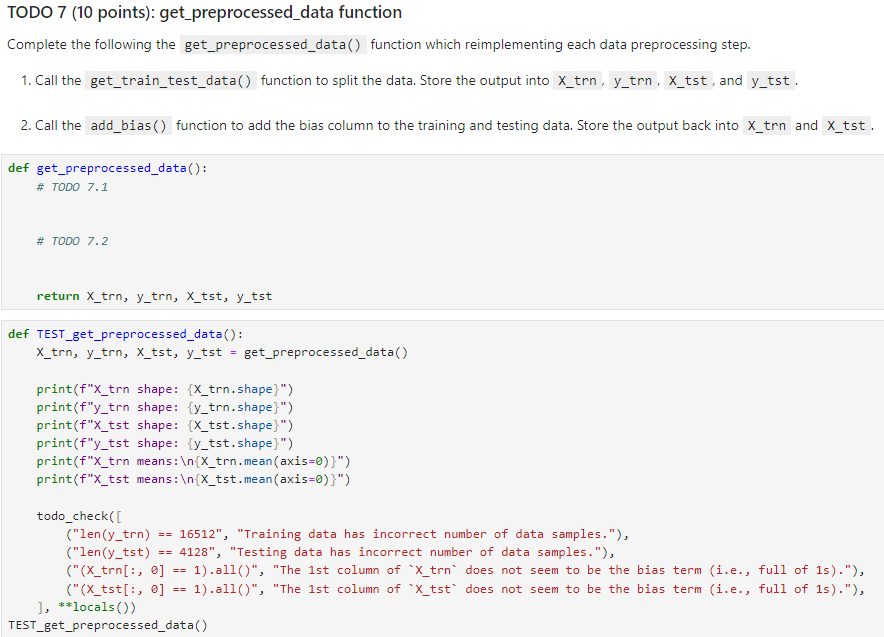
Question: TODO 7 ( 1 0 points ) : get _ preprocessed _ data function Complete the following the get _ preprocessed _ data ( )
TODO points: getpreprocesseddata function
Complete the following the getpreprocesseddata function which reimplementing each data preprocessing step.
Call the addbias function to add the bias column to the training and testing data. Store the output back into and
def getpreprocesseddata:TODO
return xtrn ytrn xtst ytst
def TESTgetpreprocesseddata:
Xtrn ytrn Xtst ytst getpreprocesseddata
printfXtrn shape: Xtrnshape
printfytrn shape: ytrnshape
printfXtst shape: Xtstshape
printfytst shape: ytstshape
printfXtrn means:
Xtrnmeanaxis
printfXtst means:
Xtstmeanaxis
todocheck
lenytrn "Training data has incorrect number of data samples."
lenytst "Testing data has incorrect number of data samples."
Xtrn:all "The st column of does not seem to be the bias term ie full of s
Xtst:all "The st column of does not seem to be the bias term ie full of s
locals
TESTgetpreprocesseddata
Step by Step Solution
There are 3 Steps involved in it
1 Expert Approved Answer
Step: 1 Unlock

Question Has Been Solved by an Expert!
Get step-by-step solutions from verified subject matter experts
Step: 2 Unlock
Step: 3 Unlock
 Study Help