







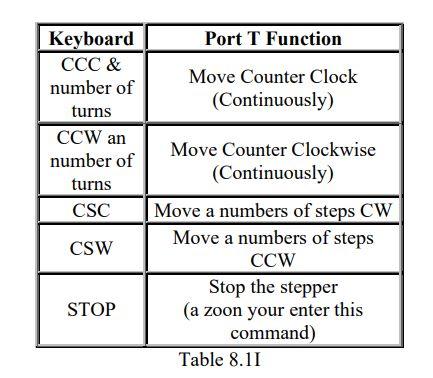
Question: Topic: Stepper Motor Write a program in Arduino that full fit the Table 8.1I, used the Arduino timer function to do delays. Use a procedure
Topic: Stepper Motor
Write a program in Arduino that full fit the Table 8.1I, used the Arduino timer function to do delays. Use a procedure to control the angular motor speed clockwise and counterclockwise from slow, medium and fast. Use the serial monitor. The pins are 3, 4 ,5 and 6.
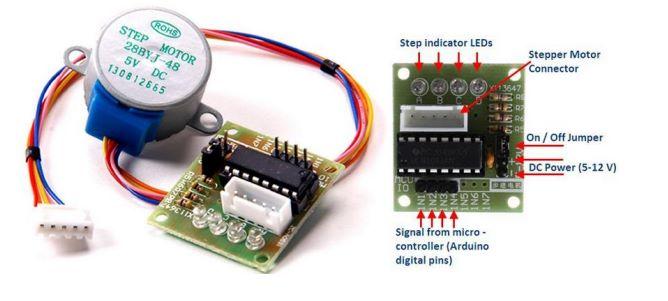
Use the following code:
#include
#define IN1 3 #define IN2 4 #define IN3 5 #define IN4 6 int Steps = 0; unsigned long last_time; unsigned long currentMillis ; int steps_left=4095; long time; void setup() { Serial.begin(9600); pinMode(IN1, OUTPUT); pinMode(IN2, OUTPUT); pinMode(IN3, OUTPUT); pinMode(IN4, OUTPUT); Serial.begin(9600); } void loop() { while(steps_left>0) { currentMillis = micros(); if(currentMillis-last_time>=1000) { stepper(Steps); time=time+micros()-last_time; last_time=micros(); steps_left--; } } delay(3000); steps_left=4095; } //HALF Stepping switching Mode void stepper(int xw) { switch(xw) { case 0: digitalWrite(IN1, LOW); digitalWrite(IN2, LOW); digitalWrite(IN3, LOW); digitalWrite(IN4, HIGH); break; case 1: digitalWrite(IN1, LOW); digitalWrite(IN2, LOW); digitalWrite(IN3, HIGH); digitalWrite(IN4, HIGH); break; case 2: digitalWrite(IN1, LOW); digitalWrite(IN2, LOW); digitalWrite(IN3, HIGH); digitalWrite(IN4, LOW); break; case 3: digitalWrite(IN1, LOW); digitalWrite(IN2, HIGH); digitalWrite(IN3, HIGH); digitalWrite(IN4, LOW); break; case 4: digitalWrite(IN1, LOW); digitalWrite(IN2, HIGH); digitalWrite(IN3, LOW); digitalWrite(IN4, LOW); break; case 5: digitalWrite(IN1, HIGH); digitalWrite(IN2, HIGH); digitalWrite(IN3, LOW); digitalWrite(IN4, LOW); break; case 6: digitalWrite(IN1, HIGH); digitalWrite(IN2, LOW); digitalWrite(IN3, LOW); digitalWrite(IN4, LOW); break; case 7: digitalWrite(IN1, HIGH); digitalWrite(IN2, LOW); digitalWrite(IN3, LOW); digitalWrite(IN4, HIGH); break; default: digitalWrite(IN1, LOW); digitalWrite(IN2, LOW); digitalWrite(IN3, LOW); digitalWrite(IN4, LOW); break; } Steps--; if(Steps \begin{tabular}{|c|c|} \hline Keyboard & Port T Function \\ \hline CCC \& number of turns & Move Counter Clock (Continuously) \\ \hline CCW an number of turns & Move Counter Clockwise (Continuously) \\ \hline CSC & Move a numbers of steps CW \\ \hline CSW & Move a numbers of steps CCW \\ \hline STOP & Stop the stepper (a zoon your enter this command) \\ \hline \end{tabular} Table 8.1I
Step by Step Solution
There are 3 Steps involved in it

Get step-by-step solutions from verified subject matter experts
 Study Help