Question: Tour BOOK APPLY Case Problem 1 Data File needed for this Case Problem: NP_EX_1-2.xlsx Cross State Trucking Brian Eagleton is a dispatch manager at Cross
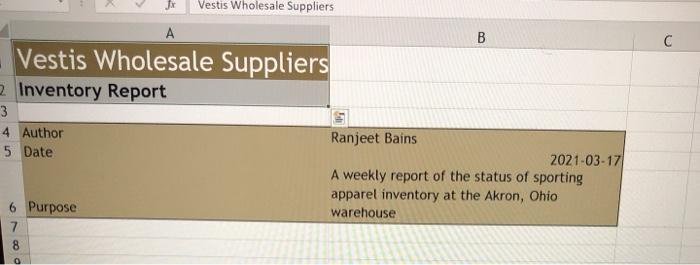
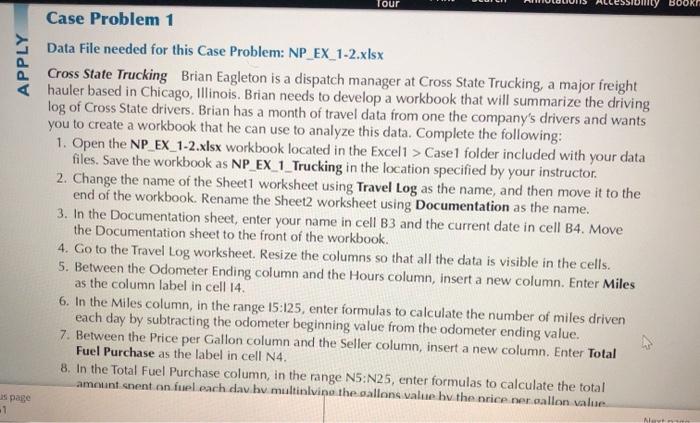
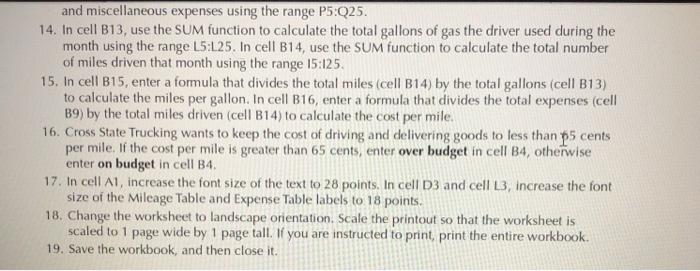
Tour BOOK APPLY Case Problem 1 Data File needed for this Case Problem: NP_EX_1-2.xlsx Cross State Trucking Brian Eagleton is a dispatch manager at Cross State Trucking, a major freight hauler based in Chicago, Illinois. Brian needs to develop a workbook that will summarize the driving log of Cross State drivers. Brian has a month of travel data from one the company's drivers and wants you to create a workbook that he can use to analyze this data. Complete the following: 1. Open the NP_EX_1-2.xlsx workbook located in the Exceli > Case folder included with your data files. Save the workbook as NP_EX_1_Trucking in the location specified by your instructor. 2. Change the name of the Sheet1 worksheet using Travel Log as the name, and then move it to the end of the workbook. Rename the Sheet2 worksheet using Documentation as the name. 3. In the Documentation sheet, enter your name in cell B3 and the current date in cell B4. Move the Documentation sheet to the front of the workbook. 4. Go to the Travel Log worksheet. Resize the columns so that all the data is visible in the cells. 5. Between the Odometer Ending column and the Hours column, insert a new column. Enter Miles as the column label in cell 14. 6. In the Miles column, in the range 15:125, enter formulas to calculate the number of miles driven each day by subtracting the odometer beginning value from the odometer ending value. 7. Between the Price per Gallon column and the Seller column, insert a new column. Enter Total Fuel Purchase as the label in cell N4. 8. In the Total Fuel Purchase column, in the range N5:N25, enter formulas to calculate the total amount cnent on fuel each dav hv multinivino the sallons value by the nice ner gallon value. 1 Men Tour WT amount spent on fuel each day by multiplying the gallons value by the price per gallon value. 9. In cell B5, use the COUNT function to calculate the total number of driving days using the val- ues in the Date column in the range D5:D25. 10. In cell B6, use the SUM function to calculate the total number of driving hours using the values in the Hours column in the range 15:25. 11. In cell B7, enter a formula that divides the hours of driving value (cell B6) by the days of driving value (cell B5) to calculate the average hours of driving per day. 12. In cell B9, use the SUM function to calculate the driver's total expenses for the month febr fuel, tolls, and miscellaneous expenditures using the nonadjacent range N5:N25,P5:Q25. 13. In cell B10, use the SUM function to calculate the total amount the driver spent on fuel using the range N5:N25. In cell B11, use the SUM function to calculate the total amount spent on tolls and miscellaneous expenses using the range P5:Q25. 14. In cell B13, use the SUM function to calculate the total gallons of gas the driver used during the month using the range 15:25. In cell B14, use the SUM function to calculate the total number of miles driven that month using the range 15:125. 15. In cell B15, enter a formula that divides the total miles (cell B14) by the total gallons (cell B13) to calculate the miles per gallon. In cell B16, enter a formula that divides the total expenses (cell B9) by the total miles driven (cell B14) to calculate the cost per mile. 16. Cross State Trucking wants to keep the cost of driving and delivering goods to less than 65 cents per mile. If the cost per mile is greater than 65 cents, enter over budget in cell B4, otherwise enter on budget in cell B4. 17 In cell A1 increase the font size of the text to 28 points.In cell D3 and collis increase the font and miscellaneous expenses using the range P5:Q25. 14. In cell B13, use the SUM function to calculate the total gallons of gas the driver used during the month using the range 15:25. In cell B14, use the SUM function to calculate the total number of miles driven that month using the range 15:125. 15. In cell B15, enter a formula that divides the total miles (cell B14) by the total gallons (cell B13) to calculate the miles per gallon. In cell B16, enter a formula that divides the total expenses (cell 19) by the total miles driven (cell B14) to calculate the cost per mile. 16. Cross State Trucking wants to keep the cost of driving and delivering goods to less than 5 cents per mile. If the cost per mile is greater than 65 cents, enter over budget in cell B4, otherwise enter on budget in cell B4. 17. In cell A1, increase the font size of the text to 28 points. In cell D3 and cell L3, increase the font size of the Mileage Table and Expense Table labels to 18 points. 18. Change the worksheet to landscape orientation. Scale the printout so that the worksheet is scaled to 1 page wide by 1 page tall. If you are instructed to print, print the entire workbook. 19. Save the workbook, and then close it. fx Vestis Wholesale Suppliers A B Vestis Wholesale Suppliers 2 Inventory Report 3 4 Author 5 Date Ranjeet Bains 2021-03-17 A weekly report of the status of sporting apparel inventory at the Akron, Ohio warehouse 6 Purpose 7 8










 Study Help