







Question: Turtle Graphics is a Python feature that functions as a drawing board allowing users to direct a turtle to create drawings on it . Functions
Turtle Graphics is a Python feature that functions as a drawing board allowing users to
direct a turtle to create drawings on it
Functions such as penup pendown pensize forward right colour fill etc. can
be utilised to control the drawing, move the turtle, and apply appropriate colouring and filling.
The frequently utilised turtle techniques can be located in the provided PDF document titled
"Turtle Graphics: Python rc Documentation."
Import the turtle module to utilise its methods and functionalities.
The module "turtle" is included in the standard Python package and does not require
external installation. The plan for carrying out a turtle project consists of three steps:
Utilise the turtle module. Instantiate a turtle for control.
Utilise the turtle method to draw shapes. Issue:
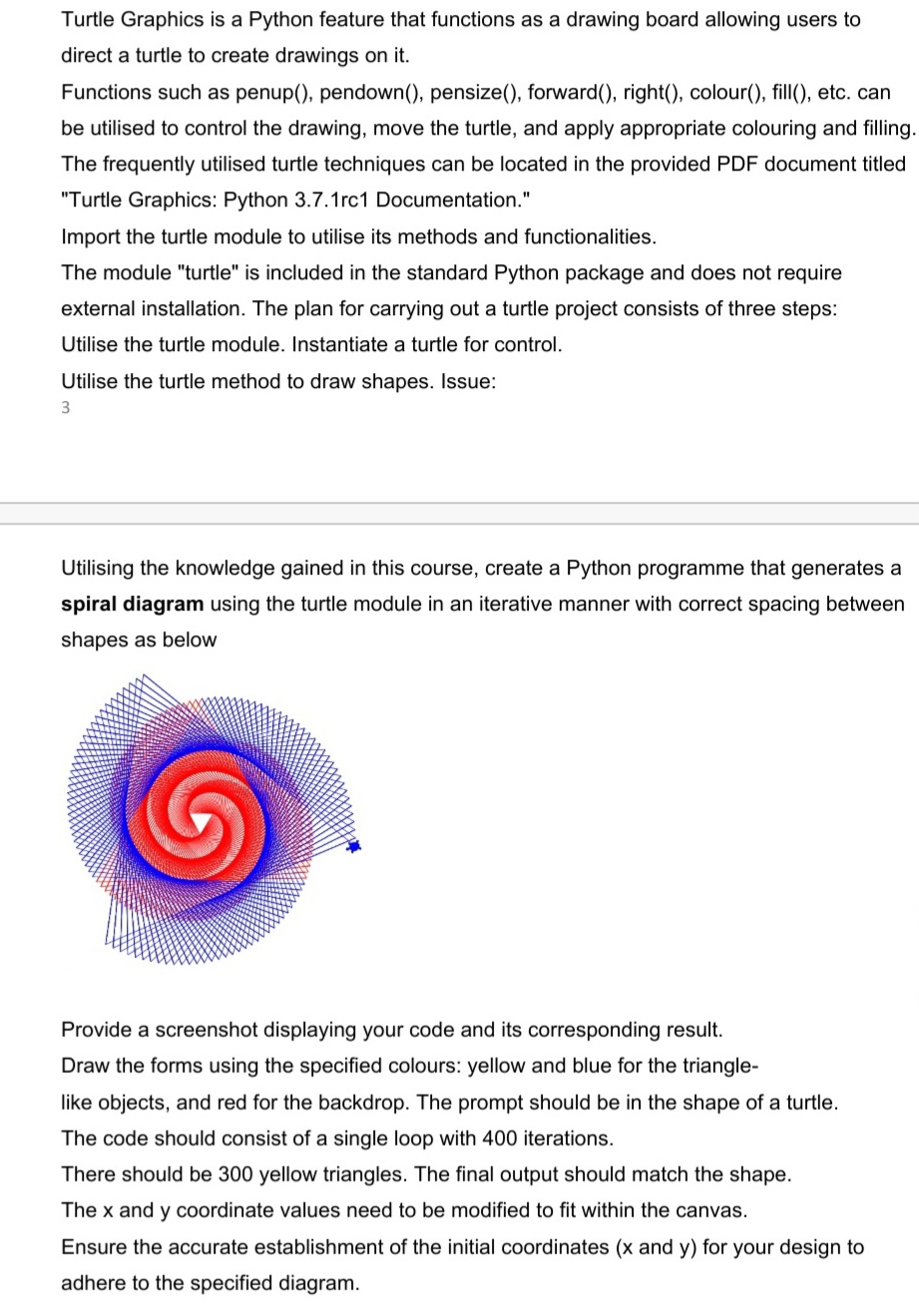
Utilising the knowledge gained in this course, create a Python programme that generates a
spiral diagram using the turtle module in an iterative manner with correct spacing between
shapes as below
Provide a screenshot displaying your code and its corresponding result.
Draw the forms using the specified colours: yellow and blue for the triangle
like objects, and red for the backdrop. The prompt should be in the shape of a turtle.
The code should consist of a single loop with iterations.
There should be yellow triangles. The final output should match the shape.
The and coordinate values need to be modified to fit within the canvas.
Ensure the accurate establishment of the initial coordinates and for your design to
adhere to the specified diagram.
Step by Step Solution
There are 3 Steps involved in it
1 Expert Approved Answer
Step: 1 Unlock

Question Has Been Solved by an Expert!
Get step-by-step solutions from verified subject matter experts
Step: 2 Unlock
Step: 3 Unlock
 Study Help