







Question: two ( 2 ) server instances. Please see the note at the bottom of this page if you were not able to complete the prior
two server instances.
Please see the note at the bottom of this page if you were not able to complete the prior programming assignment, and need a clientserver to complete this assignment.
Details
proxy
Arguments for upstream ports: arraytuplesetlist whatever your language supports These will be the dynamic ports for the server instances.
Accept traffic on a given port.
Send any 'PING' messages in a roundrobin schedule B between all the given upstream ports.
Any replies it receives from upstream, it will send to the downstream client with via $ SERVERPORT$SERVERIDX appended to the message
$SERVERPORT is the upstream server port.
$SERVERIDX is the upstream server index in the upstream array.
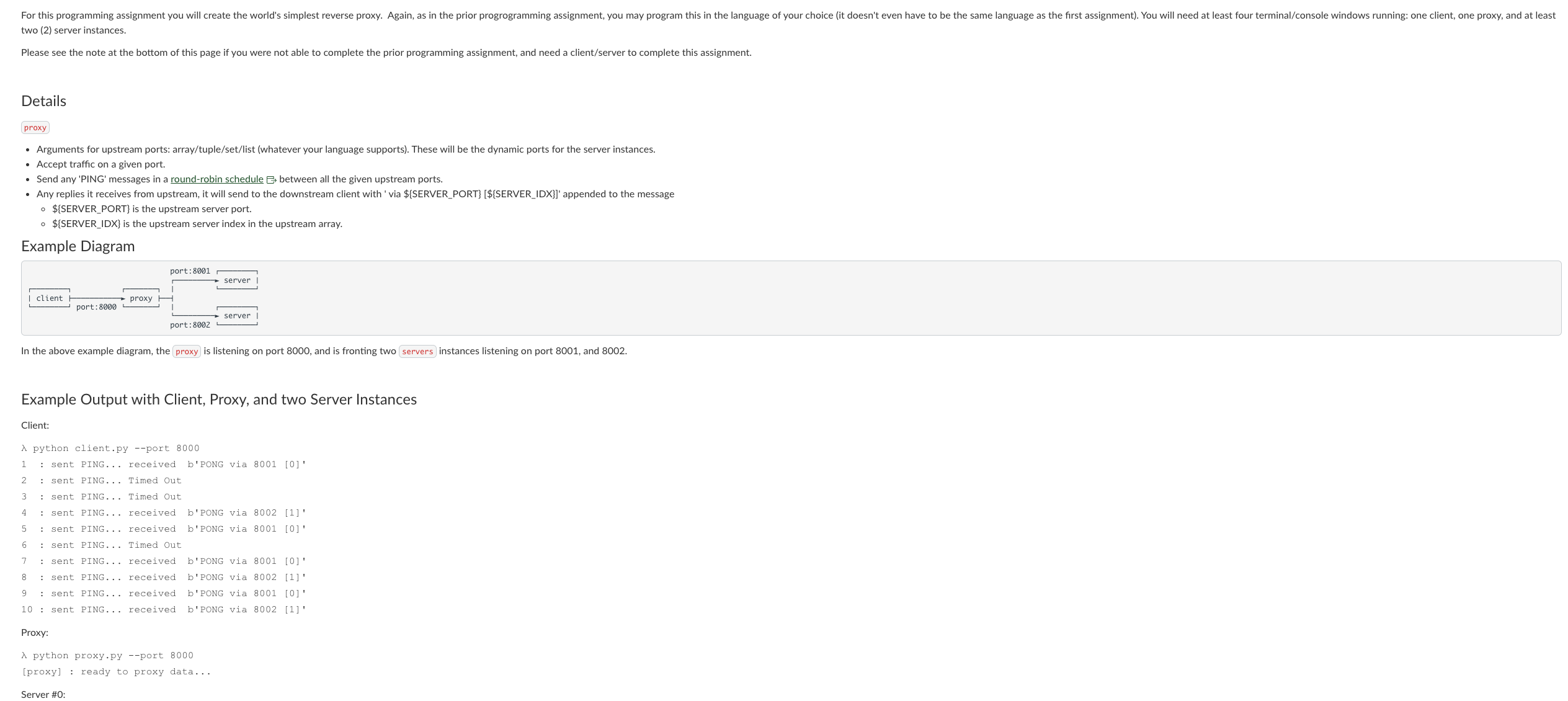
Example Diagram
In the above example diagram, the proxy is listening on port and is fronting two servers instances listening on port and
Example Output with Client, Proxy, and two Server Instances
Client: : sent PING... received b'PONG via
: sent PING... Timed out
: sent PING... Timed out
: sent PING... received b'PONG via
: sent PING... received b'PONG via
: sent PING... Timed Out
: sent PING... received b'PONG via
: sent PING... received b'PONG via
: sent PING... received b'PONG via
: sent PING... received b'PONG via
Proxy:
lambda python
proxy.py port
proxy : ready to proxy data...
Server #:
please, solve this as per requirements:
and the output should be like this:
Example Output with Client, Proxy, and two Server Instances
Client:
lambda python client.py port
: sent PING... received b'PONG via
: sent PING... Timed Out
: sent PING... Timed Out
: sent PING... received b'PONG via
: sent PING... received b'PONG via
: sent PING... Timed Out
: sent PING... received b'PONG via
: sent PING... received b'PONG via
: sent PING... received b'PONG via
: sent PING... received b'PONG via
Proxy:
lambda python proxy.py port
proxy : ready to proxy data...
Server #:
lambda python server.py port
server : ready to accept data...
client : PING
server : packet dropped
client : PING
client : PING
client : PING
Server #:
lambda python server.py port
server : ready to accept data...
server : packet dropped
client : PING
server : packet dropped
client : PING
server : PING
Step by Step Solution
There are 3 Steps involved in it
1 Expert Approved Answer
Step: 1 Unlock

Question Has Been Solved by an Expert!
Get step-by-step solutions from verified subject matter experts
Step: 2 Unlock
Step: 3 Unlock
 Study Help