







Question: undefined Problem 1 Problem 2 Problem 3 How much money do you save each period? Years until your retirement Years in you plan to be
 undefined
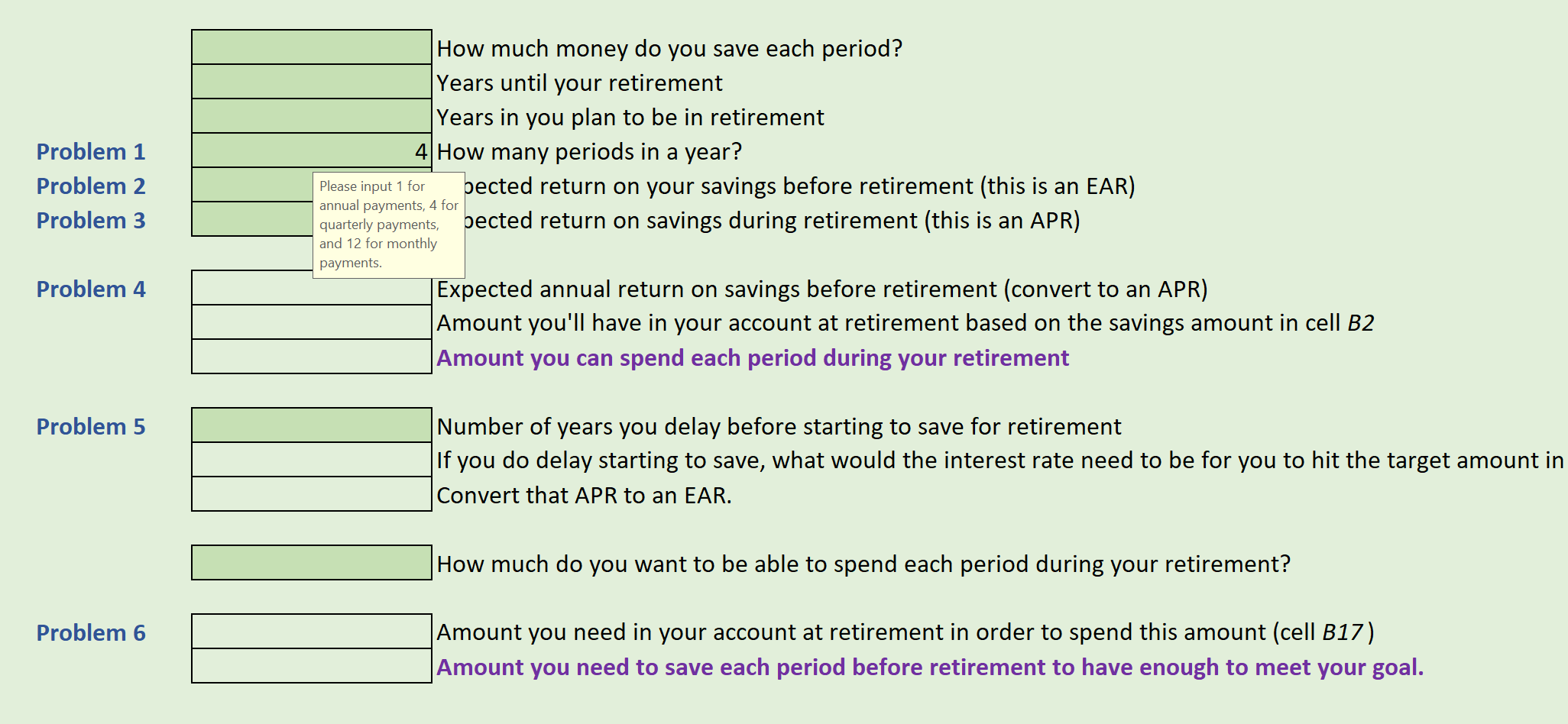
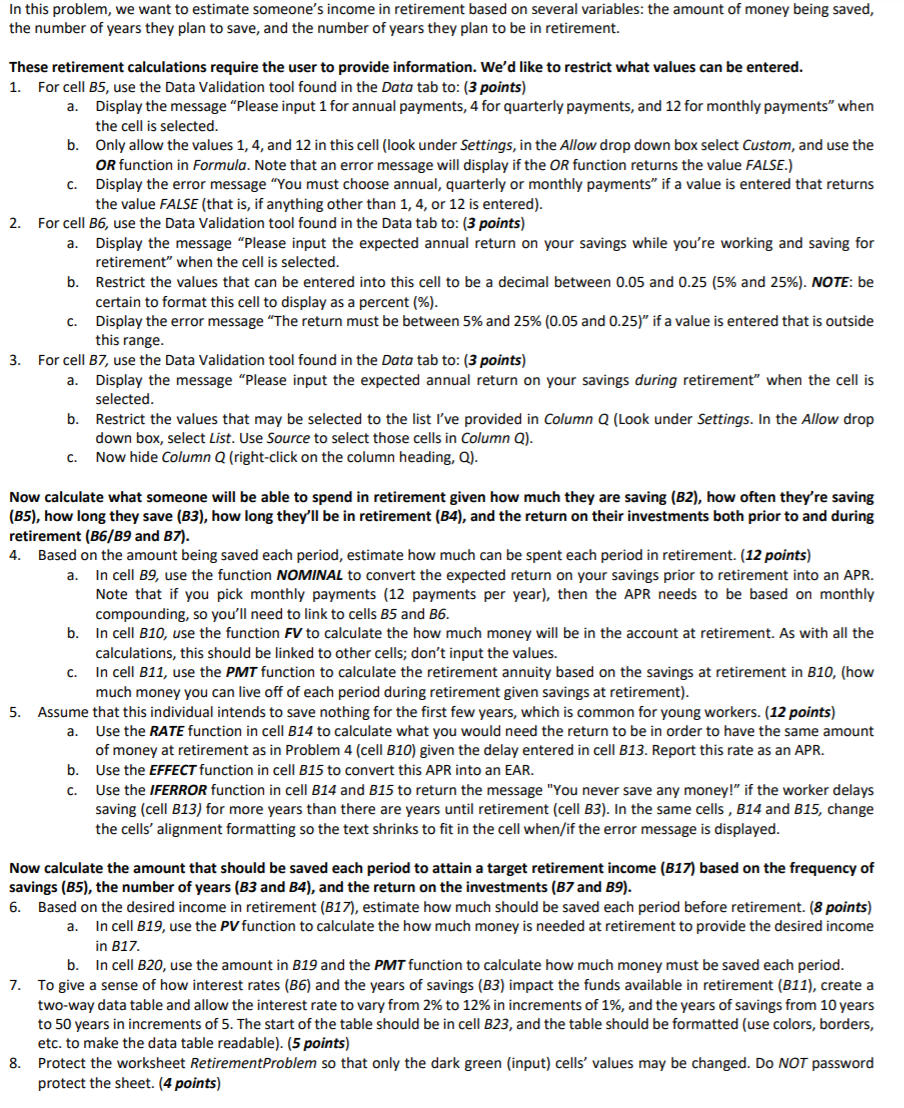
Problem 1 Problem 2 Problem 3 How much money do you save each period? Years until your retirement Years in you plan to be in retirement 4 How many periods in a year? Please input 1 for pected return on your savings before retirement (this is an EAR) annual payments, 4 for quarterly payments, pected return on savings during retirement (this is an APR) and 12 for monthly payments. Expected annual return on savings before retirement (convert to an APR) Amount you'll have in your account at retirement based on the savings amount in cell B2 Amount you can spend each period during your retirement Problem 4 Problem 5 Number of years you delay before starting to save for retirement If you do delay starting to save, what would the interest rate need to be for you to hit the target amount in Convert that APR to an EAR. How much do you want to be able to spend each period during your retirement? Problem 6 Amount you need in your account at retirement in order to spend this amount (cell B17) Amount you need to save each period before retirement to have enough to meet your goal. In this problem, we want to estimate someone's income in retirement based on several variables: the amount of money being saved, the number of years they plan to save, and the number of years they plan to be in retirement. a. These retirement calculations require the user to provide information. We'd like to restrict what values can be entered. 1. For cell B5, use the Data Validation tool found in the Data tab to: (3 points) a. Display the message "Please input 1 for annual payments, 4 for quarterly payments, and 12 for monthly payments when the cell is selected. b. Only allow the values 1, 4, and 12 in this cell (look under Settings, in the Allow drop down box select Custom, and use the OR function in Formula. Note that an error message will display if the OR function returns the value FALSE.) C. Display the error message "You must choose annual, quarterly or monthly payments if a value is entered that returns the value FALSE (that is, if anything other than 1, 4, or 12 is entered). 2. For cell B6, use the Data Validation tool found in the Data tab to: (3 points) Display the message "Please input the expected annual return on your savings while you're working and saving for retirement" when the cell is selected. b. Restrict the values that can be entered into this cell to be a decimal between 0.05 and 0.25 (5% and 25%). NOTE: be certain to format this cell to display as a percent (%). C. Display the error message "The return must be between 5% and 25% (0.05 and 0.25)" if a value is entered that is outside this range. 3. For cell B7, use the Data Validation tool found in the Data tab to: (3 points) a. Display the message "Please input the expected annual return on your savings during retirement" when the cell is selected. b. Restrict the values that may be selected to the list I've provided in Column Q (Look under Settings. In the Allow drop down box, select List. Use Source to select those cells in Column Q). C. Now hide Column Q (right-click on the column heading, Q). a. Now calculate what someone will be able to spend in retirement given how much they are saving (B2), how often they're saving (B5), how long they save (B3), how long they'll be in retirement (B4), and the return on their investments both prior to and during retirement (B6/B9 and B7). 4. Based on the amount being saved each period, estimate how much can be spent each period in retirement. (12 points) In cell B9, use the function NOMINAL to convert the expected return on your savings prior to retirement into an APR. Note that if you pick monthly payments (12 payments per year), then the APR needs to be based on monthly compounding, so you'll need to link to cells B5 and 36. b. In cell B10, use the function FV to calculate the how much money will be in the account at retirement. As with all the calculations, this should be linked to other cells; don't input the values. In cell B11, use the PMT function to calculate the retirement annuity based on the savings at retirement in B10, (how much money you can live off of each period during retirement given savings at retirement). Assume that this individual intends to save nothing for the first few years, which is common for young workers. (12 points) a. Use the RATE function in cell B14 to calculate what you would need the return to be in order to have the same amount of money at retirement as in Problem 4 (cell B10) given the delay entered in cell B13. Report this rate as an APR. b. Use the EFFECT function in cell B15 to convert this APR into an EAR. C. Use the IFERROR function in cell B14 and B15 to return the message "You never save any money!" if the worker delays saving (cell B13) for more years than there are years until retirement (cell B3). In the same cells , B14 and B15, change the cells' alignment formatting so the text shrinks to fit in the cell when/if the error message is displayed. 5. a. Now calculate the amount that should be saved each period to attain a target retirement income (B17) based on the frequency of savings (B5), the number of years (B3 and B4), and the return on the investments (B7 and 19). 6. Based on the desired income in retirement (B17), estimate how much should be saved each period before retirement. (8 points) In cell B19, use the PV function to calculate the how much money is needed at retirement to provide the desired income in B17. b. In cell B20, use the amount in B19 and the PMT function to calculate how much money must be saved each period. 7. To give a sense of how interest rates (B6) and the years of savings (B3) impact the funds available in retirement (B11), create a two-way data table and allow the interest rate to vary from 2% to 12% in increments of 1%, and the years of savings from 10 years to 50 years in increments of 5. The start of the table should be in cell B23, and the table should be formatted (use colors, borders, etc. to make the data table readable). (5 points) 8. Protect the worksheet RetirementProblem so that only the dark green (input) cells' values may be changed. Do NOT password protect the sheet. (4 points) Problem 1 Problem 2 Problem 3 How much money do you save each period? Years until your retirement Years in you plan to be in retirement 4 How many periods in a year? Please input 1 for pected return on your savings before retirement (this is an EAR) annual payments, 4 for quarterly payments, pected return on savings during retirement (this is an APR) and 12 for monthly payments. Expected annual return on savings before retirement (convert to an APR) Amount you'll have in your account at retirement based on the savings amount in cell B2 Amount you can spend each period during your retirement Problem 4 Problem 5 Number of years you delay before starting to save for retirement If you do delay starting to save, what would the interest rate need to be for you to hit the target amount in Convert that APR to an EAR. How much do you want to be able to spend each period during your retirement? Problem 6 Amount you need in your account at retirement in order to spend this amount (cell B17) Amount you need to save each period before retirement to have enough to meet your goal. In this problem, we want to estimate someone's income in retirement based on several variables: the amount of money being saved, the number of years they plan to save, and the number of years they plan to be in retirement. a. These retirement calculations require the user to provide information. We'd like to restrict what values can be entered. 1. For cell B5, use the Data Validation tool found in the Data tab to: (3 points) a. Display the message "Please input 1 for annual payments, 4 for quarterly payments, and 12 for monthly payments when the cell is selected. b. Only allow the values 1, 4, and 12 in this cell (look under Settings, in the Allow drop down box select Custom, and use the OR function in Formula. Note that an error message will display if the OR function returns the value FALSE.) C. Display the error message "You must choose annual, quarterly or monthly payments if a value is entered that returns the value FALSE (that is, if anything other than 1, 4, or 12 is entered). 2. For cell B6, use the Data Validation tool found in the Data tab to: (3 points) Display the message "Please input the expected annual return on your savings while you're working and saving for retirement" when the cell is selected. b. Restrict the values that can be entered into this cell to be a decimal between 0.05 and 0.25 (5% and 25%). NOTE: be certain to format this cell to display as a percent (%). C. Display the error message "The return must be between 5% and 25% (0.05 and 0.25)" if a value is entered that is outside this range. 3. For cell B7, use the Data Validation tool found in the Data tab to: (3 points) a. Display the message "Please input the expected annual return on your savings during retirement" when the cell is selected. b. Restrict the values that may be selected to the list I've provided in Column Q (Look under Settings. In the Allow drop down box, select List. Use Source to select those cells in Column Q). C. Now hide Column Q (right-click on the column heading, Q). a. Now calculate what someone will be able to spend in retirement given how much they are saving (B2), how often they're saving (B5), how long they save (B3), how long they'll be in retirement (B4), and the return on their investments both prior to and during retirement (B6/B9 and B7). 4. Based on the amount being saved each period, estimate how much can be spent each period in retirement. (12 points) In cell B9, use the function NOMINAL to convert the expected return on your savings prior to retirement into an APR. Note that if you pick monthly payments (12 payments per year), then the APR needs to be based on monthly compounding, so you'll need to link to cells B5 and 36. b. In cell B10, use the function FV to calculate the how much money will be in the account at retirement. As with all the calculations, this should be linked to other cells; don't input the values. In cell B11, use the PMT function to calculate the retirement annuity based on the savings at retirement in B10, (how much money you can live off of each period during retirement given savings at retirement). Assume that this individual intends to save nothing for the first few years, which is common for young workers. (12 points) a. Use the RATE function in cell B14 to calculate what you would need the return to be in order to have the same amount of money at retirement as in Problem 4 (cell B10) given the delay entered in cell B13. Report this rate as an APR. b. Use the EFFECT function in cell B15 to convert this APR into an EAR. C. Use the IFERROR function in cell B14 and B15 to return the message "You never save any money!" if the worker delays saving (cell B13) for more years than there are years until retirement (cell B3). In the same cells , B14 and B15, change the cells' alignment formatting so the text shrinks to fit in the cell when/if the error message is displayed. 5. a. Now calculate the amount that should be saved each period to attain a target retirement income (B17) based on the frequency of savings (B5), the number of years (B3 and B4), and the return on the investments (B7 and 19). 6. Based on the desired income in retirement (B17), estimate how much should be saved each period before retirement. (8 points) In cell B19, use the PV function to calculate the how much money is needed at retirement to provide the desired income in B17. b. In cell B20, use the amount in B19 and the PMT function to calculate how much money must be saved each period. 7. To give a sense of how interest rates (B6) and the years of savings (B3) impact the funds available in retirement (B11), create a two-way data table and allow the interest rate to vary from 2% to 12% in increments of 1%, and the years of savings from 10 years to 50 years in increments of 5. The start of the table should be in cell B23, and the table should be formatted (use colors, borders, etc. to make the data table readable). (5 points) 8. Protect the worksheet RetirementProblem so that only the dark green (input) cells' values may be changed. Do NOT password protect the sheet. (4 points)
Step by Step Solution
There are 3 Steps involved in it

Get step-by-step solutions from verified subject matter experts
 Study Help