







Question: Unit 5 Lab - SQL statements - Need help on these Database Below: CREATE TABLE DEMO_DEPT (DEPTNO NUMBER(2) CONSTRAINT pk_dept PRIMARY KEY, DNAME VARCHAR2(14), LOC
Unit 5 Lab - SQL statements - Need help on these
Database Below:
CREATE TABLE DEMO_DEPT (DEPTNO NUMBER(2) CONSTRAINT pk_dept PRIMARY KEY, DNAME VARCHAR2(14), LOC VARCHAR2(13) );
INSERT INTO DEMO_DEPT VALUES (10, 'ACCOUNTING', 'NEW YORK'); INSERT INTO DEMO_DEPT VALUES (20, 'RESEARCH', 'DALLAS'); INSERT INTO DEMO_DEPT VALUES (30, 'SALES', 'CHICAGO'); INSERT INTO DEMO_DEPT VALUES (40, 'OPERATIONS', 'BOSTON');
CREATE TABLE DEMO_EMP (EMPNO NUMBER(4) CONSTRAINT pk_emp PRIMARY KEY, ENAME VARCHAR2(10), JOB VARCHAR2(9), MGR NUMBER(4), HIREDATE DATE, SAL NUMBER(7, 2), COMM NUMBER(7, 2), DEPTNO NUMBER(2) CONSTRAINT fk_emp_dept REFERENCES DEMO_DEPT(deptno));
INSERT INTO DEMO_EMP VALUES (7369, 'SMITH', 'CLERK', 7902, TO_DATE('17-DEC-1980', 'DD-MON-YYYY'), 800, NULL, 20); INSERT INTO DEMO_EMP VALUES (7499, 'ALLEN', 'SALESMAN', 7698, TO_DATE('20-FEB-1981', 'DD-MON-YYYY'), 1600, 300, 30); INSERT INTO DEMO_EMP VALUES (7521, 'WARD', 'SALESMAN', 7698, TO_DATE('22-FEB-1981', 'DD-MON-YYYY'), 1250, 500, 30); INSERT INTO DEMO_EMP VALUES (7566, 'JONES', 'MANAGER', 7839, TO_DATE('2-APR-1981', 'DD-MON-YYYY'), 2975, NULL, 20); INSERT INTO DEMO_EMP VALUES (7654, 'MARTIN', 'SALESMAN', 7698, TO_DATE('28-SEP-1981', 'DD-MON-YYYY'), 1250, 1400, 30); INSERT INTO DEMO_EMP VALUES (7698, 'BLAKE', 'MANAGER', 7839, TO_DATE('1-MAY-1981', 'DD-MON-YYYY'), 2850, NULL, 30); INSERT INTO DEMO_EMP VALUES (7782, 'CLARK', 'MANAGER', 7839, TO_DATE('9-JUN-1981', 'DD-MON-YYYY'), 2450, NULL, 10); INSERT INTO DEMO_EMP VALUES (7788, 'SCOTT', 'ANALYST', 7566, TO_DATE('09-DEC-1982', 'DD-MON-YYYY'), 3000, NULL, 20); INSERT INTO DEMO_EMP VALUES (7839, 'KING', 'PRESIDENT', NULL, TO_DATE('17-NOV-1981', 'DD-MON-YYYY'), 5000, NULL, 10); INSERT INTO DEMO_EMP VALUES (7844, 'TURNER', 'SALESMAN', 7698, TO_DATE('8-SEP-1981', 'DD-MON-YYYY'), 1500, 0, 30); INSERT INTO DEMO_EMP VALUES (7876, 'ADAMS', 'CLERK', 7788, TO_DATE('12-JAN-1983', 'DD-MON-YYYY'), 1100, NULL, 20); INSERT INTO DEMO_EMP VALUES (7900, 'JAMES', 'CLERK', 7698, TO_DATE('3-DEC-1981', 'DD-MON-YYYY'), 950, NULL, 30); INSERT INTO DEMO_EMP VALUES (7902, 'FORD', 'ANALYST', 7566, TO_DATE('3-DEC-1981', 'DD-MON-YYYY'), 3000, NULL, 20); INSERT INTO DEMO_EMP VALUES (7934, 'MILLER', 'CLERK', 7782, TO_DATE('23-JAN-1982', 'DD-MON-YYYY'), 1300, NULL, 40);
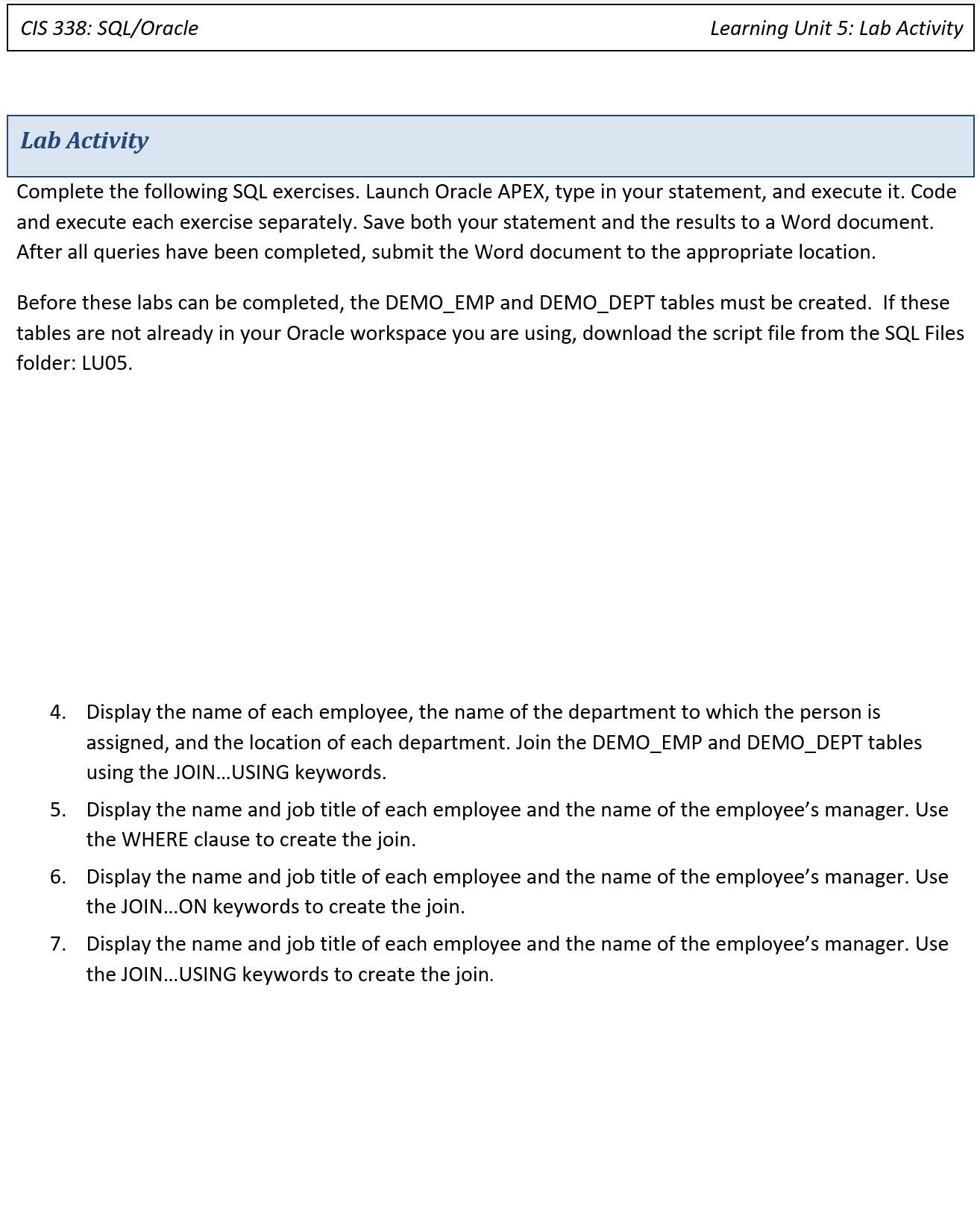
CIS 338: SQL/Oracle Learning Unit 5: Lab Activity Lab Activity Complete the following SQL exercises. Launch Oracle APEX, type in your statement, and execute it. Code and execute each exercise separately. Save both your statement and the results to a Word document. After all queries have been completed, submit the Word document to the appropriate location. Before these labs can be completed, the DEMO_EMP and DEMO_DEPT tables must be created. If these tables are not already in your Oracle workspace you are using, download the script file from the SQL Files folder: LU05. 4. Display the name of each employee, the name of the department to which the person is assigned, and the location of each department. Join the DEMO_EMP and DEMO_DEPT tables using the JOIN...USING keywords. 5. Display the name and job title of each employee and the name of the employee's manager. Use the WHERE clause to create the join. 6. Display the name and job title of each employee and the name of the employee's manager. Use the JOIN...ON keywords to create the join. 7. Display the name and job title of each employee and the name of the employee's manager. Use the JOIN... USING keywords to create the join
Step by Step Solution
There are 3 Steps involved in it

Get step-by-step solutions from verified subject matter experts
 Study Help