







Question: Urgent! How do I combine a conditional formatted table with a data table? My question is for my deployment table to automatically tabulate the respective
Urgent! How do I combine a conditional formatted table with a data table?
My question is for my "deployment table" to automatically tabulate the respective cost when "1" is entered. For example, if Guide 1 is chosen to be deployed on Week 4, the cost (column J) should automatically tabulated "$380". I have already conditional formatted my deployment table to only input 1 (will show yellow) and input 0 (blue).
My current progress is saved under "question.jpg". The desired endstate is attached as such.
Need help urgently please. I can also provide the .xlsx file if requested..
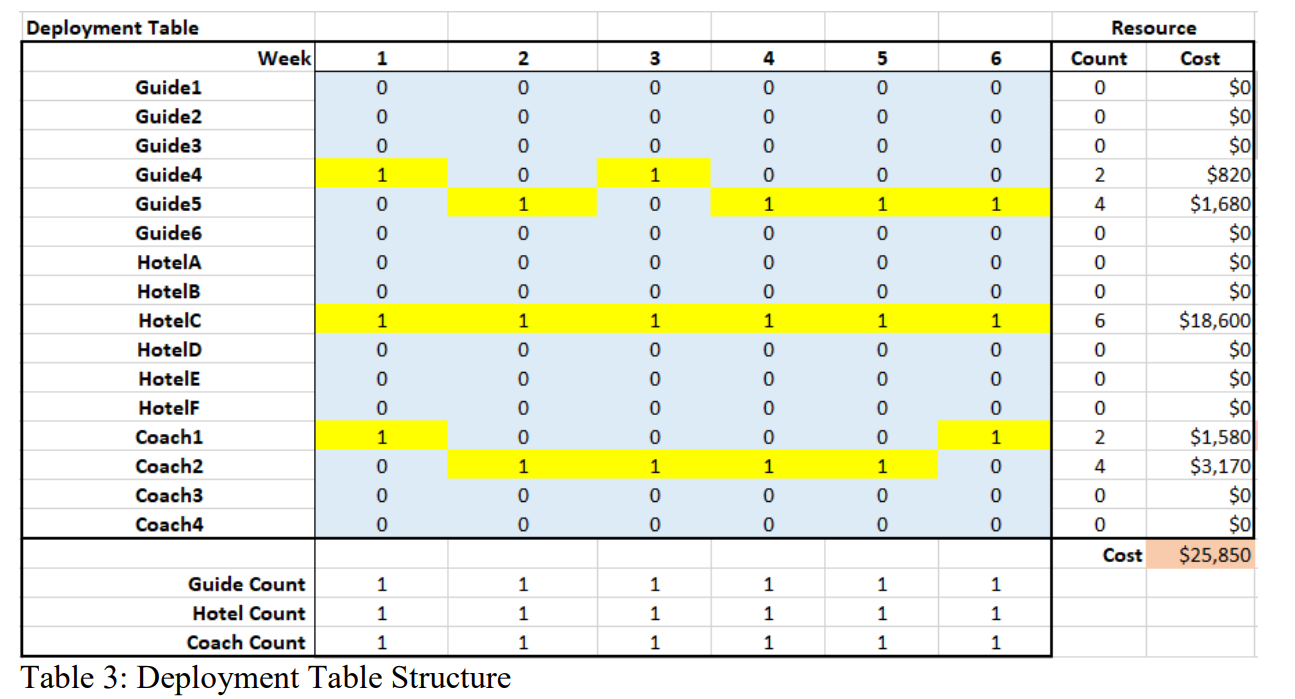
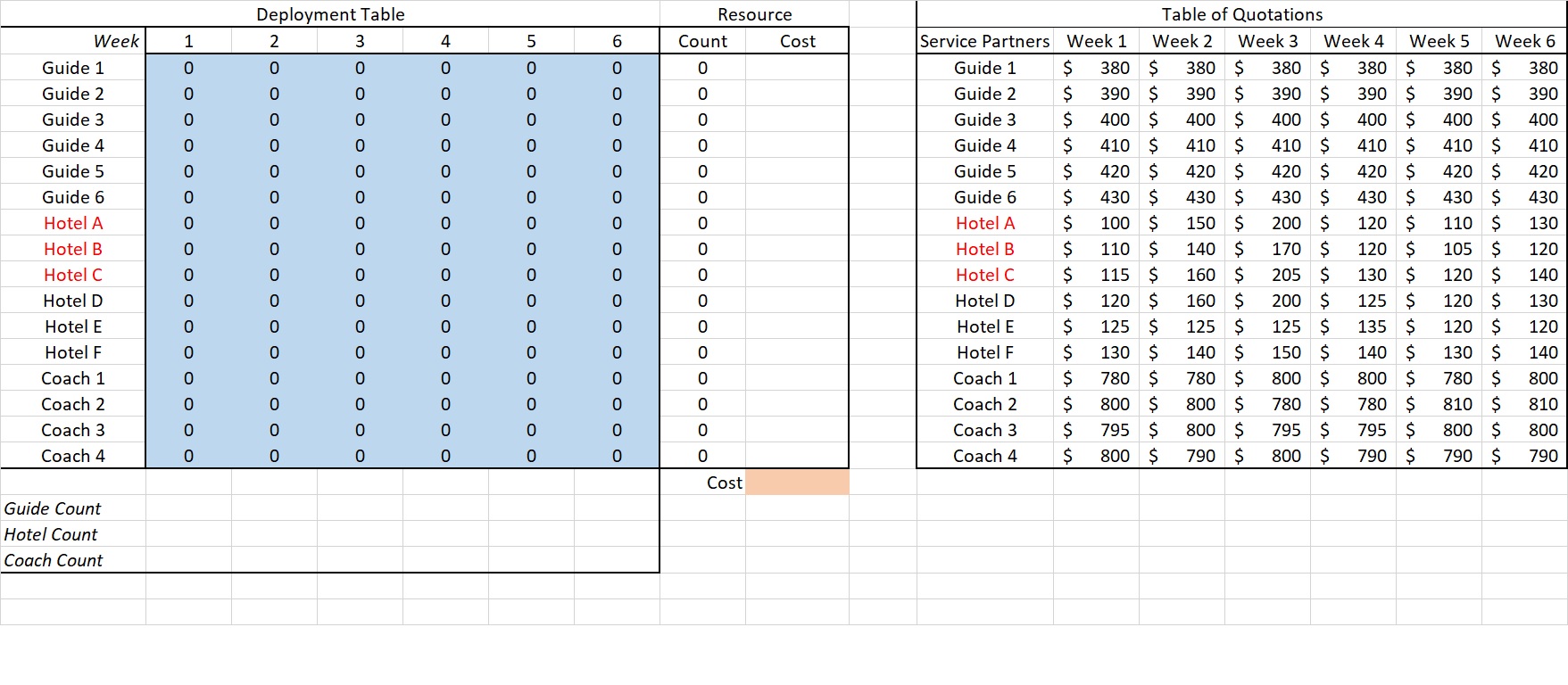
Deployment Table Resouroe 0 D 0 2 4 0 0 0 6 0 0 O 2 4 0 0 Guide Count Hotel Count Coach Count Table 3: Deployment Table Structure Deployment Table Week "I...\" Guide 1 Guide 2 Guide 3 Guide 4 Guide 5 Guide 6 Hotel A Hotel B Hotel C Hotel D Hotel E Hotel F Coach 1 Coach 2 Coach 3 Coach 4 Resource Table of Quotations Service Partners Week 1 Week 2 Week 3 Week 4 Week 5 Week 6 0 Guide 1 5 380 5 380 5 330 5 380 5 380 5 380 0 Guide 2 5 390 5 390 5 390 5 390 5 390 5 390 0 Guide 3 5 400 5 400 5 400 5 400 5 400 5 400 0 Guide 4 5 410 5 410 5 410 5 410 5 410 5 410 0 Guide 5 5 420 5 420 5 420 5 420 5 420 5 420 0 Guide 6 5 430 5 430 5 430 5 430 5 430 5 430 0 Hotel A 5 100 5 150 5 200 5 120 5 110 5 130 0 Hotel B 5 110 5 140 5 170 5 120 5 105 5 120 0 Hotel C 5 115 5 160 5 205 5 130 5 120 5 140 0 Hotel D 5 120 5 160 5 200 5 125 5 120 5 130 0 Hotel E 5 125 5 125 5 125 5 135 5 120 5 120 0 Hotel F 5 130 5 140 5 150 5 140 5 130 5 140 0 Coach 1 5 780 5 780 5 800 5 800 5 780 5 800 0 Coach 2 5 800 5 800 5 780 5 780 5 810 5 810 0 Coach 3 5 795 5 800 5 795 5 795 5 800 5 300 0 Coach 4 5 800 5 790 5 800 5 790 5 790 5 790 Guide Count Hotel Count Coach Count
Step by Step Solution
There are 3 Steps involved in it

Get step-by-step solutions from verified subject matter experts
 Study Help