







Question: Use Adafruit Trinket Mo with CircuitPhython. Part 5: Programming Practice For reference, here is the original program from Part 2: import board import digitalio import
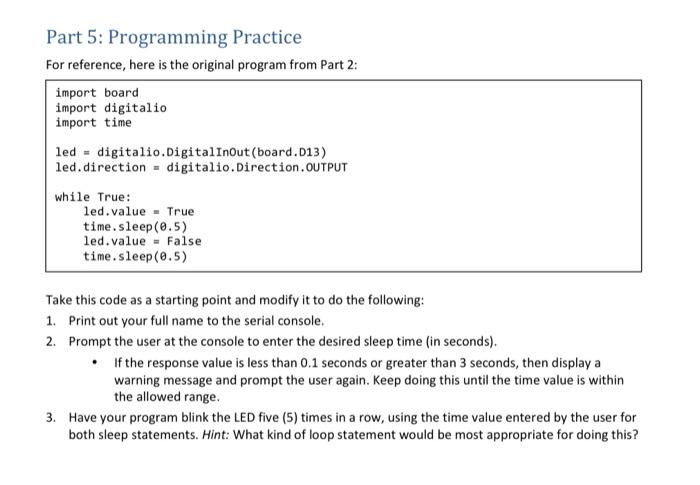
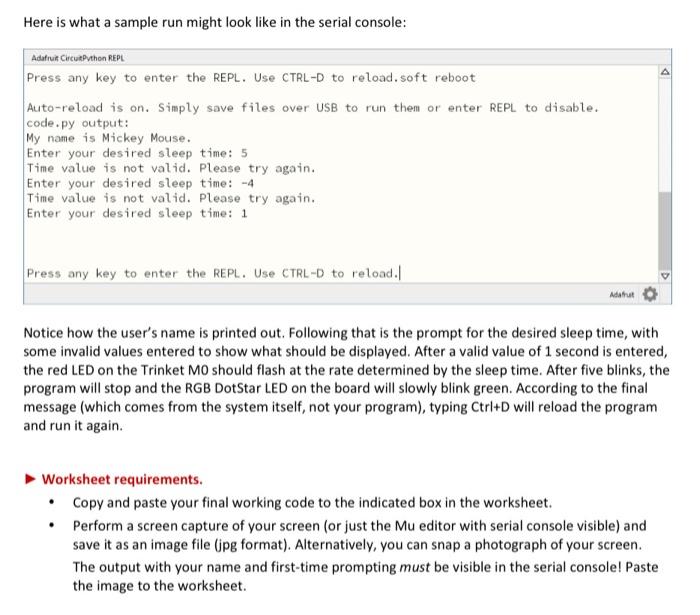
Part 5: Programming Practice For reference, here is the original program from Part 2: import board import digitalio import time led - digitalio.Digital InOutboard.013) led.direction - digitalio. Direction.OUTPUT while True: led.value = True time. sleep(0.5) led.value = False time. sleep(0.5) Take this code as a starting point and modify it to do the following: 1. Print out your full name to the serial console. 2. Prompt the user at the console to enter the desired sleep time (in seconds). If the response value is less than 0.1 seconds or greater than 3 seconds, then display a warning message and prompt the user again. Keep doing this until the time value is within the allowed range. 3. Have your program blink the LED five (5) times in a row, using the time value entered by the user for both sleep statements. Hint: What kind of loop statement would be most appropriate for doing this? Here is what a sample run might look like in the serial console: Adafruit CircutPython REPL Press any key to enter the REPL. Use CTRL-D to reload.soft reboot Auto-reload is on. Simply save files over USB to run them or enter REPL to disable. code.py output: My name is Mickey Mouse. Enter your desired sleep time: 5 Time value is not valid. Please try again. Enter your desired sleep time: -4 Time value is not valid. Please try again. Enter your desired sleep time: 1 Press any key to enter the REPL. Use CTRL-D to reload. Notice how the user's name is printed out. Following that is the prompt for the desired sleep time, with some invalid values entered to show what should be displayed. After a valid value of 1 second is entered, the red LED on the Trinket MO should flash at the rate determined by the sleep time. After five blinks, the program will stop and the RGB DotStar LED on the board will slowly blink green. According to the final message (which comes from the system itself, not your program), typing Ctrl+D will reload the program and run it again. Worksheet requirements. Copy and paste your final working code to the indicated box in the worksheet. Perform a screen capture of your screen (or just the Mu editor with serial console visible) and save it as an image file (jpg format). Alternatively, you can snap a photograph of your screen. The output with your name and first-time prompting must be visible in the serial console! Paste the image to the worksheet. Part 5: Programming Practice For reference, here is the original program from Part 2: import board import digitalio import time led - digitalio.Digital InOutboard.013) led.direction - digitalio. Direction.OUTPUT while True: led.value = True time. sleep(0.5) led.value = False time. sleep(0.5) Take this code as a starting point and modify it to do the following: 1. Print out your full name to the serial console. 2. Prompt the user at the console to enter the desired sleep time (in seconds). If the response value is less than 0.1 seconds or greater than 3 seconds, then display a warning message and prompt the user again. Keep doing this until the time value is within the allowed range. 3. Have your program blink the LED five (5) times in a row, using the time value entered by the user for both sleep statements. Hint: What kind of loop statement would be most appropriate for doing this? Here is what a sample run might look like in the serial console: Adafruit CircutPython REPL Press any key to enter the REPL. Use CTRL-D to reload.soft reboot Auto-reload is on. Simply save files over USB to run them or enter REPL to disable. code.py output: My name is Mickey Mouse. Enter your desired sleep time: 5 Time value is not valid. Please try again. Enter your desired sleep time: -4 Time value is not valid. Please try again. Enter your desired sleep time: 1 Press any key to enter the REPL. Use CTRL-D to reload. Notice how the user's name is printed out. Following that is the prompt for the desired sleep time, with some invalid values entered to show what should be displayed. After a valid value of 1 second is entered, the red LED on the Trinket MO should flash at the rate determined by the sleep time. After five blinks, the program will stop and the RGB DotStar LED on the board will slowly blink green. According to the final message (which comes from the system itself, not your program), typing Ctrl+D will reload the program and run it again. Worksheet requirements. Copy and paste your final working code to the indicated box in the worksheet. Perform a screen capture of your screen (or just the Mu editor with serial console visible) and save it as an image file (jpg format). Alternatively, you can snap a photograph of your screen. The output with your name and first-time prompting must be visible in the serial console! Paste the image to the worksheet
Step by Step Solution
There are 3 Steps involved in it

Get step-by-step solutions from verified subject matter experts
 Study Help