







Question: Use Excel formulas such as VLookup, IF Then, COUNTIF, SUMIF, etc. to fill in the green areas and provide answers. Use Excel to calculate the
Use Excel formulas such as VLookup, IF Then, COUNTIF, SUMIF, etc. to fill in the green areas and provide answers. Use Excel to calculate the Commission: The agent will receive a 2.5% commission for financed amounts of $200,000 or more, otherwise their commission is 1.5%.
Bonus: The selling agent will receive a $10,000 bonus for amounts financed of $250,000 or more, with a loan term of 20 years or more, and with an Interest rate of 5% or more. Otherwise, they get "No Bonus".(Hint, you will have an amount in the cell if they have a bonus and your formula needs to make the cell say "No Bonus" if there isn't any bonus).
For each salesperson calculate their total dollar value of Commissions.
For each salesperson, calculate their total # of sales this month.
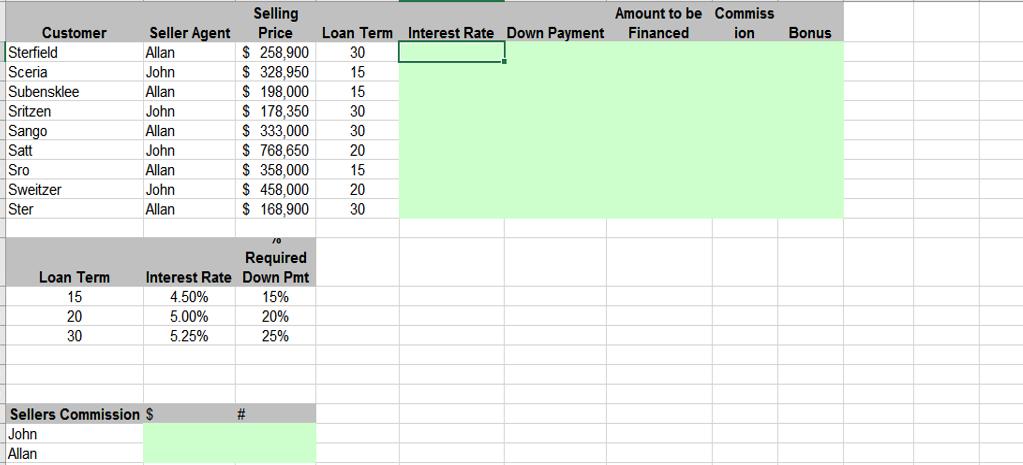
Customer Sterfield Sceria Subensklee Sritzen Sango Satt Sro Sweitzer Ster Seller Agent Allan John Allan John Allan John Allan John Allan Interest Rate 4.50% 5.00% 5.25% Loan Term 15 20 30 Sellers Commission $ John Allan Selling Price $ 258,900 $ 328,950 $198,000 $ 178,350 $ 333,000 $768,650 $ 358,000 $458,000 $ 168,900 Required Down Pmt 15% 20% 25% # Loan Term Interest Rate Down Payment 30 15 15 30 30 20 15 20 30 Amount to be Commiss ion Bonus Financed
Step by Step Solution
There are 3 Steps involved in it
B E 1 Seller Agent Selling Price Long Interest Rate 2 3 Sterfield Allan John 4 Sceria 5 Subsenklee A... View full answer

Get step-by-step solutions from verified subject matter experts
 Study Help