







Question: Use Matlab and given variables... %problem1 disp('*****problems 1A & 1B*****'); %data matrix %column 1 = density, column 2 = length, column 3 = velocity, column
Use Matlab and given variables...
%problem1
disp('*****problems 1A & 1B*****');
%data matrix
%column 1 = density, column 2 = length, column 3 = velocity, column 4 = viscosity
flowData = [1.2, 0.05, 5.0, 3.5e-5;
0.01, 1.0, 100.0, 1.7e-5;
1.29, 0.01, 2.0, 3.0e-5];
%use a for loop to loop over the rows of the data matrix
%call the Reynolds function for each test case and print out the results
%Store the results in a row vector, Re, and a string array, flow_type
Re = [];
flow_type =string([]);
Application 5: Branching and Looping
Designed to test skills: conditional statements, if statements, and switch statements, for loops
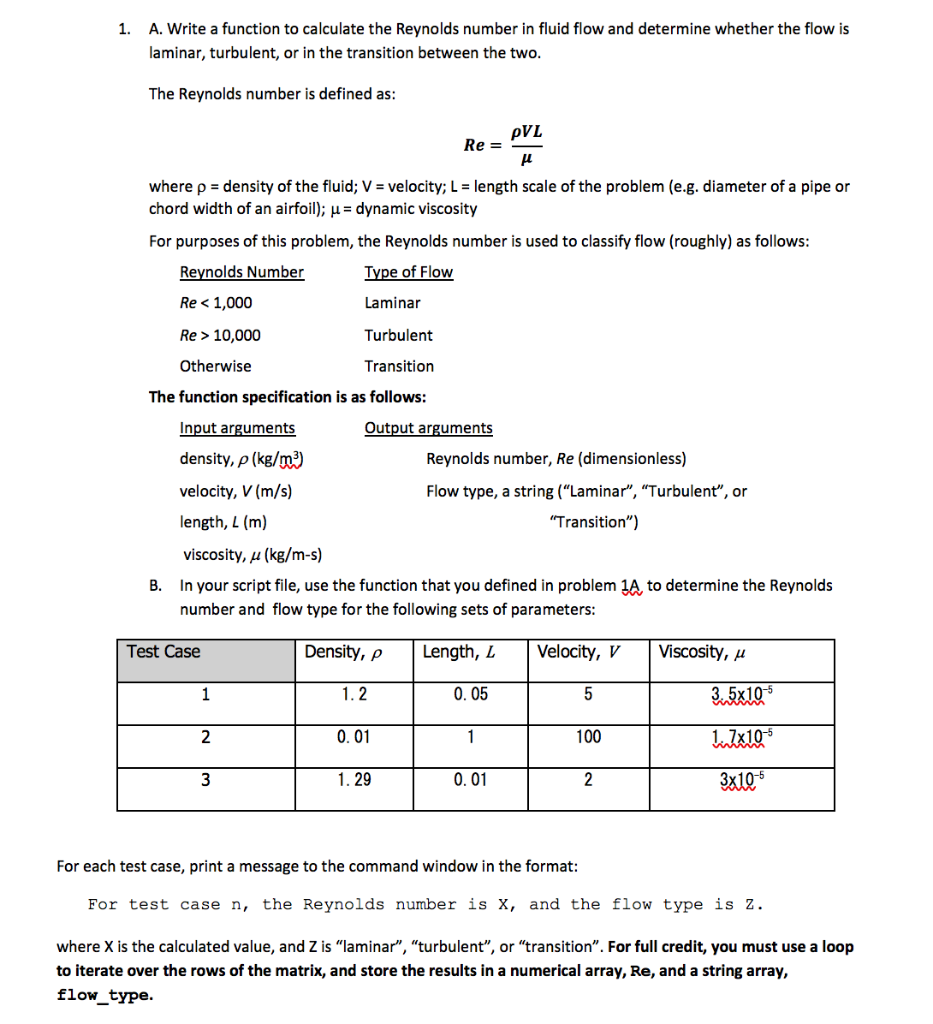
1. A. Write a function to calculate the Reynolds number in fluid flow and determine whether the flow is laminar, turbulent, or in the transition between the two The Reynolds number is defined as pVL where p density of the fluid; V velocity; L length scale of the problem (e.g. diameter of a pipe or chord width of an airfoil); u dynamic viscosity For purposes of this problem, the Reynolds number is used to classify flow (roughly) as follows Reynolds Number Re 10,000 Otherwise Type of Flow Laminar Turbulent Transition The function specification is as follows Input arguments density, (kg/00 ) velocity, V (m/s) length, L (m) viscosity, u (kg/m-s) Output arguments Reynolds number, Re (dimensionless) Flow type, a string ("Laminar", "Turbulent", or Transition") B. In your script file, use the function that you defined in problem 1A, to determine the Reynolds number and flow type for the following sets of parameters Test Case Density, p Length, LVelocity, VViscosity, u -5 0. 05 llxlo 3xl0-s 0.01 100 1. 29 0.01 For each test case, print a message to the command window in the format For test case n, the Reynolds number is X, and the flow type is z. where X is the calculated value, and Z is "laminar", "turbulent", or "transition". For full credit, you must use a loop to iterate over the rows of the matrix, and store the results in a numerical array, Re, and a string array, flowtype
Step by Step Solution
There are 3 Steps involved in it

Get step-by-step solutions from verified subject matter experts
 Study Help