







Question: Use Matlab to answer 4. Write a function to reverse the order of an input vector using a for-loop. There are at least two ways
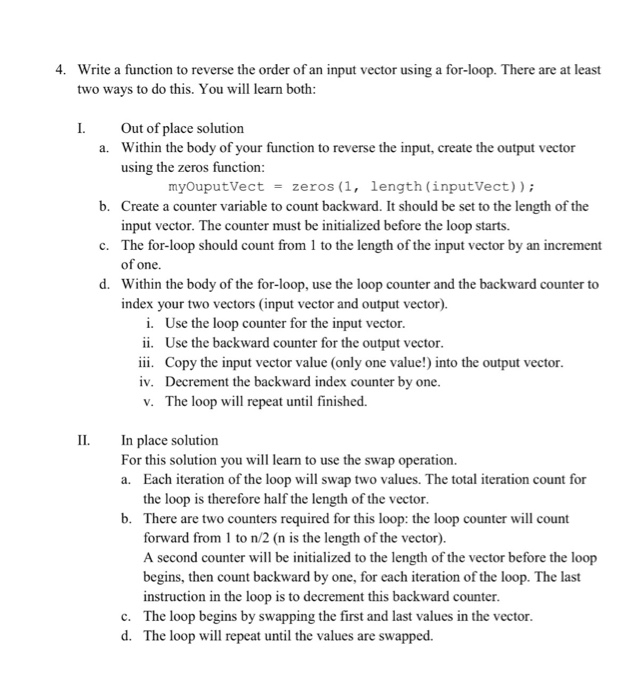
4. Write a function to reverse the order of an input vector using a for-loop. There are at least two ways to do this. You will learn both I. Out of place solution a. Within the body of your function to reverse the input, create the output vector using the zeros function myOuputVect zeros (1. length (inputVect)) b. Create a counter variable to count backward. It should be set to the length of the input vector. The counter must be initialized before the loop starts. c. The for-loop should count from 1 to the length of the input vector by an increment of one. d. Within the body of the for-loop, use the loop counter and the backward counter to index your two vectors (input vector and output vector) i. Use the loop counter for the input vector. ii. Use the backward counter for the output vector. iii. Copy the input vector value (only one value!) into the output vector. iv. Decrement the backward index counter by one v. The loop will repeat until finished. II. In place solution For this solution you will learn to use the swap operation. a. Each iteration of the loop will swap two values. The total iteration count for the loop is therefore half the length of the vector. b. There are two counters required for this loop: the loop counter will count forward from 1 to n/2 (n is the length of the vector) A second counter will be initialized to the length of the vector before the loop begins, then count backward by one, for each iteration of the loop. The last instruction in the loop is to decrement this backward counter. c. The loop begins by swapping the first and last values in the vector. d. The loop will repeat until the values are swapped
Step by Step Solution
There are 3 Steps involved in it

Get step-by-step solutions from verified subject matter experts
 Study Help