







Question: Use Processing and Python Code: It's late and Cookie Monster is hungry. He's going to sneak downstairs to get a cookie from the cookie jar.
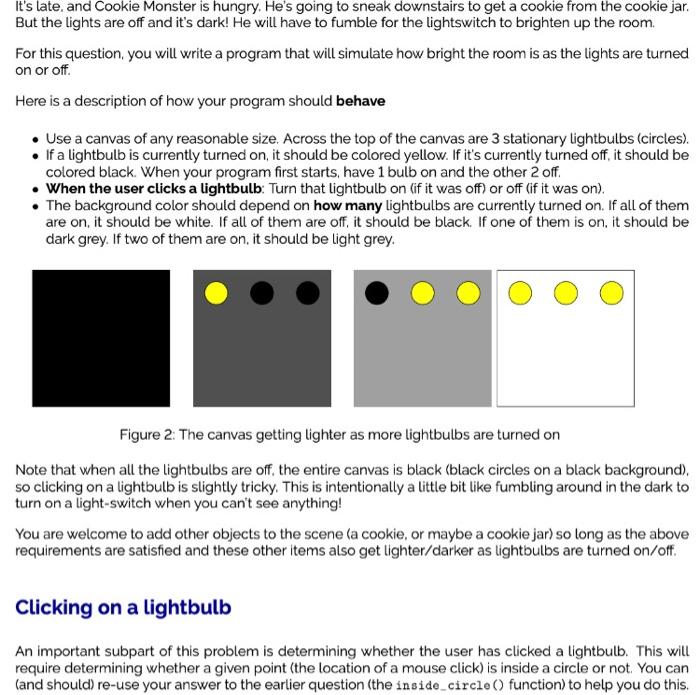
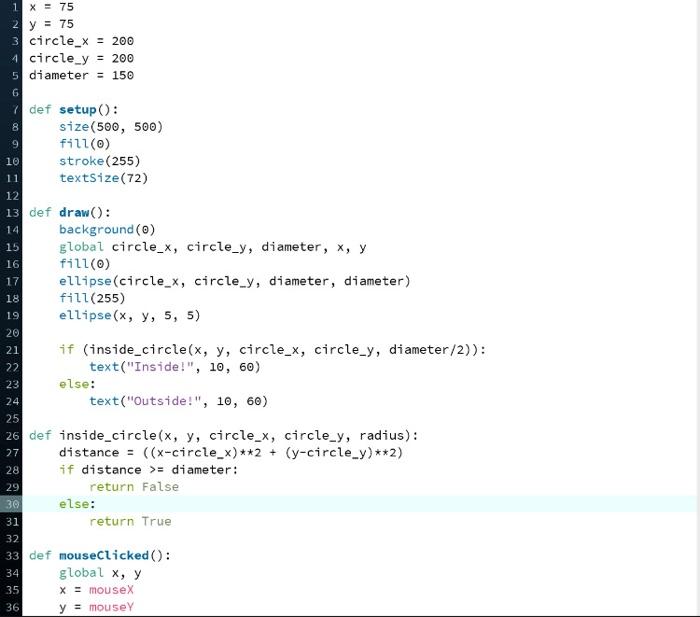
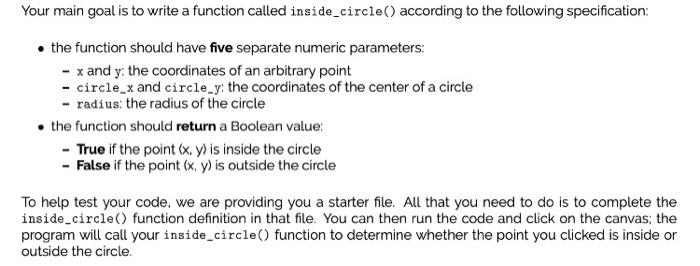
It's late and Cookie Monster is hungry. He's going to sneak downstairs to get a cookie from the cookie jar. But the lights are off and it's dark! He will have to fumble for the lightswitch to brighten up the room For this question, you will write a program that will simulate how bright the room is as the lights are turned on or off. Here is a description of how your program should behave Use a canvas of any reasonable size. Across the top of the canvas are 3 stationary Lightbulbs (circles). . If a lightbulb is currently turned on, it should be colored yellow. If it's currently turned off, it should be colored black. When your program first starts, have 1 bulb on and the other 2 off. When the user clicks a lightbulb: Turn that lightbulb on lif it was off) or off (if it was on). The background color should depend on how many lightbulbs are currently turned on. If all of them are on, it should be white. If all of them are off, it should be black. If one of them is on, it should be dark grey. If two of them are on, it should be light grey. Figure 2. The canvas getting lighter as more lightbulbs are turned on Note that when all the lightbulbs are off, the entire canvas is black (black circles on a black background), so clicking on a lightbulb is slightly tricky. This is intentionally a little bit like fumbling around in the dark to turn on a light-switch when you can't see anything! You are welcome to add other objects to the scene (a cookie, or maybe a cookie jar) so long as the above requirements are satisfied and these other items also get lighter/darker as lightbulbs are turned on/off. Clicking on a lightbulb An important subpart of this problem is determining whether the user has clicked a lightbulb. This will require determining whether a given point (the location of a mouse click) is inside a circle or not. You can (and should) re-use your answer to the earlier question (the inside_circle() function) to help you do this. 1 X = 75 2 y = 75 3 circle_X = 200 4 circle_y = 200 5 diameter = 150 11 14 15 16 7 def setup(): 8 size(500, 500) 9 fill(o) 10 stroke (255) textSize(72) 12 13 def draw(): background (0) global circle_x, circle_y, diameter, x, y fill(0) 17 ellipse(circle_x, circle_y, diameter, diameter) 18 fill(255) 19 ellipse(x, y, 5, 5) 20 21 if (inside_circle(x, y, circle_x, circle_y, diameter/2)): 22 text("Inside!", 10, 60) 23 else: 24 text("Outside!", 10, 60) 25 26 def inside_circle(x, y, circle_x, circle_y, radius): distance = ((x-circle_x) **2 + (y-circle_y)**2) 28 if distance >= diameter: return false 30 else: 31 return True 32 33 def mouseClicked(): global x, y 35 X = mouseX y = mouse 27 29 34 36 Your main goal is to write a function called inside_circle() according to the following specification: the function should have five separate numeric parameters: - x and y: the coordinates of an arbitrary point - circle_x and circle_y: the coordinates of the center of a circle -radius: the radius of the circle the function should return a Boolean value: - True if the point (x,y) is inside the circle - False if the point (x, y) is outside the circle To help test your code, we are providing you a starter file. All that you need to do is to complete the inside_circle() function definition in that file. You can then run the code and click on the canvas, the program will call your inside_circle() function to determine whether the point you clicked is inside or outside the circle
Step by Step Solution
There are 3 Steps involved in it

Get step-by-step solutions from verified subject matter experts
 Study Help