







Question: Use Program set 2 codes and use tkinter module to create a GUI program for the Loan program that looks like the below image. This
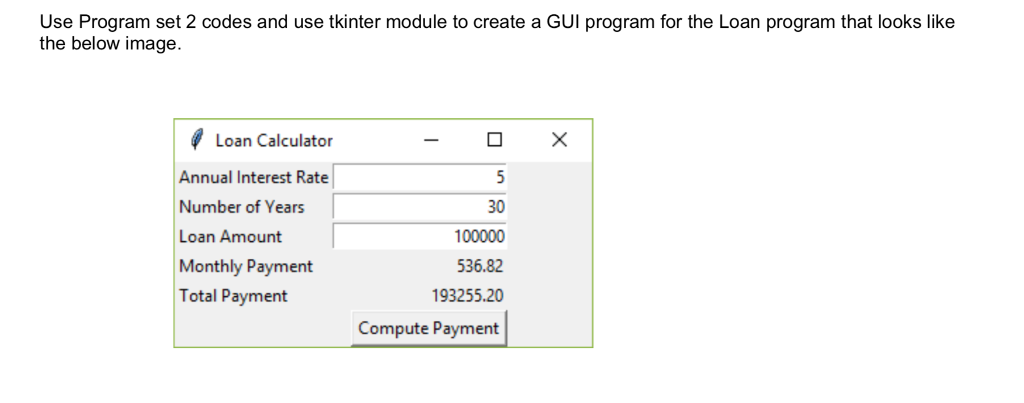 Use Program set 2 codes and use tkinter module to create a GUI program for the Loan program that looks like the below image. This should be done in Python.
- Try to use simple codes so that I (a beginner) can understand.
Here are the program set 2 codes for reference:
import math
class Loan: def __init__(self, intRate, numYears, loanAmount, name): self.__intRate = intRate self.__numYears = numYears self.__loanAmount = loanAmount self.__name = name
def getRate(self): return self.__intRate
def setRate(self, intRate): self.__intRate = intRate
def getYears(self): return self.__numYears
def setYears(self, numYears): self.__numYears = numYears
def getLoan(self): return self.__loanAmount
def setLoan(self, loanAmount): self.__loanAmount = loanAmount
def getName(self): return self.__name
def setName(self, name): self.__name = name
def getMonthlyPayment(self): monthlyIntRate = self.__intRate / 1200 monthlyPayment = self.__loanAmount * monthlyIntRate / (1 - (1 / (1 + monthlyIntRate) ** (self.__numYears * 12))) return monthlyPayment
def getTotalPayment(self): totalPayment = self.getMonthlyPayment() * self.__numYears * 12 return totalPayment
def main(): intRate = float(input("Enter yearly interest rate, for example, 7.25: ")) numYears = int(input("Enter number of years as an integer: ")) loanAmount = float(input("Enter loan amount, for example, 120000.95: ")) name = input("Enter a borrower's name: ") loan1 = Loan(intRate, numYears, loanAmount, name) print("The loan is for", name) print("The monthly payment is ",format(loan1.getMonthlyPayment(), ',.2f')) print("The total payment is ",format(loan1.getTotalPayment(), ',.2f')) print() again = input("Do you want to change the loan amount? Y for yes or enter to quit y: ") while again == 'Y': loanAmount = float(input("Enter new loan amount: ")) loan1.setLoan(loanAmount) print("The loan is for", name) print("The monthly payment is ",format(loan1.getMonthlyPayment(), ',.2f')) print("The total payment is ",format(loan1.getTotalPayment(), ',.2f')) again = input("Do you want to change the loan amount? Y for yes or enter to quit y: ") if __name__=="__main__": main()
Use Program set 2 codes and use tkinter module to create a GUI program for the Loan program that looks like the below image. Loan Calculator Annual Interest Rate Number of Years Loan Amount Monthly Payment Total Payment 30 536.82 193255.20 Compute Payment
Step by Step Solution
There are 3 Steps involved in it

Get step-by-step solutions from verified subject matter experts
 Study Help