







Question: Use python for this Tasks: 1. Obtain the IPv4 Address from your computer by using the command ipconfig and retrieve only the IPv4 Address by
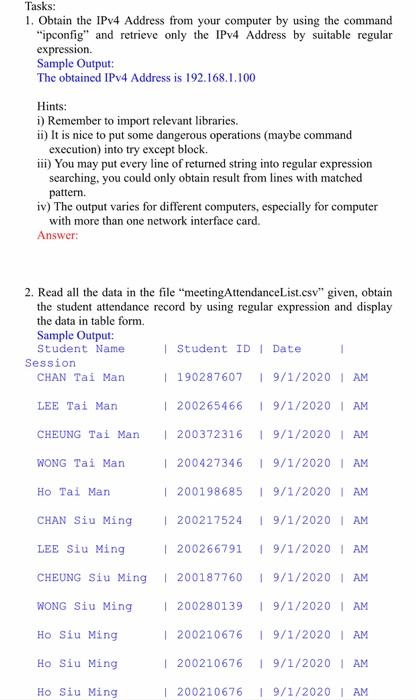
Tasks: 1. Obtain the IPv4 Address from your computer by using the command "ipconfig" and retrieve only the IPv4 Address by suitable regular expression. Sample Output: The obtained IPv4 Address is 192.168.1.100 Hints: 1) Remember to import relevant libraries. ii) It is nice to put some dangerous operations (maybe command execution) into try except block. iii) You may put every line of returned string into regular expression searching, you could only obtain result from lines with matched pattern. iv) The output varies for different computers, especially for computer with more than one network interface card. Answer: 2. Read all the data in the file "meetingAttendanceList.csv" given, obtain the student attendance record by using regular expression and display the data in table form Sample Output: Student Name | Student ID Date Session CHAN Tai Man | 190287607 19/1/2020 AM LEE Tai Man | 200265466 19/1/2020 AM CHEUNG Tai Man 200372316 19/1/2020 AM WONG Tai Man | 200427346 | 9/1/2020 AM Ho Tai Man | 9/1/2020 AM CHAN Siu Ming 19/1/2020 AM | 200198685 | 200217524 1 200266791 | 200187760 LEE Siu Ming 19/1/2020 AM CHEUNG Siu Ming 19/1/2020 AM WONG Siu Ming | 200280139 19/1/2020 AM Ho Siu Ming | 200210676 19/1/2020 | AM Ho Siu Ming | 200210676 19/1/2020 AM Ho Siu Ming | 200210676 19/1/2020 AM
Step by Step Solution
There are 3 Steps involved in it

Get step-by-step solutions from verified subject matter experts
 Study Help