







Question: Use python to create some reports based on trench depth data that you read from a CSV file below and also please provide several screen
Use python to create some reports based on trench depth data that you read from a CSV file below and also please provide several screen shots of each run.
Trench Name, Max Depth (m) Yap Trench,8527 Vityaz Trench,6150 Tonga Trench,10820 South Sandwich Trench,8265 Ryukyu Trench,5212 Romanche Trench,7760 Puysegur Trench,6300 Puerto Rico Trench,8380 Philippine Trench,10540 Peru-Chile Trench,8055 New Britain Trench,9140 Middle America Trench,6669 Mariana Trench (Challenger Deep),10920 Manila Trench,5400 Kuril-Kamchatka Trench,10542 Kermadec Trench,10047 Java Trench,7455 Japan Trench,8412 Izu-Bonin Trench,9810 Aleutian Trench,7679
Trench_Depths.csv. The data in the file is in the form:
Steps that need to be done:
1.) Create a fruitful function called file_to_dictionary(file_name) that reads trench data from the given file, and it creates a dictionary of name:depth pairs. The names will be strings; the depths will be integers. The function returns the dictionary that it creates. Your program should deal with a missing file appropriately.
2.) Create a function called display_by_name(dict) that displays the dictionary sorted alphabetically by trench name. The function should properly title the report.
3.) Create a function called display_by_depth(dict) that displays the dictionary sorted numerically in descending order by depth. This report should also display the depths in feet. You may use the fact that one meter is approximately 3.28 feet. The function should properly title the report.
4.) Create a function called display_by_length(dict) that displays the dictionary sorted in ascending order by the lengths of the trench names. The function should properly title the report.
5.) Create a fruitful function called menu() that implements a menu system that repeatedly asks the user for input. The inputs should be a single character specifying which action the user requires: N=display by name, D=display by depth, L=display by length, Q=quit the program. Input characters may be in uppercase or lowercase. Your program should deal with invalid requests appropriately. menu() should return the command character in uppercase to its caller.
6.) Create a main driver that repeatedly calls menu() to acquire user commands and then execute them. It should loop until the quit command is issued.
7.) You must do your final run (for submission) using Thonnys Run | Run current script in terminal command. Alternatively, you can just run your program directly from Windows by double-clicking on your Python .py program file.
8.) Your program should clear the output window before each repetition begins to achieve the effect shown below. To accomplish this, you must import os and then use the command: os.system('cls') to clear the screen.
Hint: You may find that when sorting your dictionary and then displaying it in sorted form that it is convenient to recreate the data in some other form such as a list before doing the printing.
Sample screen shot of run:
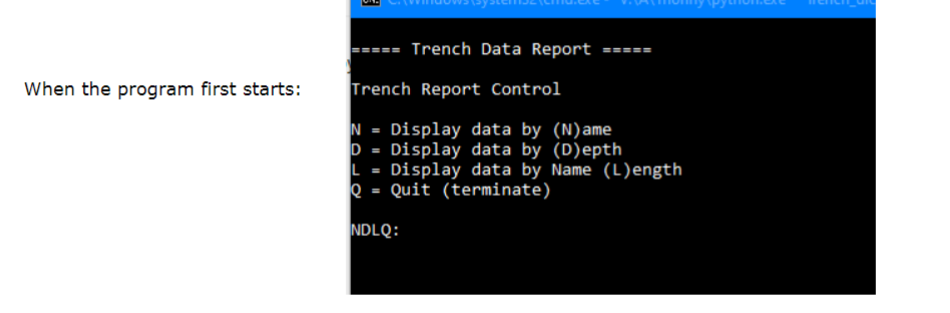
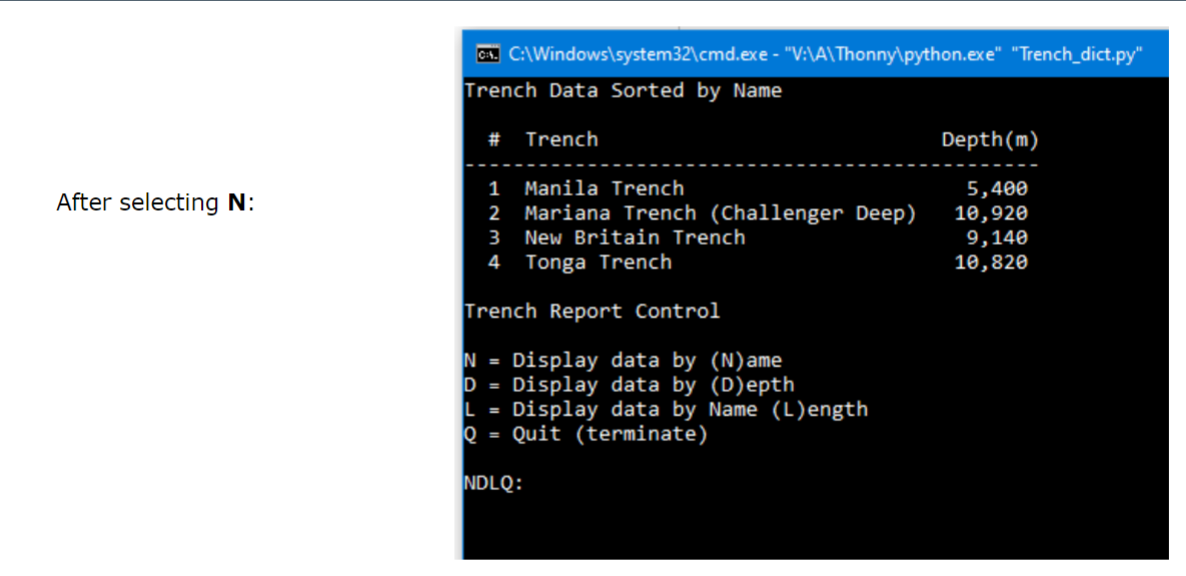
When the program first starts: Trench Report Control N=Displaydataby(N)ameD=Displaydataby(D)epth L= Display data by Name (L)ength Q= Quit (terminate) NDLQ: Trench Data Sorted by Name
Step by Step Solution
There are 3 Steps involved in it

Get step-by-step solutions from verified subject matter experts
 Study Help