







Question: Use python to write the code and have it open in pygame Heres the template code: Pygame base template for opening a window Sample
Use python to write the code and have it open in pygame
 Heres the template code:
"""
Pygame base template for opening a window
Sample Python/Pygame Programs
Simpson College Computer Science
http://programarcadegames.com/
http://simpson.edu/computer-science/
Explanation video: http://youtu.be/vRB_983kUMc
"""
import pygame
# Define some colors
BLACK = (0, 0, 0)
WHITE = (255, 255, 255)
GREEN = (0, 255, 0)
RED = (255, 0, 0)
pygame.init()
# Set the width and height of the screen [width, height]
size = (700, 500)
screen = pygame.display.set_mode(size)
pygame.display.set_caption("My Game")
# Loop until the user clicks the close button.
done = False
# Used to manage how fast the screen updates
clock = pygame.time.Clock()
# -------- Main Program Loop -----------
while not done:
# --- Main event loop
for event in pygame.event.get():
if event.type == pygame.QUIT:
done = True
# --- Game logic should go here
# --- Screen-clearing code goes here
# Here, we clear the screen to white. Don't put other drawing commands
# above this, or they will be erased with this command.
# If you want a background image, replace this clear with blit'ing the
# background image.
screen.fill(WHITE)
# --- Drawing code should go here
# --- Go ahead and update the screen with what we've drawn.
pygame.display.flip()
# --- Limit to 60 frames per second
clock.tick(60)
# Close the window and quit.
pygame.quit()
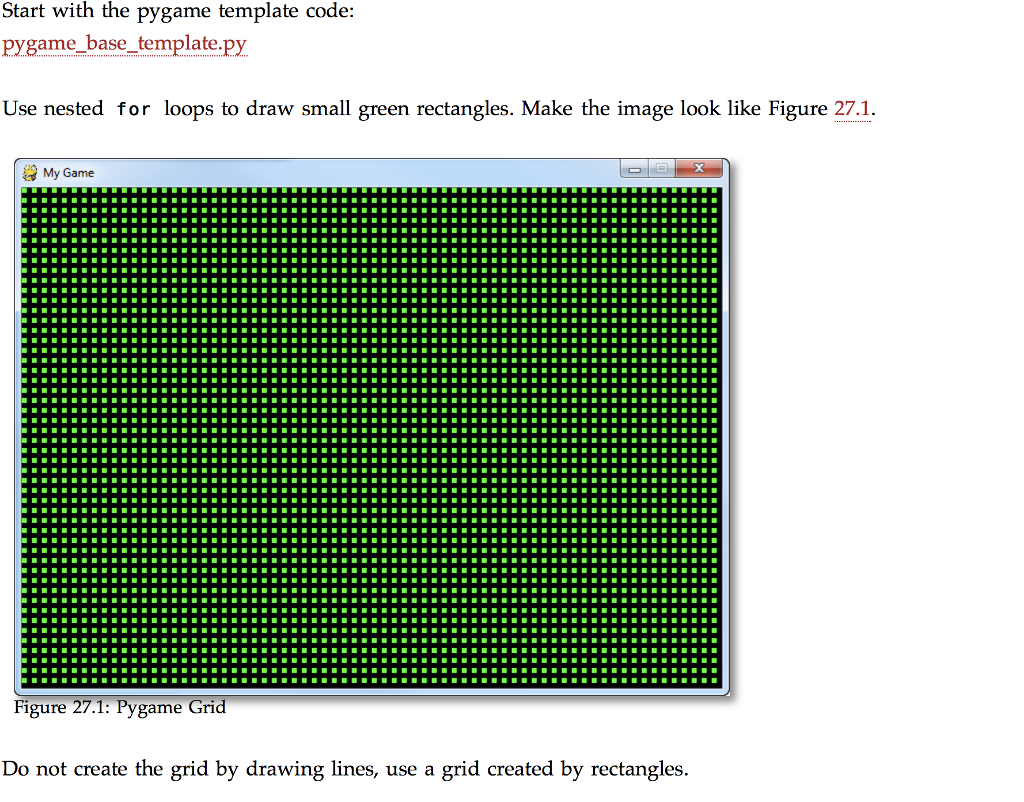
Start with the pvgame template code: pygame base template.py Use nested for loops to draw small green rectangles. Make the image look like Figure 27.1. My Game Figure 27.1: Pygame Grid Do not create the grid by drawing lines, use a grid created by rectangles Start with the pvgame template code: pygame base template.py Use nested for loops to draw small green rectangles. Make the image look like Figure 27.1. My Game Figure 27.1: Pygame Grid Do not create the grid by drawing lines, use a grid created by rectangles
Step by Step Solution
There are 3 Steps involved in it

Get step-by-step solutions from verified subject matter experts
 Study Help