







Question: Use SQL Server Management Studio (SSMS) Step 1: Create a new database and name it WP_Database Step 2: Create a New Query to type the
Use SQL Server Management Studio (SSMS)
Step 1: Create a new database and name it WP_Database
Step 2: Create a New Query to type the SQL Code to Create the table in the picture. Make sure to use the correct Data Type of each column based on the Data listed in the table in the picture
Step 3: Execute the SQL Code (Run Query). The query must run successfully without any errors.
Step 4: Refresh your Database. Then, show me that the table was created successfully in the Database (available in the left margin)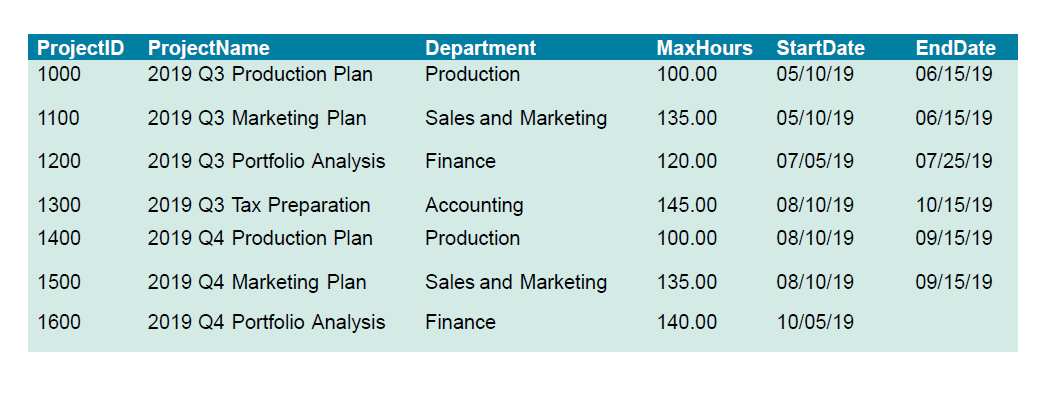
\begin{tabular}{llllll} \hline ProjectID & ProjectName & Department & MaxHours & StartDate & EndDate \\ \hline 1000 & 2019 Q3 Production Plan & Production & 100.00 & 05/10/19 & 06/15/19 \\ 1100 & 2019 Q3 Marketing Plan & Sales and Marketing & 135.00 & 05/10/19 & 06/15/19 \\ 1200 & 2019 Q3 Portfolio Analysis & Finance & 120.00 & 07/05/19 & 07/25/19 \\ 1300 & 2019 Q3 Tax Preparation & Accounting & 145.00 & 08/10/19 & 10/15/19 \\ 1400 & 2019 Q4 Production Plan & Production & 100.00 & 08/10/19 & 09/15/19 \\ 1500 & 2019 Q4 Marketing Plan & Sales and Marketing & 135.00 & 08/10/19 & 09/15/19 \\ 1600 & 2019 Q4 Portfolio Analysis & Finance & 140.00 & 10/05/19 & \end{tabular} \begin{tabular}{llllll} \hline ProjectID & ProjectName & Department & MaxHours & StartDate & EndDate \\ \hline 1000 & 2019 Q3 Production Plan & Production & 100.00 & 05/10/19 & 06/15/19 \\ 1100 & 2019 Q3 Marketing Plan & Sales and Marketing & 135.00 & 05/10/19 & 06/15/19 \\ 1200 & 2019 Q3 Portfolio Analysis & Finance & 120.00 & 07/05/19 & 07/25/19 \\ 1300 & 2019 Q3 Tax Preparation & Accounting & 145.00 & 08/10/19 & 10/15/19 \\ 1400 & 2019 Q4 Production Plan & Production & 100.00 & 08/10/19 & 09/15/19 \\ 1500 & 2019 Q4 Marketing Plan & Sales and Marketing & 135.00 & 08/10/19 & 09/15/19 \\ 1600 & 2019 Q4 Portfolio Analysis & Finance & 140.00 & 10/05/19 & \end{tabular}
Step by Step Solution
There are 3 Steps involved in it

Get step-by-step solutions from verified subject matter experts
 Study Help