







Question: ********* USE THE BELOW CODE TO DRAW THE GRID**************** (Simple animation starter code) import java.awt.*; import java.awt.event.*; import javax.swing.*; public class SimpleAnimationStarter extends JPanel implements
********* USE THE BELOW CODE TO DRAW THE GRID**************** (Simple animation starter code)
import java.awt.*;
import java.awt.event.*;
import javax.swing.*;
public class SimpleAnimationStarter extends JPanel implements ActionListener {
public void drawFrame(Graphics g, int frameNumber, int width, int height) {
g.drawString( "Frame number " + frameNumber, 40, 50 );
}
//------ Implementation details: DO NOT EXPECT TO UNDERSTAND THIS ------
public static void main(String[] args) {
JFrame window = new JFrame("Simple Animation");
SimpleAnimationStarter drawingArea = new SimpleAnimationStarter();
drawingArea.setBackground(Color.WHITE);
window.setContentPane(drawingArea);
drawingArea.setPreferredSize(new Dimension(600,450));
window.pack();
window.setLocation(100,50);
window.setDefaultCloseOperation(JFrame.EXIT_ON_CLOSE);
window.setResizable(true);
Timer frameTimer = new Timer(20,drawingArea);
window.setVisible(true);
frameTimer.start();
} // end main
private int frameNum;
public void actionPerformed(ActionEvent evt) {
frameNum++;
repaint();
}
protected void paintComponent(Graphics g) {
super.paintComponent(g);
drawFrame(g, frameNum, getWidth(), getHeight());
}
}
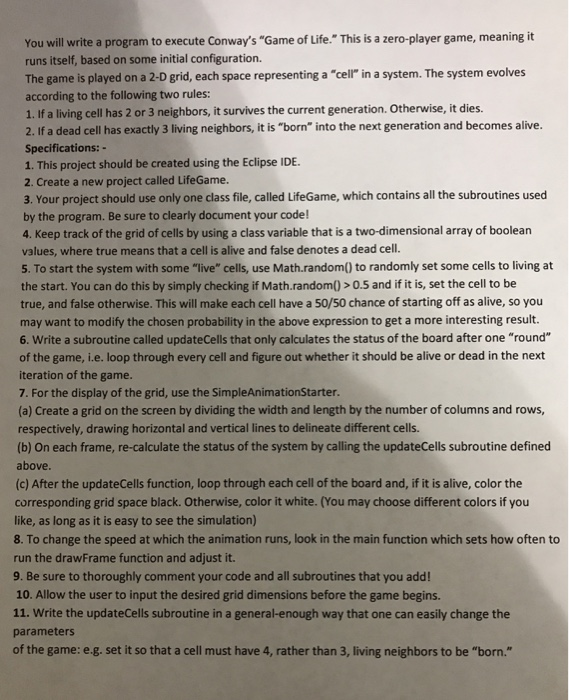
You will write a program to execute Conway's "Game of Life." This is a zero-player game, meaning it runs itself, based on some initial configuration. The game is played on a 2-D grid, each space representing a "cell in a system. The system evolves according to the following two rules: 1. If a living cell has 2 or 3 neighbors, it survives the current generation. Otherwise, it dies. 2. If a dead cell has exactly 3 living neighbors, it is "born" into the next generation and becomes alive. Specifications: 1. This project should be created using the Eclipse IDE. 2. Create a new project called LifeGame. 3. Your project should use only one class file, called LifeGame, which contains all the subroutines used by the program. Be sure to clearly document your code! 4. Keep track of the grid of cells by using a class variable that is a two-dimensional array of boolean values, where true means that a cell is alive and false denotes a dead cell. S. To start the system with some "live" cells, use Math.random) to randomly set some cells to living at the start. You can do this by simply checking if Math.random) > 0.5 and if it is, set the cell to be true, and false otherwise. This will make each cell have a 50/50 chance of starting off as alive, so you may want to modify the chosen probability in the above expression to get a more interesting result. 6. Write a subroutine called updateCells that only calculates the status of the board after one "round" of the game, i.e. loop through every cell and figure out whether it should be alive or dead in the next iteration of the game 7. For the display of the grid, use the SimpleAnimationStarter (a) Create a grid on the screen by dividing the width and length by the number of columns and rows, respectively, drawing horizontal and vertical lines to delineate different cells. (b) On each frame, re-calculate the status of the system by calling the updateCells subroutine defined above. (c) After the updateCells function, loop through each cell of the board and, if it is alive, color the corresponding grid space black. Otherwise, color it white. (You may choose different colors if you like, as long as it is easy to see the simulation) 8. To change the speed at which the animation runs, look in the main function which sets how often to run the drawFrame function and adjust it. 9. Be sure to thoroughly comment your code and all subroutines that you add! 10. Allow the user to input the desired grid dimensions before the game begins. 11. Write the updateCells subroutine in a general-enough way that one can easily change the parameters of the game: e.g. set it so that a cell must have 4, rather than 3, living neighbors to be "born
Step by Step Solution
There are 3 Steps involved in it

Get step-by-step solutions from verified subject matter experts
 Study Help