







Question: Use the classes below Don't change anything in the Course class. Just complete the TODOs for English, math, and history class. Follow the prompt for
Use the classes below
Don't change anything in the Course class.
Just complete the TODOs for English, math, and history class.
Follow the prompt for the CreateACourse and English, math, and history classes.
/** This class contains information for all Courses * * Purpose: The purpose is to hold the information for the broad attributes of the different Course. */ public class Course { private int crn; private String name; private String category;
public Course(int crn, String name, String category) { this.crn = crn; this.name = name; this.category = category; }
public int getCrn() { return crn; }
public String getName() { return name; }
public String getCategory() { return category; }
@Override public String toString() { return "Course [crn=" + crn + ", name=" + name + ", category=" + category + "]"; } }
/** This class describes a subclass of Course called English * * Purpose: Contains the attributes specific to a type of Course called * English. */
//TODO: define the class as described in the assignment description
/** This class describes a subclass of Course called Math * * Purpose: Contains the attributes specific to a type of Course called * Math. */ //TODO: define the class as described in the assignment description
/** This class describes a subclass of Course called History * * Purpose: Contains the attributes specific to a type of Course called * History. */ //TODO: define the class as described in the assignment description
import java.util.Scanner;
/** Purpose: Read info for a course and print the course info. */ public class CreateACourse { public static void main(String[] args) { Scanner keyboard = new Scanner(System.in);
System.out.println("Enter CRN number: ");
System.out.println("Enter course category: "); System.out.println("Enter course name: "); /* The following are needed for different categories: System.out.println("Please enter course level (lower or upper): "); System.out.println("Is the English course a reading course (R), a writing course (W), or both (RW)? ");
System.out.println("Is this a STEM course (true/false)? "); System.out.println("Is this course an (online), an (in-person), or a (hybrid) course? ");
System.out.println("Is this course Area E eligible (true/false)? "); System.out.println("Is this course a (recorded), an (online), or an (in-person) course? ");
System.out.println("Invalid course category.");
*/
} }
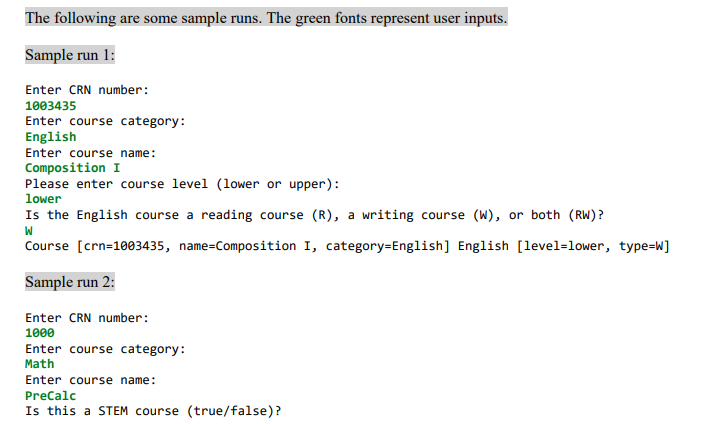
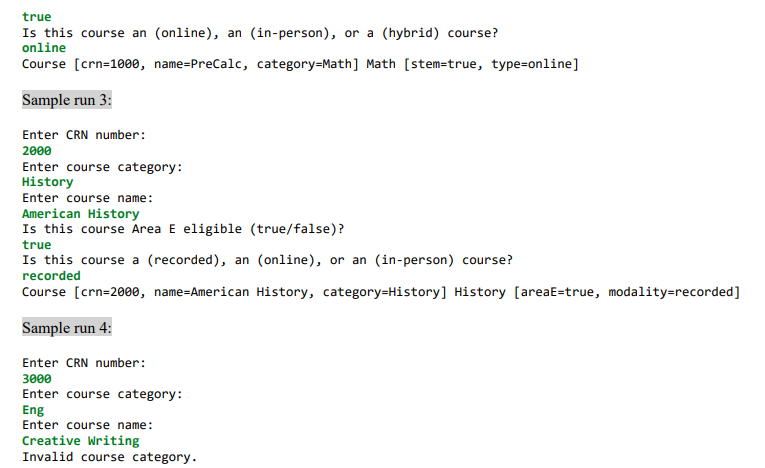
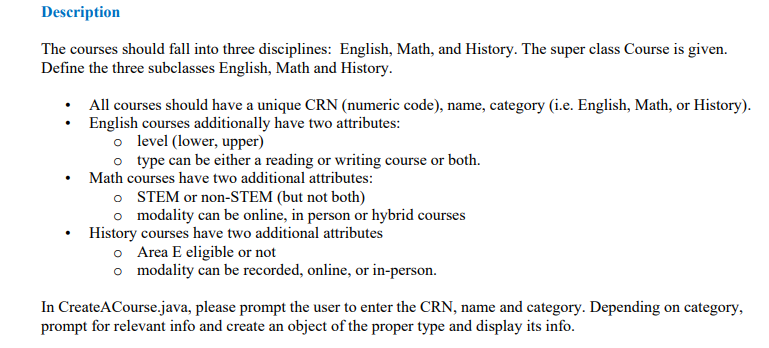
The courses should fall into three disciplines: English, Math, and History. The super class Course is given. Define the three subclasses English, Math and History. - All courses should have a unique CRN (numeric code), name, category (i.e. English, Math, or History). - English courses additionally have two attributes: - level (lower, upper) type can be either a reading or writing course or both. - Math courses have two additional attributes: - STEM or non-STEM (but not both) - modality can be online, in person or hybrid courses - History courses have two additional attributes - Area E eligible or not - modality can be recorded, online, or in-person. In CreateACourse.java, please prompt the user to enter the CRN, name and category. Depending on category, prompt for relevant info and create an object of the proper type and display its info. The following are some sample runs. The green fonts represent user inputs. Sample run 1: Enter CRN number: 1003435 Enter course category: English Enter course name: Composition I Please enter course level (lower or upper): lower Is the English course a reading course (R), a writing course (W), or both (RW)? W Course [crn=1003435, name=Composition I, category=English] English [level=lower, type=W] Sample run 2: Enter CRN number: 1000 Enter course category: Math Enter course name: PreCalc Is this a STEM course (true/false)? true Is this course an (online), an (in-person), or a (hybrid) course? online Course [crn=1000, name=PreCalc, category=Math] Math [stem=true, type=online] Sample run 3: Enter CRN number: 2000 Enter course category: History Enter course name: American History Is this course Area E eligible (true/false)? true Is this course a (recorded), an (online), or an (in-person) course? recorded Course [crn=2000, name=American History, category=History] History [areaE=true, modality=recorded] Sample run 4 : Enter CRN number: 3000 Enter course category: Eng Enter course name: Creative Writing Invalid course category
Step by Step Solution
There are 3 Steps involved in it

Get step-by-step solutions from verified subject matter experts
 Study Help