







Question: use the link to answer these questions https://phet.colorado.edu/sims/html/projectile-motion/latest/projectile-motion_en.html Activity 1 1. With the 'Vectors' area of the simulation open, click and hold the cannon to

use the link to answer these questions
https://phet.colorado.edu/sims/html/projectile-motion/latest/projectile-motion_en.html
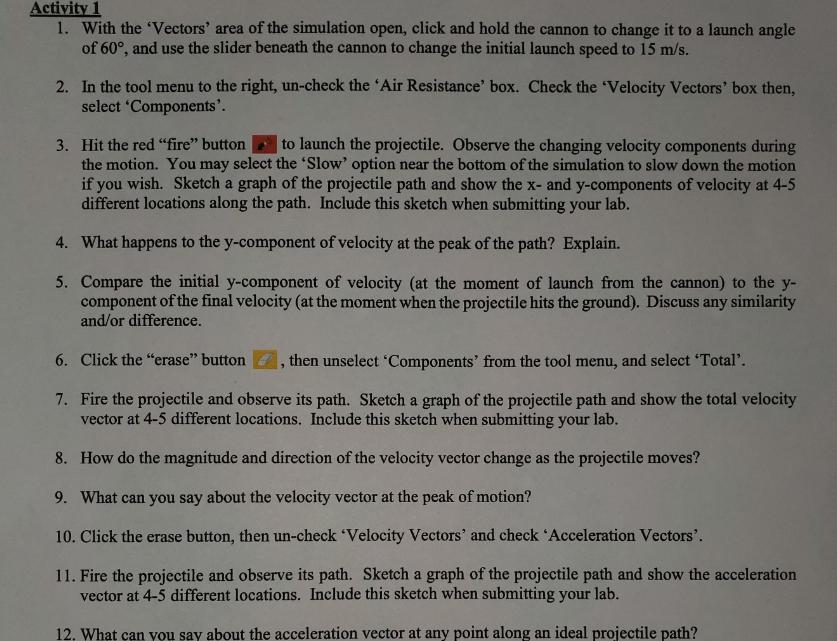
Activity 1 1. With the 'Vectors' area of the simulation open, click and hold the cannon to change it to a launch angle of 60, and use the slider beneath the cannon to change the initial launch speed to 15 m/s. 2. In the tool menu to the right, un-check the 'Air Resistance' box. Check the 'Velocity Vectors' box then, select 'Components'. 3. Hit the red "fire" button to launch the projectile. Observe the changing velocity components during the motion. You may select the 'Slow' option near the bottom of the simulation to slow down the motion if you wish. Sketch a graph of the projectile path and show the x- and y-components of velocity at 4-5 different locations along the path. Include this sketch when submitting your lab. 4. What happens to the y-component of velocity at the peak of the path? Explain. 5. Compare the initial y-component of velocity (at the moment of launch from the cannon) to the y- component of the final velocity (at the moment when the projectile hits the ground). Discuss any similarity and/or difference. 6. Click the "erase" button then unselect 'Components' from the tool menu, and select 'Total'. 9 7. Fire the projectile and observe its path. Sketch a graph of the projectile path and show the total velocity vector at 4-5 different locations. Include this sketch when submitting your lab. 8. How do the magnitude and direction of the velocity vector change as the projectile moves? 9. What can you say about the velocity vector at the peak of motion? 10. Click the erase button, then un-check 'Velocity Vectors' and check 'Acceleration Vectors'. 11. Fire the projectile and observe its path. Sketch a graph of the projectile path and show the acceleration vector at 4-5 different locations. Include this sketch when submitting your lab. 12. What can you say about the acceleration vector at any point along an ideal projectile path?
Step by Step Solution
There are 3 Steps involved in it

Get step-by-step solutions from verified subject matter experts
 Study Help