







Question: Use the spreadsheet above to complete these questions. PLEASE include the formulas because that is what I am struggling with. Essentially, I would like for
Use the spreadsheet above to complete these questions. PLEASE include the formulas because that is what I am struggling with. Essentially, I would like for you to repost this spreadsheet with the completed formulas.Thank you for your help!
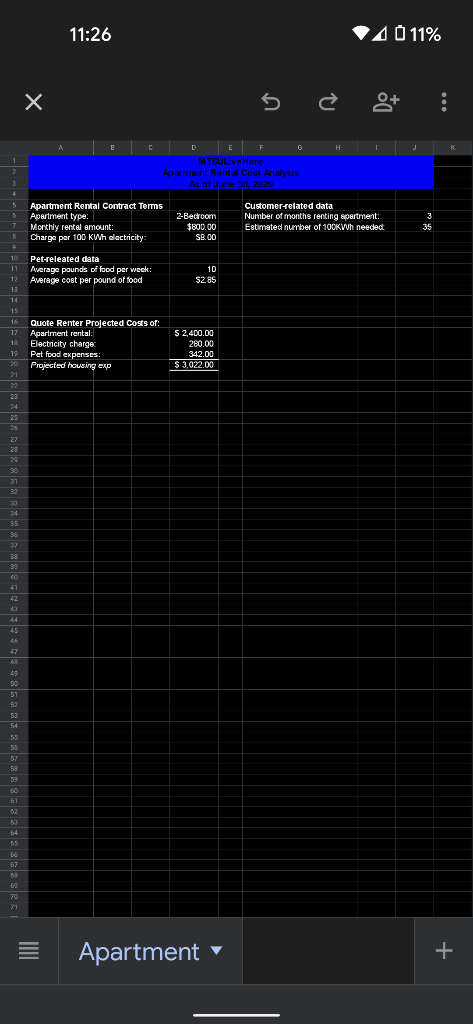
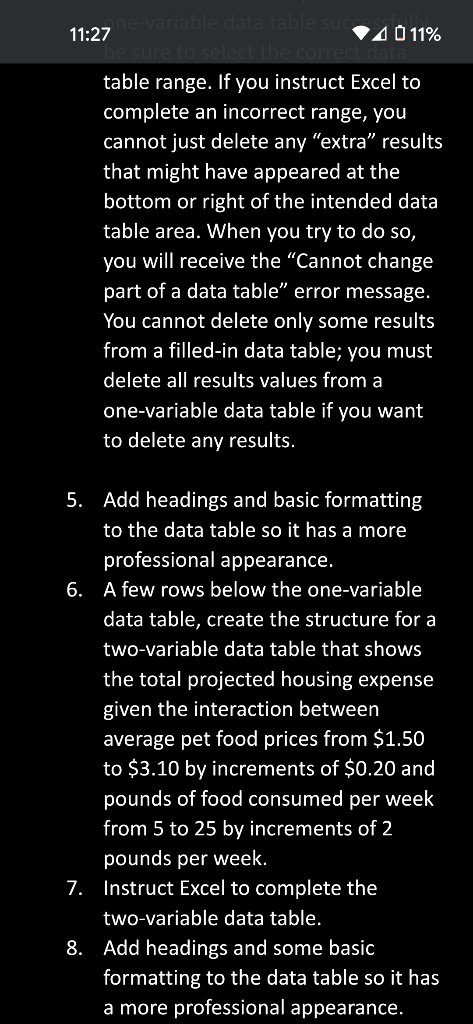
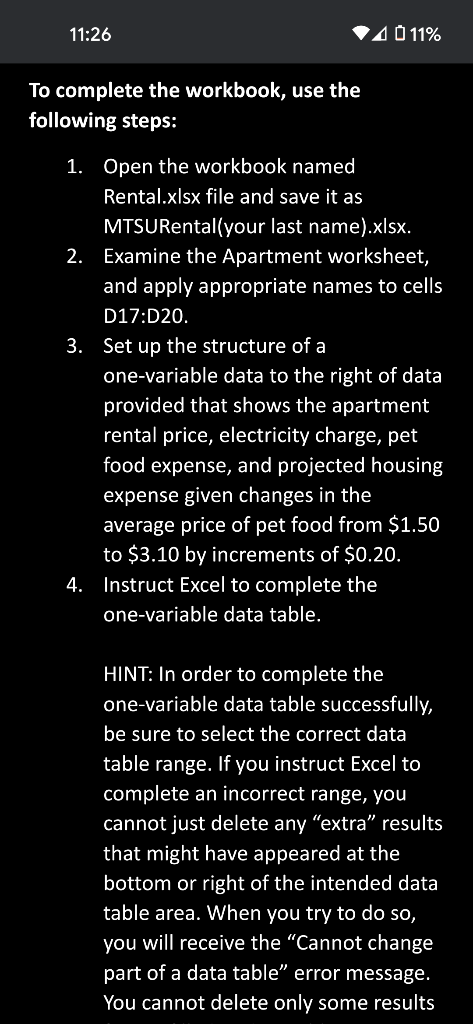
11:26 4 0 11% s o : H MTSULive Here Apartment Rental Cost Analysis As of June 30, 2020 Apartment Rental Contract Terms Customer related data Apartment type: 2-Bedroom Number of months renting apartment: Monthly rental amount $800.00 Estimated number of 100KWh needed Charge per 100 KWh dectricity SB.00 Pet-releated data Average pounds of food per week 10 Average cost per pound of food $2.85 15 16 Quote Renter Projected costs of: Apartment rental Electricity charge Pet food expenses: Projected housing exp 52,400.00 280,00 342.00 $ 3,022,00 Apartment + ne-variable data tables 11:27 4 11% be sure to select the correc table range. If you instruct Excel to complete an incorrect range, you cannot just delete any "extra" results that might have appeared at the bottom or right of the intended data table area. When you try to do so, you will receive the "Cannot change part of a data table" error message. You cannot delete only some results from a filled-in data table; you must delete all results values from a one-variable data table if you want to delete any results. 5. Add headings and basic formatting to the data table so it has a more professional appearance. 6. A few rows below the one-variable data table, create the structure for a two-variable data table that shows the total projected housing expense given the interaction between average pet food prices from $1.50 to $3.10 by increments of $0.20 and pounds of food consumed per week from 5 to 25 by increments of 2 pounds per week. 7. Instruct Excel to complete the two-variable data table. 8. Add headings and some basic formatting to the data table so it has a more professional appearance. 11:26 A 11% To complete the workbook, use the following steps: 1. Open the workbook named Rental.xlsx file and save it as MTSURental(your last name).xlsx. 2. Examine the Apartment worksheet, and apply appropriate names to cells D17:D20. 3. Set up the structure of a one-variable data to the right of data provided that shows the apartment rental price, electricity charge, pet food expense, and projected housing expense given changes in the average price of pet food from $1.50 to $3.10 by increments of $0.20. 4. Instruct Excel to complete the one-variable data table. HINT: In order to complete the one-variable data table successfully, be sure to select the correct data table range. If you instruct Excel to complete an incorrect range, you cannot just delete any "extra" results that might have appeared at the bottom or right of the intended data table area. When you try to do so, you will receive the "Cannot change part of a data table error message. You cannot delete only some results 11:26 4 0 11% s o : H MTSULive Here Apartment Rental Cost Analysis As of June 30, 2020 Apartment Rental Contract Terms Customer related data Apartment type: 2-Bedroom Number of months renting apartment: Monthly rental amount $800.00 Estimated number of 100KWh needed Charge per 100 KWh dectricity SB.00 Pet-releated data Average pounds of food per week 10 Average cost per pound of food $2.85 15 16 Quote Renter Projected costs of: Apartment rental Electricity charge Pet food expenses: Projected housing exp 52,400.00 280,00 342.00 $ 3,022,00 Apartment + ne-variable data tables 11:27 4 11% be sure to select the correc table range. If you instruct Excel to complete an incorrect range, you cannot just delete any "extra" results that might have appeared at the bottom or right of the intended data table area. When you try to do so, you will receive the "Cannot change part of a data table" error message. You cannot delete only some results from a filled-in data table; you must delete all results values from a one-variable data table if you want to delete any results. 5. Add headings and basic formatting to the data table so it has a more professional appearance. 6. A few rows below the one-variable data table, create the structure for a two-variable data table that shows the total projected housing expense given the interaction between average pet food prices from $1.50 to $3.10 by increments of $0.20 and pounds of food consumed per week from 5 to 25 by increments of 2 pounds per week. 7. Instruct Excel to complete the two-variable data table. 8. Add headings and some basic formatting to the data table so it has a more professional appearance. 11:26 A 11% To complete the workbook, use the following steps: 1. Open the workbook named Rental.xlsx file and save it as MTSURental(your last name).xlsx. 2. Examine the Apartment worksheet, and apply appropriate names to cells D17:D20. 3. Set up the structure of a one-variable data to the right of data provided that shows the apartment rental price, electricity charge, pet food expense, and projected housing expense given changes in the average price of pet food from $1.50 to $3.10 by increments of $0.20. 4. Instruct Excel to complete the one-variable data table. HINT: In order to complete the one-variable data table successfully, be sure to select the correct data table range. If you instruct Excel to complete an incorrect range, you cannot just delete any "extra" results that might have appeared at the bottom or right of the intended data table area. When you try to do so, you will receive the "Cannot change part of a data table error message. You cannot delete only some results
Step by Step Solution
There are 3 Steps involved in it

Get step-by-step solutions from verified subject matter experts
 Study Help