







Question: Use this data model to complete the following tasks. 1. Transform the data model to physical model (database design). Note: a. Draw the entity-relationship diagram
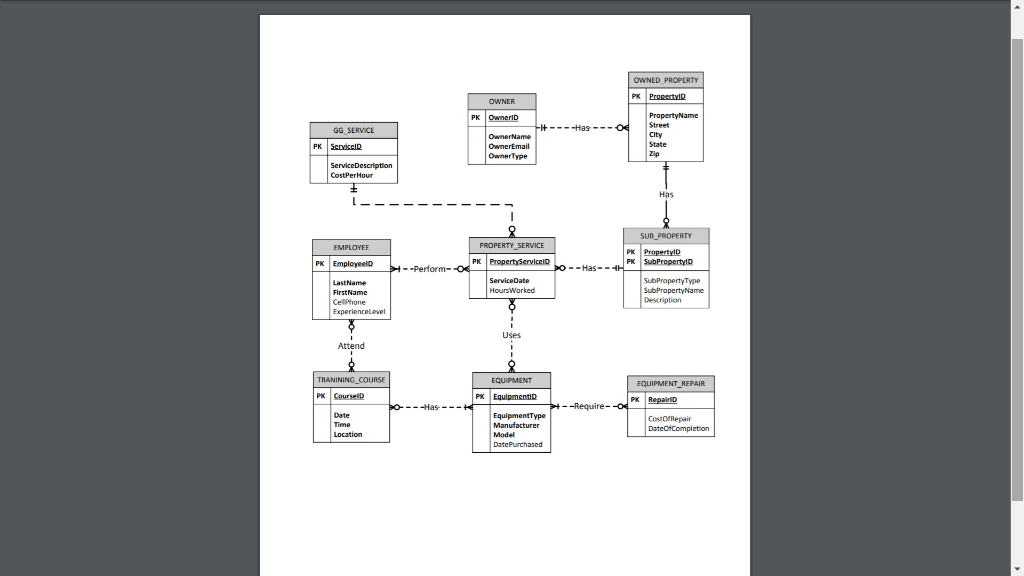 Use this data model to complete the following tasks.
1. Transform the data model to physical model (database design).
Note:
a. Draw the entity-relationship diagram (ERD) in Crows foot notation using MS Visio 2013/2016. Use only the crows foot database notation (template) in MS Visio.
b. There must be no many-to-many relationships.
c. The ERD must include not only tables, foreign keys and relationships with cardinalities but also all columns and their data types (do not use char type only, you need to choose the appropriate data types for each column instead) and also display data types in the Visio file.
d. The names must be the same as provided in the data model; clearly label the primary keys and foreign keys.
e. All foreign keys are required, i.e., cannot be null.
2. Transform the physical model/database design to an actual database using MS Access 2013/2016 for all tables and relationships. The data types for each column in Access should be compatible with those defined in database design above. Populate the tables with real data (you can make up) and each table needs to have at least 5 rows. Dont forget to enforce referential integrity constraints when necessary and ensure the values satisfy the constraints.
OWNED PROPERTY PK Property OWNER PK Ownerid Property Name Street GG SERVICE It ----Has ---0 City ServiceID Owner Name OwnerEmail Owner Type State Service Description Cost Per Hour - - - - - SUB_PROPERTY PROPERTY SERVICE EMPLOYEE Employee PK PK PK PropertyID SubPropertyID PropertyserviceID +--Perform--o O --Has--- ServiceDate Hours Worked Sub Property Type Sub Property Name Description Ce Phone Attend TFLAMINING CLIP5F EQUIPMENT EQUIPMENT_REPAIR Coursel PK Equipmenti PR ---Has - Repair o +--Require- EquipmentType Manufacturer Model DatePurchased Cost OfRepair Date CompletionStep by Step Solution
There are 3 Steps involved in it

Get step-by-step solutions from verified subject matter experts
 Study Help