







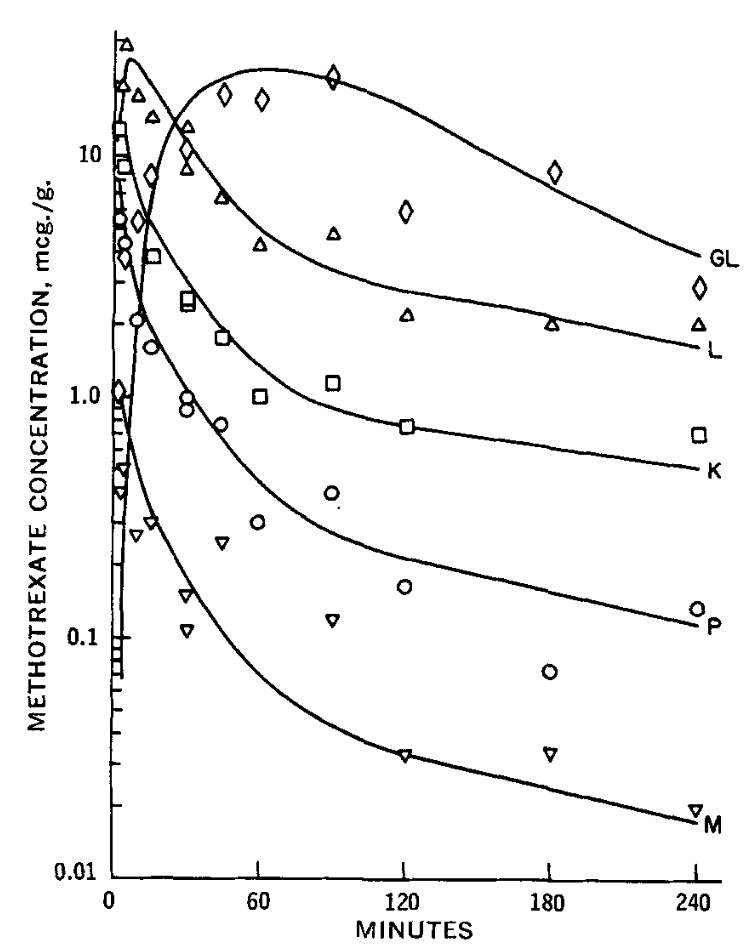
Question: Use this MATLAB code and fix it to match the image perfectly. Do not use AI or ChatGPT % Define the number of compartments num
Use this MATLAB code and fix it to match the image perfectly. Do not use AI or ChatGPT
Define the number of compartments
numcompartments ;
Define the rate constants adjust these based on the paper's model
k ; example values, replace with actual
Initial concentrations in mcgg for each compartment
initialconditions ones numcompartments; initial drug concentration in mcgg for each compartment
Time vector in minutes
tspan ; from to minutes
Define the system of ODEs differential equations
Placeholder equations, modify based on the model's dynamics in the paper
odesystem @t C
kC kC; Equation for compartment
kC kC kC; Equation for compartment
kC kC; Equation for compartment
kC kC; Equation for compartment
kC kC; Equation for compartment
kC kC; Equation for compartment
kC kC; Equation for compartment
kC kC; Equation for compartment
kC kC; Equation for compartment
kC kC; Equation for compartment
kC kC; Equation for compartment
kC kC; Equation for compartment
;
Solve the system of ODEs
t C odeodesystem, tspan, initialconditions;
Plot the results for compartments
figure;
hold on;
plott C:s 'DisplayName', GL;
plott C: 'DisplayName', L;
plott C:s 'DisplayName', S;
plott C:o 'DisplayName', P;
plott C:v 'DisplayName', M;
Formatting the plot
xlabelTime minutes;
ylabelMethotrexate Concentration mcgg;
legend;
titleMethotrexate Concentration in Different Compartments';
hold off;
Step by Step Solution
There are 3 Steps involved in it
1 Expert Approved Answer
Step: 1 Unlock

Question Has Been Solved by an Expert!
Get step-by-step solutions from verified subject matter experts
Step: 2 Unlock
Step: 3 Unlock
 Study Help