



Question: Using a table similar to that shown in Figure 3.6 (in the book or slide 13th on lecture of Feb 13rd), calculate the product of
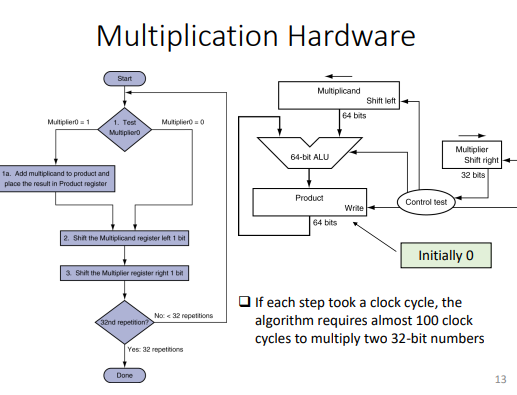
Using a table similar to that shown in Figure 3.6 (in the book or slide 13th on lecture of Feb 13rd), calculate the product of the unsigned 6-bit integers x = 110 010 and y = 001 010 using the first version of the multiplication hardware described in Figure 3.3 in the textbook. You should show the contents of each register on each step
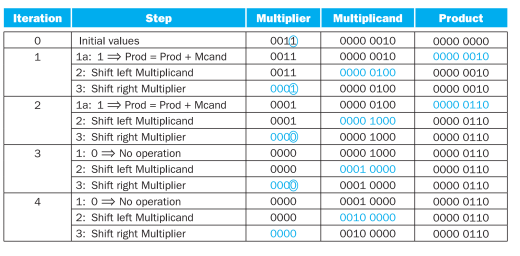
\begin{tabular}{|c|l|c|c|c|} \hline \multicolumn{1}{|c|}{ Step } & Multiplier & Multiplicand & Product \\ \hline 0 & Initial values & 0011 & 00000010 & 00000000 \\ \hline 1 & 1a: 1 Prod = Prod + Mcand & 0011 & 00000010 & 00000010 \\ \cline { 2 - 5 } & 2: Shift left Multiplicand & 0011 & 00000100 & 00000010 \\ \cline { 2 - 5 } & 3: Shift right Multiplier & 0001 & 00000100 & 00000010 \\ \hline 2 & 1a: 1 Prod = Prod + Mcand & 0001 & 00000100 & 00000110 \\ \cline { 2 - 5 } & 2: Shift left Multiplicand & 0001 & 00001000 & 00000110 \\ \cline { 2 - 5 } & 3: Shift right Multiplier & 0000 & 00001000 & 00000110 \\ \hline \multirow{2}{*}{3} & 1: 0 No operation & 0000 & 00001000 & 00000110 \\ \cline { 2 - 5 } & 2: Shift left Multiplicand & 0000 & 00010000 & 00000110 \\ \cline { 2 - 5 } & 3: Shift right Multiplier & 0000 & 00010000 & 00000110 \\ \hline \multirow{2}{*}{4} & 1: 0 No operation & 0000 & 00010000 & 00000110 \\ \cline { 2 - 6 } & 2: Shift left Multiplicand & 0000 & 00100000 & 00000110 \\ \cline { 2 - 6 } & 3: Shift right Multiplier & 0000 & 00100000 & 00000110 \\ \hline \end{tabular} .I: 1:1 : 11
Step by Step Solution
There are 3 Steps involved in it

Get step-by-step solutions from verified subject matter experts