







Question: Using App inventor Android , design and blocks Like this using ai2.apponventor.mit Write a modular program to create a Bill or an Automobile Repair Shop.
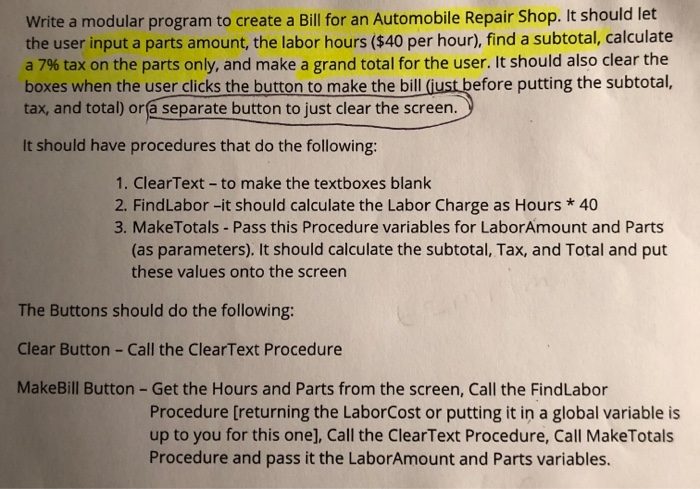
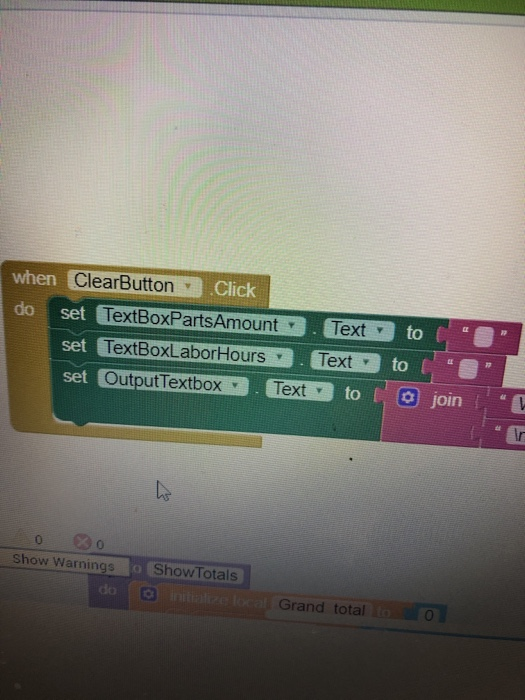
Write a modular program to create a Bill or an Automobile Repair Shop. It should let the user input a parts amount, the labor hours ($40 per hour), find a subtotal, calculate a 7% tax on the parts only, and make a grand total for the user. It should also clear the boxes when the user clicks the button to make the bil tax, and total) orf@ separate button to just clear the screen. efore putting the subtotal, It should have procedures that do the following: 1. ClearText- to make the textboxes blank 2. FindLabor -it should calculate the Labor Charge as Hours * 40 3. MakeTotals -Pass this Procedure variables for LaborAmount and Parts (as parameters). It should calculate the subtotal, Tax, and Total and put these values onto the screen The Buttons should do the following: Clear Button - Call the ClearText Procedure MakeBill Button -Get the Hours and Parts from the screen, Call the FindLabor Procedure [returning the LaborCost or putting it in a global variable is up to you for this one], Call the ClearText Procedure, Call MakeTotals Procedure and pass it the LaborAmount and Parts variables. when ClearButtonClick do set TextBoxPartsAmount Textto Text y set to set Output TextboxTexttojoin OutputTextbox Text to O join 0 0 Show Warnings Show Totals Grand total 0
Step by Step Solution
There are 3 Steps involved in it

Get step-by-step solutions from verified subject matter experts
 Study Help